What should you look for when choosing?
Start with the exact game and system. Nintendo Netherlands describes both stick steering and motion controls for Mario Kart World; after that, the right choice depends on your desk and how you want to play.
| What to consider |
What should you check? |
Who is this important for? |
| Game and system |
Check support for the exact game and console or PC. 8BitDo specifies a firmware update for the Ultimate 2 Bluetooth on Switch 2; for the NSX-122 on Windows 11, HORI lists only games that use XInput. |
If I switch between systems, I don’t want to find out that my game doesn’t recognise the controller. Around 29% of consumers prioritise compatibility with their game and system. |
| Desk space and connection |
Measure the space available for the wheel and pedals, and consider where a cable could run. HORI lists USB Type-A for the NSX-122; Microsoft lists Bluetooth for the Xbox Wireless Controller on Windows PCs. |
If my desk is also my workspace, I want to be able to put the controls away easily after playing and use a suitable connection. Around 24% of consumers prioritise desk space and connection. |
| Motion controls |
Check that the controller supports motion controls and that you can enable this feature in the game. Nintendo lists this as a requirement for tilt controls in Mario Kart World. |
If I’d rather tilt than steer with a stick, the controller needs to support that way of playing. Around 18% of consumers prioritise motion controls. |
| Wheel and pedals |
Check that your game supports the wheel and which features you want to use. HORI states that the NSX-122 has no motion sensors or vibration function. |
If I want a fixed racing setup with pedals, I need to make room for it and check that the game works with it. Around 17% of consumers prioritise this type of racing experience. |
| Playing together and storage |
Count how many compatible controllers you already have and check what’s included with the model. Nintendo says that Mario Kart World can be played by up to four players on one system. |
If I want to play with others, I want to know in advance how many controllers I’ll need; for everyday use, charging and storage matter too. Around 12% of consumers prioritise playing together and practical storage. |
Controller options on Joybuy
The options below include gamepads for Switch and Switch 2, a controller described in its product name as being for Switch and PC, and a racing wheel model. Check that your chosen controls suit your game, system and setup.
 No image available
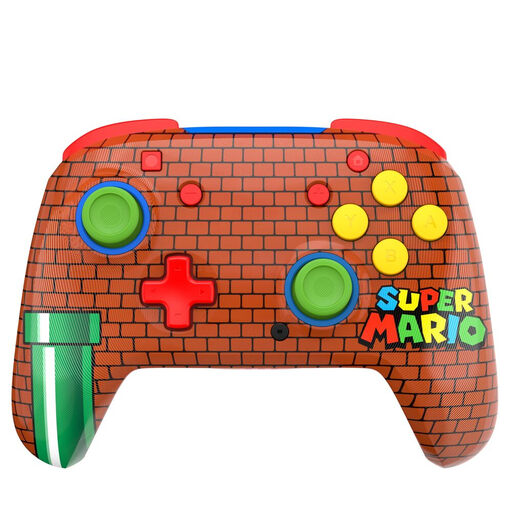
Turtle Beach Rematch Controller Mario Bricks
A compact wireless gamepad option if you want to play on Switch 2; check that your specific game supports it.
Bluetooth; TMR joystick; battery life of up to 40 hours; two programmable rear buttons.
Joybuy
 No image available
KONIX JoyPad controller pair, blue and red
A pair of controllers if you’re looking for an extra set for a supported Switch game; the product name also mentions compatibility with Switch 2.
Controller pair; battery life of up to 8 hours; vibration function.
Joybuy
 No image available
Game controller with dual vibration and gyroscope
An option if you’re looking for a controller described in the product name as being for Switch and PC; check whether your kart game supports it.
The product name mentions a gyroscope and dual vibration.
Joybuy
 No image available
Thrustmaster T98-X Ferrari 296 GTB
An option if you’re looking for a fixed racing setup with a wheel and pedals. Check that the game and the available desk and floor space suit this setup.
Joybuy
 No image available
Official Nintendo Switch 2 Pro Controller, black
A compact gamepad option if you’re looking for a controller for Switch 2; check which controls your game supports.
Joybuy
Frequently asked questions
Can I play Mario Kart World on Switch 2 with an Xbox controller?
Microsoft lists support for Windows PCs and Xbox, not Switch 2. So don’t choose this controller for Mario Kart World unless support for that exact combination is confirmed; for a Windows kart game, check that the game supports it too.
How do I enable tilt controls in Mario Kart World?
Nintendo says you can enable motion controls under ‘Settings/Controls’ from the kart selection screen or the pause menu. You’ll need a controller that supports motion controls; steering assist and auto-accelerate are separate settings.
Does the original Nintendo Switch Pro Controller work with Switch 2?
Nintendo says you can pair the controller wirelessly with Switch 2. According to Nintendo, you can’t wake Switch 2 from sleep using the HOME button on a Switch controller.
What should I do if a controller I bought online turns out to be faulty?
According to the Dutch Government, the seller must provide a solution if there’s a problem with a product. A manufacturer’s warranty may be in addition to your statutory rights.
Do I have a cooling-off period when buying online in the Netherlands?
The Dutch Government says that when you buy online, you often have 14 days to change your mind, but this doesn’t apply to every transaction without exception. Check the seller’s information for your specific order.


