
Housemates playing Nintendo Switch Sports
You want to play together using motion controls. Nintendo Netherlands says the Joy-Con setup required varies by sport.


Start with the exact game and console: Nintendo Switch Sports requires a Nintendo-supported Joy-Con setup, while for sports games with standard gamepad controls on PC or console, you’ll need to check whether the game supports the controller and local multiplayer. Then count how many controllers you need and consider the space to move, cables, button noise and power supply. No controller type is automatically suited to both styles of play.
You want to play together using motion controls. Nintendo Netherlands says the Joy-Con setup required varies by sport.
You play on one PC and need to check whether your chosen game supports both the controller and the local multiplayer mode you want. Steam provides information about controller support.
You consider noise, cables and power supply as well as compatibility. Treat claims about quieter buttons as statements from the manufacturer, not independently measured noise levels.
A good fit if: you want to play this specific game using motion controls.
Keep in mind: Nintendo specifies which Joy-Con setup works for each sport; standard Pro Controllers are not compatible.
A good fit if: your chosen game supports gamepad controls and the local play mode you want.
Keep in mind: a standard gamepad won’t replace Joy-Con for Nintendo Switch Sports; for wireless Xbox use, you’ll also need to arrange a power supply.
A good fit if: you already have a PS5 or DualSense and your chosen game supports local multiplayer.
Keep in mind: Sony says PC features depend on the game and connection; haptic feedback on PC requires both a USB connection and game support.
First check the game, platform and local play mode. Then compare how many controllers you need and consider the practical implications for a shared room.
| Consideration | What should you check? | Who should pay particular attention? |
|---|---|---|
| Compatibility | Note the exact game title and platform. Check which controllers and play styles the game supports. | If I don’t want to buy a controller that won’t work with my sports game, I check the game requirements first; around 36% of consumers put compatibility at the top of their list. |
| Playing together | Check the number of local players and the controller setup required for your chosen sport or game. Count any controllers you already have. | If all my housemates want to join the same session, I check how many compatible controllers the game mode requires; around 29% of consumers prioritise having enough controllers to play together. |
| Shared room | Make room for motion controls and follow the instructions for wrist straps. Assess claims about quiet buttons for yourself. | If I play in a shared room, I want to take noise and room to move into account; around 14% of consumers consider these conditions their main concern. |
| Running costs | Compare what’s needed for all players and check which cables, batteries or charging options are required for your chosen setup. | If I need controllers for several housemates, I include the power supply in my calculations; around 21% of consumers prioritise the cost of the complete setup. |
Nintendo Switch Sports does not support the Switch Pro Controller or Switch 2 Pro Controller. PowerA also states that the Enhanced Wired Controller isn’t suitable for games that use Joy-Con only.
Check the controller requirements for the exact game, not just compatibility with the console.
If the game requires Joy-Con, you may still need an additional Joy-Con for the setup you had in mind.
8BitDo lists different platforms for the Ultimate 2C Wireless and Ultimate 2C Bluetooth. So, a similar model name doesn’t mean they support the same platforms.
Compare the full variant name and connection type with the device you want to play on.
The Joy-Con setup you need for Nintendo Switch Sports depends on the sport. For wireless use of an Xbox controller, you’ll also need to arrange a power supply.
First count the players and controllers you already have. Then check what you’ll need for the complete setup.
Extra controllers and batteries or a suitable rechargeable battery can mean additional purchases and upkeep.
The Dutch government distinguishes between a manufacturer’s warranty and statutory rights. If a product is faulty, the seller is your point of contact for a solution; in the Netherlands, there is no fixed statutory warranty period that applies to all products.
Keep your proof of purchase and consider what any extra warranty offers beyond your statutory rights.
Worth considering if you want to play Nintendo Switch Sports using motion controls.
The Xbox Wireless Controller is an option for games with standard gamepad controls on Xbox or a Windows PC.
DualSense is worth considering if you already have a PS5, or for PC games that support the controller.
Compare the Ultimate 2C variants by their full model name and platform.
The brand offers several models; the X05 and X05 Pro are separate versions.
The Enhanced Wired Controller is a wired option for compatible Switch games when the console is docked.
This selection includes Joy-Con for motion controls and gamepads for sports games on PC or Xbox. Check that each product and game supports the local play mode you want.
 No image available
Worth considering for sports games with standard gamepad controls on Xbox or PC; check whether your chosen game supports local multiplayer. This won’t replace the Joy-Con setup for Nintendo Switch Sports.
The product name specifies Xbox Series/PC and the Heart Breaker Special Edition.
 No image available
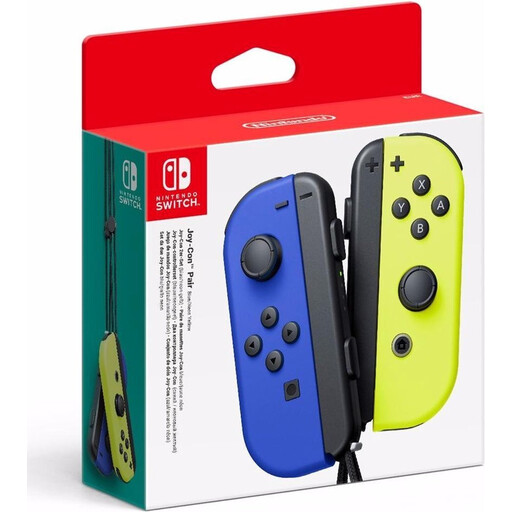
Relevant for Nintendo Switch Sports if you want to play using motion controls. Nintendo Netherlands says the Joy-Con setup required depends on the sport you choose.
The product name specifies a pair of Joy-Con controllers in Neon Blue/Neon Yellow.
 No image available
Worth considering for PC sports games if your chosen game supports the controller and connection. This model won’t replace the Joy-Con setup for Nintendo Switch Sports.
The product name lists PC, Nintendo Switch, Nintendo Switch 2, iOS and Android, with Wireless/Bluetooth connectivity.
 No image available
Worth considering for PC sports games if the game supports the controller; also check that it supports the local multiplayer mode you want. This model won’t replace Joy-Con for Nintendo Switch Sports.
The product name lists TMR sticks, a 1000 Hz polling rate and a charging station in the White Bundle.
 No image available
Relevant for Nintendo Switch Sports when the sport you choose supports the Joy-Con 2 setup. Nintendo says Joy-Con 2 doesn’t work with the leg strap; check the requirements for the sport you want to play.
The product name specifies a Joy-Con 2 pair in Light Blue/Light Red.
No. Nintendo Netherlands says that neither the Switch Pro Controller nor the Switch 2 Pro Controller is compatible with Nintendo Switch Sports. Check which Joy-Con setup is required for each sport.
Leave enough room to move without hitting anyone or any furniture. Nintendo instructs you to attach the Joy-Con 2 wrist straps when using the controllers without a grip; also make sure you use a setup supported by the game.
No. Microsoft says rechargeable AA batteries aren’t charged in the controller; charge them according to the battery manufacturer’s instructions. A compatible Xbox rechargeable battery is another option.
For eligible distance purchases from a business, the Dutch government says you’ll often have 14 days to change your mind, subject to conditions and exceptions. You also have statutory rights if a product is faulty: the seller is responsible for providing a solution. The Netherlands has no fixed statutory warranty period that applies to all products.
Nintendo describes playing together on the same Switch system separately from online play. An active Nintendo Switch Online membership is listed as a requirement for playing Nintendo Switch Sports online, not for the local play mode described here.