
Making a fixed tabletop video
You want to show the jigsaw, your hands and small pieces from a consistent viewpoint. Think about the lens, recording distance and mounting options in advance.


If you mainly film a jigsaw puzzle on a table, choose a setup and lens that can capture both the whole work surface and the important details. A mirrorless camera gives you a choice of lenses, while a compact camera may be easier to position. If you also film while walking around the workshop, a stabilised pocket camera may be better suited to that kind of use. Always check the focusing distance, how clearly your voice can be heard and who might be recognisable in the footage.
You want to show the jigsaw, your hands and small pieces from a consistent viewpoint. Think about the lens, recording distance and mounting options in advance.
You speak while other people are using the space, and want to check how clearly your voice is recorded and who might be recognisable in the footage.
As well as filming at the table, you want to capture steps or materials while walking around. Portability and stabilisation may then matter more than a fixed tabletop setup.
Best for: a fixed setup where you want to choose a lens to suit the table and the framing you need.
Consider: assess the camera body, the specific lens and the kit contents together. Choosing a lens alone does not tell you whether details will be in focus.
Best for: a small camera that you can easily position in a fixed spot.
Consider: a built-in stand will not automatically give you an overhead view of the jigsaw. Check the framing and focus at the distance you plan to use.
Best for: demonstrations where you also want to film materials or steps while walking around.
Consider: stabilisation while moving is no substitute for a fixed tabletop setup. Pay attention to the focusing distance for close-ups, too.
The Consumers' Association (Consumentenbond) identifies video quality, weight, screen type, video features and a microphone socket as useful camera filters. Manufacturer specifications can help you compare options, but they do not, on their own, show how a camera will perform in your workshop.
| What to consider | What should you check? | Who should pay particular attention? |
|---|---|---|
| Work surface and details | Check the lens or fixed angle of view, focusing distance, camera position and framing at the height you plan to work. | If you want to show the whole jigsaw as well as small pieces, the framing needs to suit your distance. Around 36% of consumers rank framing and detail as their top buying priority. |
| Clear speech | Check the microphone options for the exact version and make a short recording with typical background noise. | If you explain things while the workshop is in use, you want your voice to be easy to follow. Around 29% of consumers put clear speech at the top of their list. |
| Movement and stabilisation | Work out how much you will film while walking, then check the angle of view, focusing distance and mounting options. | If you also film between workstations, you will want a camera that is easy to carry and keeps the footage usable as you move. Around 21% of consumers name mobile filming as their top priority. |
| Setup and session length | Compare what is included in the package and check the power supply, storage and mounting options for your planned recording. | If you want to record a long demonstration without unnecessary interruptions, check in advance that the whole setup is suitable. Around 14% of consumers prioritise ease of setup and uninterrupted recording. |
Resolution does not tell you whether the whole jigsaw and the details that matter will be visible from the spot where you can mount the camera.
Plan the camera and table positions, then check the framing with the lens or kit you are actually considering.
You may need a different lens or mount to get the framing you want.
A listed microphone feature does not tell you how sound will be captured in your workshop. Background noise can make your explanations harder to follow.
Make a test recording from the position you plan to use and check which microphone options are available with the exact version.
An external microphone may mean adding extra equipment to your setup.
What is included can vary between versions, even when they have the same camera body.
Compare the full model and kit name with the list of contents before choosing a version.
Check whether the lens, charger and any other essentials are included with the version you choose.
Other people may be recognisable in your footage. According to the Dutch Data Protection Authority, the GDPR applies to professional or commercial video recordings.
Where possible, keep the frame focused on the table and check which rules apply to your situation before filming or publishing.
The ZV-E10 II is an option for a fixed setup where you want to choose a lens to suit your working distance and framing.
The PowerShot V10 offers a compact fixed-lens option, while the EOS R50 V is a mirrorless camera with interchangeable RF lenses.
The Osmo Pocket 3 is worth considering if your demonstration also includes moving shots.
The Z50II is a mirrorless alternative if you also want a configurable photo setup as well as video.
The Ace Pro 2 is an action camera option if a compact mount is important and a fixed angle of view suits your recording.
This selection includes PC webcams for fixed recordings at a computer and compact cameras for demonstrations on the move. If you choose a webcam, check how it will work with your computer setup and the framing you want for the table.
 No image available
For fixed recording via a computer. Check whether the webcam position gives you the tabletop view you want.
The product name lists 4K, a 99° field of view, a built-in microphone and a privacy cover.
 No image available
This compact gimbal camera suits demonstrations where you also want to film while walking. Check that the recording distance works for the details you want to capture.
The product name lists a 1-inch CMOS sensor, 4K/240 fps, 3-axis stabilisation, 2× zoom, 107 GB of built-in storage and a handle with a 1/4-inch thread.
 No image available
For a fixed computer setup. Check that the mount and framing suit the spot where you film the jigsaw.
The product name lists 4K UHD, autofocus, dual built-in microphones and a privacy cover.
 No image available
This compact camera suits demonstrations that you also film on the move. Check the focusing distance for close-ups.
The product name lists a 1-inch CMOS sensor, 4K/120 fps, 3-axis stabilisation and an included microphone.
 No image available
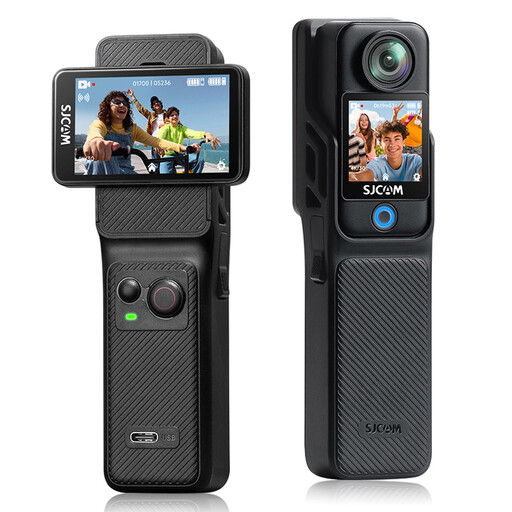
A compact camera for video recording. Check whether its wide angle of view suits the framing you want at the table.
The product name lists 4K, 6-axis electronic image stabilisation, dual 2.29-inch touchscreens and a 154° wide-angle view.
This depends, among other things, on the purpose and on what is recognisable in the recording. According to the Dutch Data Protection Authority, the GDPR applies to professional or commercial video recordings. The exemption for purely personal or household use is limited, so check which rules apply before publishing footage in which people are recognisable. Where possible, keep other people out of shot if you do not need to film them.
No, the presence of a stand does not guarantee this. Canon describes the PowerShot V10 as having a built-in stand and a tripod mount. Check separately whether the position you want for an overhead view will work with your table and mounting setup.
Check the power supply, memory card and recording settings for the exact version, and make a test recording in advance for the planned duration. Canon lists compatibility with microSD, microSDHC and microSDXC cards for the PowerShot V10; that alone does not tell you how long your planned recording can last.
Report the fault to the retailer. According to the Government of the Netherlands, there is no fixed statutory warranty period in the Netherlands; what you can expect from a product depends in part on the product itself. A manufacturer's warranty or an extended warranty does not replace your statutory rights.