
Jigsaw demonstrators with limited table space
You want to show both the whole work area and small jigsaw details. The distance between the table and camera determines which framing will work.


Start with a setup that keeps the whole jigsaw and your moving hands in focus from the mounting height available to you. A webcam is a good fit if you’re recording via a computer, a compact camera if you want to film without a separate lens, and a mirrorless camera if you’d like to change lenses. For every model, check the framing, focus, mounting and recording time you’ll need in your intended setup.
You want to show both the whole work area and small jigsaw details. The distance between the table and camera determines which framing will work.
You want to record directly via a computer and are mainly looking for practical mounting and focusing options for a permanent setup.
You want to record a full demonstration with spoken commentary, so recording time and your audio setup are important.
First, check the framing and focus at your planned camera-to-table distance. Then consider mounting, recording time and sound.
| What to consider | What should you check? | Which consumers is this most relevant to? |
|---|---|---|
| Keeping the jigsaw and your hands in frame | Test the framing from the planned height and check that the camera can focus at that distance. | If I want to show both the steps involved and my moving hands, the frame needs to be wide enough without making the pieces too small to see clearly. Around 33% of consumers prioritise framing and sharpness above all else. |
| Easy mounting | Check the mount, cable routing and view of the recording from your usual workstation. | If I record at the same small table every time, I want to be able to position the camera easily without it getting in the way of my work area. Around 27% of consumers prioritise easy mounting and operation. |
| Recording without interruption | Check the recording time with your chosen settings, as well as the power supply and storage you’ll need. | If I want to record a long explanation in one session, the whole setup needs to be able to run for that long. Around 20% of consumers put uninterrupted recording first. |
| Clear spoken commentary | Make a test recording from your planned position and check whether you need an external microphone. | If I’m explaining things while working on the jigsaw, my commentary needs to be easy to follow in the recording. Around 20% of consumers give spoken commentary top priority. |
A high resolution doesn’t tell you whether the whole jigsaw will fit in the frame or small details will stay sharp at your camera-to-table distance.
Check the framing and focus with the camera in the position you plan to use.
With a mirrorless camera, the framing also depends on the lens you choose. The body alone doesn’t automatically give you a complete recording setup.
Check which lens and mount are included with your chosen version, and whether that combination suits the distance to your table.
ACM ConsuWijzer distinguishes between the statutory guarantee and the seller’s guarantee. An additional plan does not replace your statutory rights.
Read what extra cover the plan offers before deciding whether it’s useful for you.
These brands and product ranges offer different types of camera setup. The features mentioned apply to the specific products and versions listed below.
The StreamCam is a USB-C webcam for recording via a computer.
The ZV-1 II is a compact camera with a built-in wide-angle zoom lens.
The EOS R50 is a mirrorless camera, so choosing a lens is part of putting together your setup.
The Z 30 is a mirrorless camera for video recording, which can be useful for longer sessions too.
The LUMIX G100D is a Micro Four Thirds mirrorless camera; the DC-G100DK kit includes a 12–32mm lens.
Here you’ll find Joybuy products for filming demonstrations, including webcams, vlog cameras and action cameras. For each model, check that the framing, focus and mounting work at the distance you plan to use from the table.
 No image available
This vlog camera could be an option for a jigsaw demonstration. Before you buy, check that the framing and focus suit the distance to your table.
The product description lists a 20mm wide-angle lens and 4K video. The stated 4K/240fps applies to slow motion only.
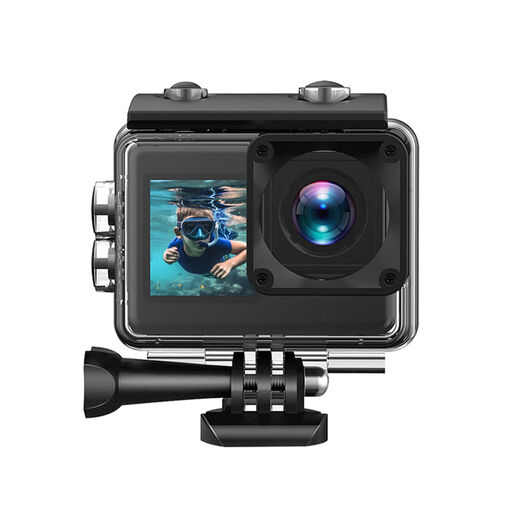 No image available
This action camera is an option for recording a demonstration. Test whether the jigsaw details remain easy to see in the wide-angle frame.
The product description lists 4K/30fps video, a 170° wide-angle lens and a rear touchscreen.
 No image available
This pocket vlog camera is worth considering for a demonstration. Check the framing and focus at the planned distance from the table.
The product title lists 4K video, 3-axis stabilisation, 2× lossless zoom, built-in storage and a rotating screen.
 No image available
This webcam is designed for use with a computer. Check whether you can mount it above your small table at the height you need.
The product title lists autofocus, 4K UHD video, two built-in microphones and a privacy cover.
 No image available
This vlog camera could suit a demonstration with spoken commentary. Make a test recording to check the framing and audio clarity at your workstation.
The product title lists a 1-inch CMOS sensor, 4K/120fps video, fast focusing, 3-axis stabilisation and an included microphone.
Measure the available distance between the camera and table, then test the framing at that distance. A stated field of view or lens name alone doesn’t prove that both the jigsaw and your hands will fit in frame.
Check the mounting, power supply, storage and recording time using the settings you plan to use, and make a full test recording. Nikon lists up to 125 minutes of uninterrupted recording for the Z 30; this is a manufacturer’s figure subject to conditions.
No, you don’t need an additional plan to have statutory rights when making a consumer purchase in the Netherlands. ACM ConsuWijzer explains statutory rights alongside the seller’s guarantee. If you’re considering an additional plan, check what extra cover its terms and conditions offer.
Not without considering the privacy rules and the circumstances of the publication. The Dutch Data Protection Authority states that identifiable people in a video are personal data, and that public sharing is not covered by the exemption for purely personal or household use. Whether publication is permitted in a particular case depends on the circumstances.