
Creator of detailed demonstrations
You want to show settings, clasps or finishing in close-up. Pay attention to the minimum focusing distance and magnification of the specific lens.


For filming small jewellery details, the camera and lens you choose make all the difference. Check that the lens can focus close enough and offers the magnification you need, rather than looking at 4K alone. A compact camera keeps your setup simple; a mirrorless camera gives you a choice of lenses, but may require a separate macro lens and more space for lighting.
You want to show settings, clasps or finishing in close-up. Pay attention to the minimum focusing distance and magnification of the specific lens.
You want to switch between the jewellery, your hands and the work surface. Think about the framing you need and whether the supplied lens is suitable.
You want to know whether a camera with a fixed lens will do, or whether you’ll need a separate lens and more space around your subject.
Choose this option: if you want to get started without separate lenses. OM SYSTEM lists a built-in lens and Microscope macro mode for the Tough TG-7.
Keep in mind: the lens is not interchangeable. Test whether the close-up you want works in the video mode you plan to use.
Choose this option: if you want to create different framings and choose a suitable lens for each shot.
Keep in mind: a camera body or standard zoom lens is not automatically a macro kit. Check which lenses are compatible and what the package includes.
Choose this option: if your camera already captures the jewellery large and sharply enough. First try a stable setup and a test recording under your own lighting.
Keep in mind: changing your setup won’t solve the problem if your lens cannot focus close enough or does not offer sufficient magnification.
| What to consider | What to look for | Who is this important for? |
|---|---|---|
| Capturing small details in focus | Check the maximum magnification and minimum focusing distance for each lens. Test the distance you want to use with a similar piece of jewellery. | If I want to show small settings or clasps in close-up, I check whether the lens can focus on them. Around 36% of consumers cite magnifying details as their top buying priority. |
| Switching between framings | Compare the supplied lens with the framings you want to film, and check the lens mount if you might buy an additional lens. | If I want to switch between the work surface, my hands and the jewellery during a tutorial, I consider the camera’s lens options. Around 29% of consumers prioritise being able to switch between demonstration framings. |
| Reflections and flicker | Make a test recording using your own lighting and check which video settings your camera offers. | If I want to avoid distracting reflections or bands under my own lights, I want to assess the setup in practice. Around 21% of consumers prioritise manageable studio lighting; Sony notes that adjusting the shutter speed may help reduce flicker, depending on the camera model. |
| Complete kit and upgrade options | Check whether a lens is included and whether it offers the focusing distance and magnification you need. | If I want to get started easily, I want to know which lens comes with the camera and whether I’ll need anything else for my close-up shots. Around 14% of consumers make a complete kit with limited need for upgrades their top priority. |
Magnification figures are lens specifications, not measurements of video performance. Sony and Nikon list a maximum magnification of 1:1 for the SEL30M35 and NIKKOR Z MC 50mm f/2.8 respectively; Canon lists a maximum of 0.5× for the RF 85mm F2 Macro IS STM. Sony gives the SEL30M35 a minimum focusing distance of 0.095 m. Always check that the lens is suitable for your camera body and the framing you have in mind.
The stated magnifications of 1:1 and 0.5× apply to specific lenses. They are not automatically available with the camera body or standard zoom lens.
Check the exact lens and what the package includes before comparing cameras or kits.
OM SYSTEM lists both 4K video and a Microscope macro mode for the TG-7. This does not confirm that every close-up function is available in the 4K video mode you want to use.
Make a test recording in your intended video mode, using a piece of jewellery of a similar size.
According to Sony, flickering light sources can cause bands in recorded video; the corrections available depend on the camera model.
Film a short clip under your own lighting and check the image before settling on your setup.
The ZV-E10 II is a mirrorless camera body with an E-mount; Sony also lists a kit with the E PZ 16–50 mm F3.5–5.6 OSS II zoom lens.
The EOS R50 is a mirrorless camera with the RF system; the separately available RF 85mm F2 Macro IS STM is a close-up option.
The Z 30 is a mirrorless camera with a Z-mount; the separate NIKKOR Z MC 50mm f/2.8 is a close-up lens.
The Tough TG-7 is a compact alternative with a built-in lens, 4K video and a Microscope macro mode listed by OM SYSTEM.
This selection includes compact video cameras, a webcam and a Sony mirrorless camera with a zoom lens. The product information provided does not make it clear for every model whether it is suitable for extreme close-ups of jewellery. To assess this, consider the lens, focusing distance and setup you have in mind.
 No image available
A compact vlogging camera may suit a small studio setup; check the focusing distance for small jewellery details.
The product information lists a 20 mm f/2.0 wide-angle lens, autofocus and 3-axis stabilisation. According to the description, 4K/240fps is only available in slow-motion mode.
 No image available
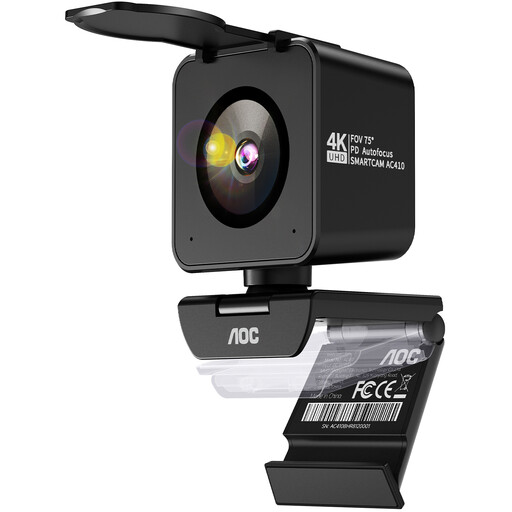
This webcam could be an option for a fixed desktop setup; check that the stated autofocus and field of view suit the framing you need for your demonstrations.
The product title lists a 75° field of view, PDAF autofocus, dual microphones and USB-A/USB-C connections. The description mentions a desktop tripod.
 No image available
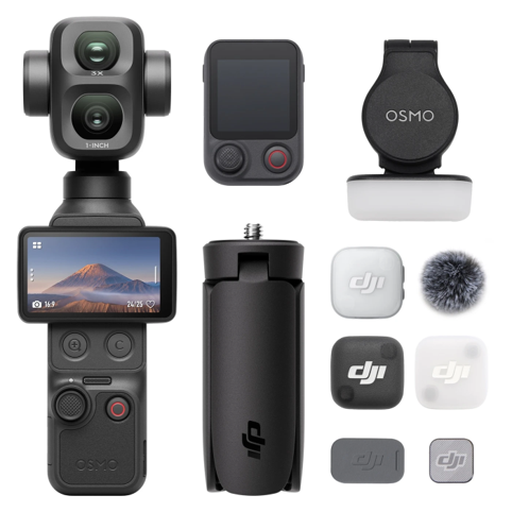
A pocket camera can keep your setup compact; check whether its fixed lens can capture the close-up you need of your jewellery.
The product information lists a 1-inch CMOS sensor, 4K/240fps, 3-axis stabilisation, 2× lossless zoom and 107 GB of built-in storage. The description limits 4K/240fps to slow motion.
 No image available
This compact video camera may suit changing framings; check that it can focus on the jewellery from the distance you plan to film at.
The product information lists a 1-inch sensor, 4K video up to 120fps, fast autofocus, 3-axis stabilisation and a rotating screen.
 No image available
This mirrorless camera with a zoom lens may suit you if you want to switch between different framings during a tutorial; check that the lens can focus close enough for your detail shots.
The product information lists an E-mount, a 16–50 mm kit lens, 4K video and a Product Showcase setting for a focus transition from face to object. It also mentions a tilting screen and digital stabilisation in Active Mode.
No. 4K alone doesn’t tell you whether a small clasp will appear sharply and large enough in the frame. Check that the exact lens can focus at the distance you want and offers sufficient magnification. Magnification is a lens specification, not part of the camera body’s 4K rating.
First, make a test recording and check whether you can adjust the shutter speed while filming. Sony notes that this may help reduce flicker; the functions available vary by camera model.
Check whether the kit includes a suitable lens and which other parts you may need to buy separately. The Dutch government describes the statutory guarantee for a consumer purchase as the right to a product that works properly; any additional manufacturer’s or retailer’s guarantee is separate. If you’re buying in a business’s name, check which terms and conditions apply.
If you film and publish recognisable people on behalf of a business or organisation for professional or commercial purposes, the Dutch Data Protection Authority says the GDPR applies and you need a valid legal basis under the GDPR. Consent is one possible legal basis, but it is not automatically the only one. The exception for purely personal or household use does not apply to such business publications.