Start by checking the focusing distance and framing on your work surface: make sure small components appear sharp and large enough before choosing 4K or zoom. A document camera or webcam suits a computer-based setup; a compact camera offers more independence, while a mirrorless camera gives you more lens options but may also require a suitable lens and a stable mount.
Who is this choice relevant to?
Filming fine details
You want to capture clasps, beads and precise hand movements clearly. Focusing distance, field of view and controllable lighting are important considerations; Canon and DJI provide product specifications that can help you assess lens choice and working distance.
Making things on a small desk
You want a repeatable overhead view without your hands or camera mount getting in the way. A computer-connected document camera or webcam could suit your needs; IPEVO and Logitech describe features for filming work on a desk.
Filming in other locations too
You want to take your camera with you after filming and weigh up the freedom of recording independently against the limitations of a fixed lens or short working distance. Sony describes a Product Showcase Setting for the ZV-1 II; DJI lists a minimum focusing distance of 0.2 m for the Osmo Pocket 3.
What should you look for when choosing?
Document camera
A good fit if: you usually film directly above a small work surface and record using a computer. IPEVO describes the V4K ULTRA as having an adjustable setup and autofocus.
Keep in mind: this setup relies on USB and recording software; the stated resolution does not guarantee a suitable focusing distance for your jewellery.
Webcam
A good fit if: you record using a computer and want to switch easily between showing yourself and your desk. Logitech describes a downward-facing Show Mode for the MX Brio.
Keep in mind: Show Mode does not confirm that the camera is suitable for macro filming; test the focus and full working area from the intended camera angle.
Mirrorless camera with a suitable lens
A good fit if: you want to adjust the framing and focusing distance by choosing a lens. Canon lists RF and RF-S lens support for the EOS R50.
Keep in mind: the camera body or a standard zoom lens is not automatically suitable for close-ups; assess the lens and make sure the camera is securely mounted.
Compact standalone camera
A good fit if: you also film away from your desk, without a fixed computer setup. Sony describes a Product Showcase Setting for the ZV-1 II; DJI lists a minimum focusing distance of 0.2 m for the Pocket 3.
Keep in mind: the fixed lens and minimum working distance both affect whether a small component will fit in the frame.
| Consideration |
What to look for |
Who is this most important for? |
| Keeping small components in focus |
Measure the distance to your workpiece and test the autofocus while your hands are moving; check that the smallest component appears large enough in the frame. |
I want to show clasps and beads clearly without them looking blurry or too small; around 36% of consumers prioritise capturing details like these. |
| A fixed overhead view |
Measure your desk and filming area; check that the arm reaches your workpiece and keeps both hands in the frame. |
I want to move my hands freely on a small desk while keeping the framing consistent; around 29% of consumers prioritise a fixed overhead setup. |
| Recording with a computer |
Check the USB connection, software compatibility and the resolution and frame-rate combination you want to use. |
I want to record using my computer without a lot of standalone camera equipment; around 21% of consumers put ease of computer use first. |
| Filming in other locations too |
Decide whether you really want to move the camera, then test close-ups at the working distance you use in those locations. |
I want to film my jewellery-making away from my usual desk; around 14% of consumers prioritise this flexibility. |
Common buying mistakes
-
Choosing based only on 4K or digital zoom
A high recording resolution does not tell you whether the camera will focus at your working distance or frame the smallest components large enough.
Measure the working distance and record a test video with a real piece of jewellery before you decide.
-
Assuming a camera body is a complete close-up setup
With the Canon EOS R50, close-up performance depends partly on the lens you choose; the camera body alone does not determine how close the lens can focus.
Check the exact lens and mount, and try the full setup on your desk.
You may need to buy a suitable lens and a stable mount separately.
-
Confusing a desk-view mode with macro filming
Logitech describes Show Mode as a way to show your desk, but this feature does not prove that a small bead will appear sharply and fill the frame.
Test the focus on your smallest component from the angle you plan to use while filming.
Brands to consider
These brands are relevant to different camera setups. The features mentioned apply to the product ranges described and are not a general recommendation for the entire brand.
IPEVO
Document cameras for computer-based demonstrations over a work surface; the V4K ULTRA is one example.
- According to IPEVO, the V4K ULTRA supports autofocus, USB-A and 3840 × 2160 at up to 30 fps.
- Check that your jewellery appears sharp and large enough at your working distance.
Logitech
Webcams for computer-based recording; the MX Brio is worth considering if you want to show yourself as well as your desk.
- According to Logitech, the MX Brio has Show Mode and supports 4K at 30 fps.
- Show Mode does not confirm that the camera is suitable for very small close-ups; test the working distance and framing.
Canon
Mirrorless cameras with interchangeable lenses; the EOS R50 suits anyone who values lens choice for close-ups.
- Canon lists support for RF and RF-S lenses for the EOS R50.
- The camera body has no in-body image stabilisation, and the usable focusing distance depends partly on the lens you choose.
Sony
Compact standalone vlogging cameras; the ZV-1 II has a fixed zoom lens and a Product Showcase Setting.
- Sony describes how the camera automatically focuses on a product held in front of it.
- This does not tell you whether the same setting will show a very small, stationary component on your work surface sharply and large enough.
DJI
Small standalone gimbal cameras, such as the Osmo Pocket 3, for anyone who wants to use the same camera away from their desk too.
- DJI lists a weight of 179 g and a minimum focusing distance of 0.2 m for the Osmo Pocket 3.
- The fixed lens and minimum working distance need to suit the close-up you want; a gimbal is no substitute for a suitable fixed overhead setup.
Joybuy products for desk-based and independent filming
This selection includes webcams for computer-based recording, along with compact and interchangeable-lens camera systems for filming at or away from a fixed desk.
 Image unavailable
Philips 4000 Series 4K UHD Webcam SPL6408BT/00
Suitable for filming desk-based work using a computer; the product title mentions autofocus.
4K UHD, 8 MP, dual microphones, privacy shutter and EU version.
Joybuy
 Image unavailable
DJI Osmo Pocket 3
Suitable for filming without a fixed computer setup; check whether it can manage close-ups at your working distance.
1-inch CMOS, 4K/120fps video and 3-axis stabilisation.
Joybuy
 Image unavailable
Sony ZV-E10 + 16-50mm Zoom Black
Suitable if you want to adjust the framing; check that the supplied lens is right for the close-ups you want to film.
The product description lists 4K video and a 16–50mm kit lens. According to the description, an SD card and adapter/charger are not included.
Joybuy
 Image unavailable
Insta360 Link 2C Standard Bundle Graphite Black
Suitable for filming at your desk using a computer; the product description mentions DeskView and autofocus.
4K webcam for PC and Mac, 1/2-inch sensor and HDR.
Joybuy
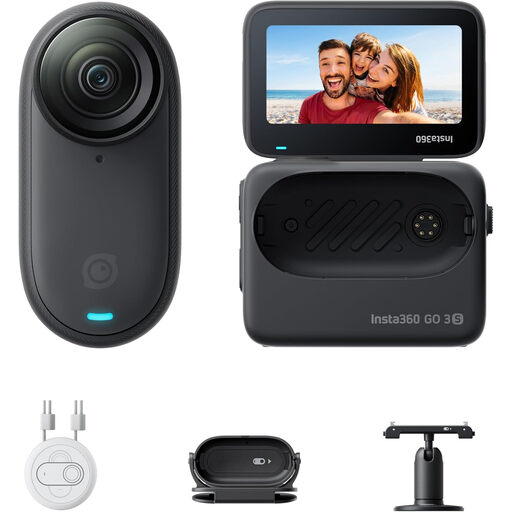 Image unavailable
Insta360 GO 3S 128GB
Suitable for hands-free POV filming and mounting in different locations; consider whether this viewpoint will show your hands and workpiece clearly.
Portable 4K camera, 140-minute battery life and waterproof to 10 m according to the product title. The description warns that anyone with a pacemaker should not use or wear the magnetic pendant.
Joybuy
Frequently asked questions
Is 4K enough to film a small clasp clearly?
Not on its own: also check whether the component appears sharp and large enough at your chosen distance. Resolution and focusing distance are different things; for example, DJI lists a minimum focusing distance of 0.2 m for the Osmo Pocket 3.
What can I test on my desk before my first recording?
Set up the camera and position your hands as you would when working, check the full frame and record a short clip while picking up a small component. If you are using a USB camera, also check the computer connection and recording software; IPEVO lists a USB-A connection for the V4K ULTRA.
Who can help if a camera I bought as a consumer in the Netherlands is faulty?
According to the Government of the Netherlands, the seller must offer a solution if a product is faulty. The Netherlands has no fixed statutory guarantee period; what you can reasonably expect from a product depends, among other things, on the type of product and the sales information.
Can someone I live with be identifiable in a jewellery-making video I publish?
A recording that stays private may fall under the exception for personal or household use. That exception does not automatically apply when you publish a recording; according to the Dutch Data Protection Authority, consent is usually the most straightforward legal basis under the GDPR when other people are identifiable. Keep anyone you live with out of shot if you want to avoid having to assess this.
Can I try out a camera bought online and then return it?
When you buy from a business remotely, you are often entitled to a statutory 14-day cooling-off period, although there are exceptions. The Government of the Netherlands explains this cooling-off period; check which terms apply to your purchase before you buy. A retailer’s returns policy does not replace your statutory rights.


