
For makers showing fine details
If you want to show settings, textures or joints, choose your camera and lens together, based on magnification and working distance. Sony and Canon give specific magnification figures for their separate macro lenses.


Start with the smallest detail you want to film, then choose a camera with a lens that can capture it sharply from your working distance. With a mirrorless camera, you can choose a separate macro lens. A compact camera is an option for filming while moving, but check that its focusing distance suits your jewellery. Whichever you choose, a stable setup and manageable lighting are important.
If you want to show settings, textures or joints, choose your camera and lens together, based on magnification and working distance. Sony and Canon give specific magnification figures for their separate macro lenses.
If your hands are busy while you demonstrate, a fixed shooting angle and control over focus and lighting are important. Nikon recommends using a tripod for small subjects, while Shopify Netherlands highlights the importance of lighting and reflections when photographing jewellery.
If you film short clips in your studio or for presentations as well as at your workbench, a compact camera can be handy to take with you. DJI specifies mechanical stabilisation for the Osmo Pocket 3, but that feature alone won’t tell you whether small pieces of jewellery will fill the frame when filmed close up.
Start with the limitation that will have the biggest effect on your shot. For small pieces of jewellery, the lens, working distance and lighting are just as important as the camera body when planning your setup.
Choose this setup if: you want to show fine details filling the frame and have room to coordinate your lens, working distance and lighting. Sony quotes 1:1 magnification for the separate SEL30M35, while Canon quotes a maximum of 1:2 for the separate RF 35mm F1.8 MACRO IS STM.
Keep in mind: a macro lens may be a separate purchase, and filming close up can limit the space available for lighting.
Choose this setup if: you mainly want to show your hands, your process and the whole piece of jewellery, and might choose a close-up lens later.
Keep in mind: a camera with 4K video or a kit zoom lens doesn’t guarantee the magnification you need. Check the lens included with the exact version you’re considering.
Choose this setup if: you mainly want to film moving studio or presentation shots without putting together a system with interchangeable lenses. DJI lists mechanical three-axis stabilisation and a Product Showcase focusing mode for the Osmo Pocket 3.
Keep in mind: DJI specifies a minimum subject distance of 20 cm for the Osmo Pocket 3. Check that your smallest piece of jewellery will appear large enough in the frame from that distance.
| What to consider | What should you check? | Who is this important for? |
|---|---|---|
| Fine details | Compare the magnification and working distance of the exact lens; test your smallest piece of jewellery in the frame you want. | If I want to show a fine setting or joint, it needs to appear large enough in the frame without the lens taking up my workspace. Around 31% of consumers would make fine details their top priority. |
| Shine and colour | Take a test shot with your own jewellery and the lighting you plan to use; look out for reflections and shadows. | With shiny metal, I want to see how reflections and colour appear on camera. Around 25% of consumers would prioritise lighting and colour. |
| Filming on your own | Check where you can position a tripod, whether you can see the screen and how to check focus while your hands are moving in the frame. | If I need both hands to work on the piece, I want to be able to set up the shot in advance and check the focus. Around 19% of consumers would make filming on their own their top priority. |
| Filming on the go | Weigh up size and stabilisation against focusing distance; test the framing with your smallest subject. | If I’m filming in different places, I want to carry as little equipment as possible while still framing the detail I need. Around 13% of consumers would prioritise portability above all else. |
| Complete setup | Check exactly what’s included in the kit, the lens mount and the support you’ll need before choosing the components. | I want a body, lens and support that work together, without overlooking any components. Around 12% of consumers would focus mainly on having a complete setup that works well together. |
The magnification figures quoted by Sony and Canon apply to specific macro lenses. A camera body’s video resolution won’t tell you whether your smallest detail will appear large enough in the frame.
First decide which small detail you want to show. Then check the lens’s magnification, working distance and mount, as well as what’s included in the exact kit.
A suitable close-up lens may be a separate component of your setup.
Stabilisation and a focusing mode for products on show don’t automatically determine how close the lens can focus. DJI lists a minimum subject distance of 20 cm for the Osmo Pocket 3.
Test your smallest piece of jewellery from the distance you plan to film at and check whether it appears large enough in the frame.
Reflections and marks can hide fine details; changing the camera body won’t solve the problem on its own. Shopify Netherlands highlights the importance of lighting when photographing jewellery.
Before you buy, take a test shot with your own piece of jewellery, background and adjustable lighting.
Adjusting your lighting setup may take extra time and equipment.
The ZV-E10 II is an E-mount mirrorless camera for creators who want to choose a lens for wider shots and, if needed, a separate macro lens.
The EOS R50 is part of the RF system and is suited to wider video shots, with the option to choose a separate close-up lens.
The Z50II is a Z-system camera for demonstrations where product-focused focusing and the option of choosing a macro lens later are useful.
The Osmo Pocket 3 is a compact fixed-lens option for creators who also film moving presentation and studio shots.
The LUMIX G100D is a Micro Four Thirds mirrorless camera with interchangeable lenses, for creators who want to explore choosing a separate lens.
These product picks focus on compact cameras for portable video recording. When filming jewellery, always check that the focus and framing work for the smallest detail you want to capture.
 No image available
Test it with your smallest piece of jewellery to see whether the camera can achieve the focus and framing you need.
The product name specifies the black Vlog Combo version.
 No image available
This bundle pairs a camera with an LED video light, giving you more control over your lighting when filming.
Check that you can position the light towards your jewellery without creating distracting reflections.
 No image available
The product name mentions three-axis stabilisation for handheld video recording.
The title also lists 2× lossless zoom, 107 GB of built-in storage and a 2-inch rotatable screen. Zoom doesn’t indicate macro magnification, so test the close-up framing you need.
 No image available
This version is for anyone who wants the listed grip with a 1/4-inch thread included with the camera.
The product name lists three-axis stabilisation, 2× lossless zoom and 107 GB of built-in storage. Check that the included grip is compatible with the accessories you want to attach.
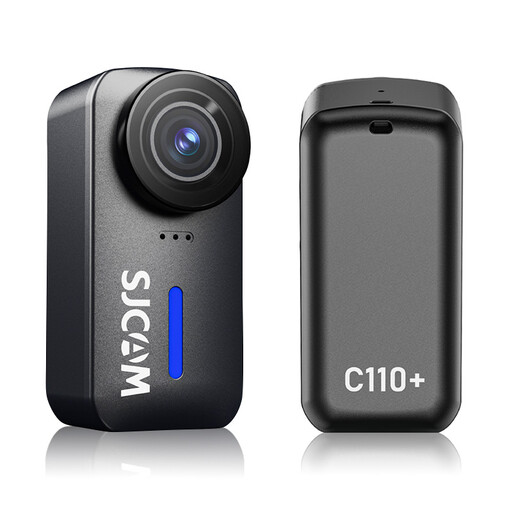 No image available
The product name mentions gyro stabilisation for handheld video; check whether you can achieve the close-up framing you need for jewellery.
The title lists a 170° field of view, an f/1.8 aperture, 120 minutes of recording time and a waterproof housing rated to 30 m. It also gives the dimensions as 6,4 × 3,1 × 3,3 cm.
Set up the camera securely, decide in advance how to frame your hands and the piece you’re working on, then take a test shot to check the focus. Nikon recommends a tripod, a simple background and adjustable lighting for small subjects. For video, consider separately which recording settings are right for your situation.
No. A focusing mode like this doesn’t guarantee that a very small piece of jewellery will appear large enough in the frame. The lens and shooting distance also matter: DJI specifies a minimum subject distance of 20 cm for the Osmo Pocket 3.
If you bought the camera as a consumer in the Netherlands, you can contact the seller about your statutory guarantee. According to the Dutch government, there is no fixed statutory guarantee period in the Netherlands. What you can expect from a product depends, among other things, on the product itself and the information provided at the time of sale. These consumer rules don’t necessarily apply to a business purchase.
If you film recognisable people on behalf of a business or organisation and publish the footage for professional or commercial purposes, the Dutch Data Protection Authority says that the GDPR applies and you need a lawful basis, such as consent. The authority also states that the exception for purely personal or household use doesn’t apply when sharing with a wider audience. This isn’t a general ban on filming jewellery without recognisable people in the shot.