What should you look for?
First decide where you listen and which album source you use. Then choose between one speaker and a supported stereo pair, and check the controls and any parts you’ll need.
| What to consider |
What should you check? |
Who should consider this? |
| Sound and stereo image |
Listen at your usual volume and check whether the exact model supports stereo pairing. |
If I usually listen to albums from one regular spot, I want to know whether one speaker is enough or two compatible speakers will give me the left-right soundstage I’m looking for. Around 36% of consumers prioritise sound and the stereo image from their listening spot. |
| Compatibility with my album source |
Make a note of your music service, phone and any CD player or turntable; check that your preferred way to play music works with the exact model. |
If I want to keep using my existing music service or physical album source, the speaker needs to support my preferred way of playing music. Around 29% of consumers prioritise connecting to their existing album source. |
| Placement and controls |
Check the space available and whether microphone and voice controls suit how the speaker will be used by everyone. |
In a shared open-plan space, I want to position the speaker suitably and consider whether voice controls work for my household. Placement and shared controls matter most to around 21% of consumers. |
| What your set-up requires |
Check whether you’ll need a second compatible speaker, an adapter or any other components. |
If I want to connect an external album source or add stereo later, I want to know in advance what components I’ll need. Around 14% of consumers focus mainly on the overall set-up and the support it requires. |
Joybuy products
This Joybuy selection includes wireless speakers and speaker sets for playing albums through Bluetooth, Wi-Fi or other listed connections. Check that each model’s playback options and set-up suit the way you want to use it.
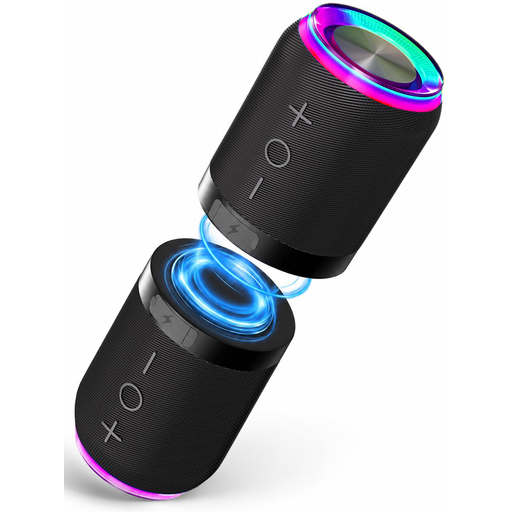 Image unavailable
2-in-1 Bluetooth speaker set, set of 2
A set of two separate units to consider if you use a Bluetooth source and want to set up a stereo pair.
The product information lists Bluetooth, AUX and TF card as playback options, and says the units can be separated for left-right stereo.
View at Joybuy
 Image unavailable
Bose Lifestyle Ultra Speaker, black
Worth considering if you’re looking for a single network speaker with several listed connection options.
The product specifications list Wi-Fi, Bluetooth, app control and LAN.
View at Joybuy
 Image unavailable
Edifier ES300 Wi-Fi and Bluetooth speaker, 60 W
A model to compare if you want a choice of different wireless and wired playback options.
The product information lists Wi-Fi, Bluetooth, AirPlay 2, USB and AUX; the product name specifies 60 W.
View at Joybuy
Frequently asked questions
Do I always need two speakers for jazz albums in an open-plan living space?
No. One speaker may be enough if you want a simple set-up or listen in different places. If a distinct left-right soundstage matters to you and you can position two suitable speakers, consider a stereo pair supported by the manufacturer. Assess the sound in your own space.
Where should I put a speaker?
Choose a spot on a stable surface and listen from where you usually sit. Consumentenbond notes that placement, particularly for larger speakers, affects how music sounds.
Can I connect a CD player or turntable to a Sonos Era 100?
Sonos says you can do this with a separate Line-In Adapter and a suitable audio cable. Also check whether your source needs a preamp; the line-in is disabled when the Era 100 is used as a surround speaker.
What if the speaker is faulty after I buy it?
In the Netherlands, you’re entitled to a product that works as it should. If you make a valid claim under the statutory guarantee, the seller must provide a solution. According to Rijksoverheid, there is no fixed statutory guarantee period. For eligible distance purchases, you’ll also have a 14-day cooling-off period in many cases.
Should I choose a speaker without a microphone for privacy reasons?
That depends on the controls you want and how you feel about having a microphone in a shared space. For smart devices, the Autoriteit Persoonsgegevens advises checking the privacy statement, data security and provider. Then check the features of the exact model.


