
Vandaag of morgen in huis

Kwaliteit gegarandeerd

Welkomstaanbiedingen ontgrendelen: GRATIS bezorging | Tot 80% korting | Gratis 30 dagen JoyPlus-proefperiode
Download de app
An important online meeting is about to start. You put on your headset, but your colleagues immediately complain about the noise from your neighbour's renovation. Or worse, after an hour, the headset feels like a vice grip on your head. Choosing a good professional headset seems simple, until you realise that many models fail to live up to their marketing promises.
As a Product Recommendation Officer at Joybuy, I see the challenges buyers face every day. Before you consider purchasing a Jabra Evolve2 65 wireless headset, it's helpful to understand the most common pitfalls.
A smart purchase depends on specifications that truly matter, not on marketing buzzwords.
To avoid buying a headset that ends up in a drawer after a month, it's crucial to check three core aspects. These determine whether a wireless headset for work is worth the investment.
A headset with a noise-cancelling microphone is the standard, but the technology behind it varies enormously. A single microphone simply cannot effectively isolate your voice from ambient sound.
Look for headsets with multiple microphones (a so-called microphone array). These systems use one microphone to capture your voice and the others to identify and suppress environmental noise. This ensures that only your voice is transmitted clearly. The Jabra Evolve2 65, for example, uses a 3-microphone setup to significantly reduce background noise.
A stable wireless connection is essential. Pay attention to the following points:
For office and remote workers, there are two popular styles:
Pay attention to the ear cushion material. Soft memory foam moulds to your ears and distributes pressure evenly, which is essential for comfort during long workdays. A lightweight design, like that of the Evolve2 65 (only 99 grams for the mono version), prevents neck strain.
Not everyone has the same needs. Below is a selection of headsets that suit different work profiles, based on their objective specifications.
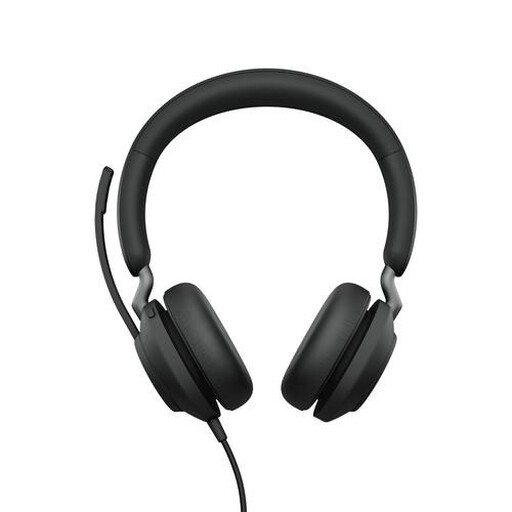
Why This Fits Their Persona: Perfect for the remote or office worker who spends all day on calls. This headset is designed for reliability and seamless integration with business software.
The 3-microphone technology tackles the pitfall of poor noise cancellation. The MS Teams certification and included USB adapter prevent connectivity issues. Its lightweight design with memory foam is built for long-lasting comfort.
Long Battery Life: Up to 37 hours of talk time. MS Teams Integration: Dedicated button for direct interaction. Comfort: Lightweight (99.2 g) and soft ear cushions.
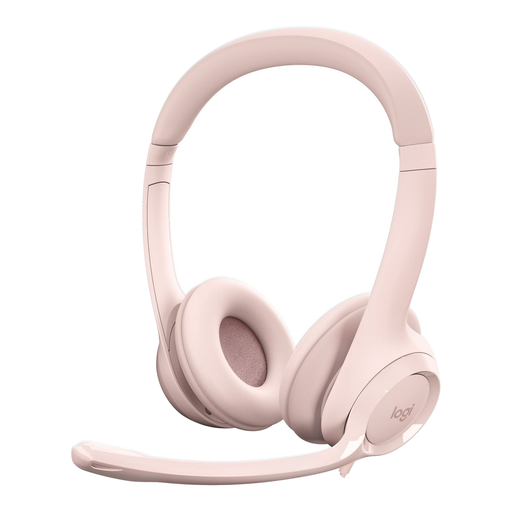
Why This Fits Their Persona: Ideal for those seeking a reliable, no-frills headset without the expense of a wireless model. Perfect for students or professionals who need a solid, entry-level solution.
The wired USB connection completely eliminates the pitfall of an unstable wireless connection. Its noise-cancelling microphone is a clear upgrade over the cheapest models and ensures clear conversations.
Plug-and-Play: No installation or charging needed; works instantly via USB. In-Line Controls: Adjust volume or mute the microphone directly from the cable. Reliability: A wired connection is always stable.
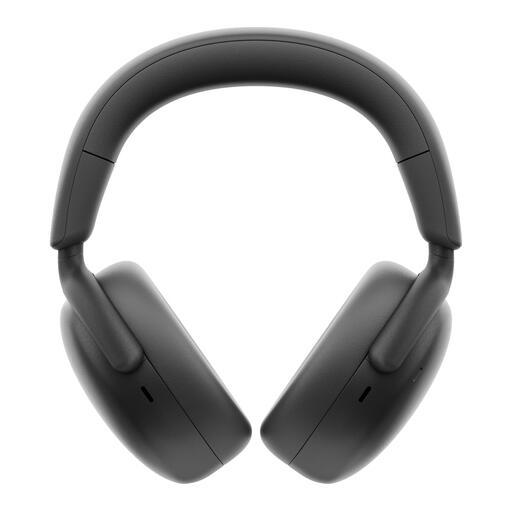
Why This Fits Their Persona: For the professional who frequently switches between the office, home, and being on the go. This headset offers advanced features for maximum focus and flexibility in any environment.
According to Dell, its AI-driven noise cancellation distinguishes voices from background noise, tackling the pitfall of unclear conversations. The hybrid Active Noise Cancellation (ANC) ensures focus, while the long battery life and charging stand prevent unexpected interruptions.
AI Noise Cancellation: Advanced microphone technology for clear calls. Exceptional Battery Life: Up to 80 hours of listening time. Convenient Charging: Includes a desktop charging stand.
We have compiled a complete, up-to-date list of products that meet these strict selection criteria and local regulations.
Is a mono headset better for office work? A mono headset (with one earcup) is often a practical choice for an office environment. It allows you to focus on your call or meeting while still being available to colleagues with your other ear. This promotes collaboration and ensures you are not completely cut off from your surroundings.
How long does the battery of a wireless headset like the Jabra Evolve2 65 really last? The battery life stated by manufacturers is usually based on ideal conditions. For the Jabra Evolve2 65, a talk time of up to 37 hours is claimed. In practice, this depends on the volume and distance from the transmitter. However, you can reasonably expect such a headset to last for several workdays on a single charge, minimising the risk of the battery dying during an important call.
Does a headset certified for Microsoft Teams also work with other apps like Zoom or Google Meet? Yes, absolutely. A headset certified for Microsoft Teams, such as the Jabra Evolve2 65 MS Mono, functions as a standard audio device with other communication platforms. You can use it for calls via Zoom, Google Meet, Slack, and other applications without any issues. The specific Teams features, like the dedicated button, will naturally only work within the Microsoft Teams environment.
