Choose your screen layout according to how many windows you want to read at once: 27-inch QHD is a starting point for two main windows, while 27-inch 4K, 34-inch ultrawide and two separate monitors each involve different trade-offs. Dell Netherlands specifies 2560 × 1440 pixels for the P2725D; Philips Netherlands lists 3840 × 2160 for the 27E1N1800AE/00, and Samsung Netherlands gives the LS34C652UAUXEN as 34 inches with a 21:9 aspect ratio. Test your preferred text size and window width, then check the adjustability and exact video and USB-C features. More pixels do not guarantee a transcript that is comfortable to read or give you more physical screen width.
Who is this choice relevant to?
Indexer working with multiple windows
You regularly compare interview footage or audio, transcripts and indexing fields, so usable window width is your main priority. Dell Netherlands specifies a 27-inch screen for the P2725D, while Samsung Netherlands lists the LS34C652UAUXEN as 34 inches with a 21:9 aspect ratio.
Reviewer of multilingual transcripts
You want to check small characters, diacritics and timecodes at a text size you can comfortably read. Philips Netherlands lists 3840 × 2160 pixels for the 27E1N1800AE/00; assess the resolution and display scaling together in your own software.
Working at a screen for long periods
You spend long periods working with interview material and want a setup where you can position the screen comfortably and minimise distracting reflections. Arboportaal describes workplace requirements for specific working situations; these do not automatically apply to every private buyer.
What should you look for when choosing?
27-inch QHD
Suited to: two main windows, such as a recording and a transcript, when both remain readable side by side at your preferred text size. Dell Netherlands specifies 2560 × 1440 pixels and height adjustment for the P2725D.
Trade-off: the QHD monitor reviewed has fewer pixels and less horizontal width than the 4K and ultrawide options listed.
27-inch 4K
Suited to: anyone looking for more pixels on a 27-inch screen. Philips Netherlands specifies 3840 × 2160 pixels for the 27E1N1800AE/00; LG Netherlands lists the same resolution for the 27UP850K-W.
Trade-off: 4K does not increase the physical width of the screen; at a larger text size, you may be able to fit fewer windows on screen at once.
34-inch ultrawide
Suited to: having your recording, transcript and indexing fields side by side, provided your desk is wide enough. Samsung Netherlands lists the LS34C652UAUXEN as a 34-inch screen with a 21:9 aspect ratio.
Trade-off: check that each window remains usable at your preferred text size and that the curved design suits your workspace.
Two separate monitors
Suited to: anyone who prefers to view recordings and text on separate screens. EIZO describes a daisy-chaining function for the EV2795.
Trade-off: you’ll need room for two screens and should check that your computer supports the setup and connections you want.
| Consideration |
Check before buying |
Who particularly values this? |
| Room for windows |
Test your preferred windows side by side in your own software and at your usual text size. |
If I want to see the recording, transcript and indexing fields at the same time, the layout needs to work at my usual text size. That’s why room for windows is the top priority for around 36% of consumers. |
| Text readability |
Try representative languages, diacritics and timecodes at your preferred zoom or scaling setting. |
I want to check transcripts and timecodes without making the text too small to read. Text readability is the top purchasing priority for around 29% of consumers. |
| Posture and reflections |
Check the height adjustment, screen finish and the monitor’s position in relation to windows. |
When working for long periods, I want to position the screen to suit my workspace and minimise distracting reflections. Workspace setup is the top consideration for around 21% of consumers. |
| Connecting to your computer |
Compare the video outputs and monitor inputs; if you want to use one cable, check video support and the required charging power too. |
If I want to connect my existing laptop or a second monitor, the features of both devices need to be compatible. Ease of connection is the top purchasing consideration for around 14% of consumers. |
Common pitfalls
-
Choosing based on resolution alone
A 27-inch 4K screen has more pixels than the 27-inch QHD model reviewed, but that does not automatically give you more physical width for three readable windows.
First, test your actual window layout and text size. Then compare 4K with an ultrawide setup.
-
Assuming a USB-C port means full docking functionality
Video, laptop charging and daisy-chaining are separate features, and support depends on both the monitor and the computer.
Compare the ports and charging power of both devices before relying on a one-cable setup.
An unsuitable connection may mean you need a different cable or a separate docking solution.
-
Assuming similar model names refer to the same product
Samsung lists model code LS34C652UAUXEN for the ultrawide monitor reviewed; a Joybuy product page lists LS34C650TAUXEN. Different full model codes do not prove that these are the same version.
Check the full model code and key specifications of the version you’re considering.
Brands to compare
Dell
The Pro Plus P2725D is a 27-inch QHD option for an adjustable workspace with two main windows.
- Dell Netherlands specifies 2560 × 1440 pixels and height adjustment for the P2725D.
- Check whether three windows will fit at your preferred text size, and confirm the connections on the exact version.
Philips
The 27E1N1800AE/00 is a 27-inch 4K option with a height-adjustable stand.
- Philips Netherlands specifies 3840 × 2160 pixels and an IPS panel for this model.
- Don’t assume it has USB-C docking; check the ports on the exact version.
LG
The UltraFine 27UP850K-W is a 27-inch 4K model with USB-C and an adjustable stand.
- LG Netherlands lists height, tilt and pivot adjustment for the stand.
- Check separately that your computer supports compatible video output and the required power delivery through the connection you plan to use.
Samsung
The ViewFinity S6 LS34C652UAUXEN is a curved 34-inch ultrawide option.
- Samsung Netherlands lists a 21:9 screen for this model.
- Whether the curve and window layout work for you depends on your preferences, text size and available desk width.
EIZO
The FlexScan EV2795 is a 27-inch QHD option for comparing adjustability and USB-C docking.
- EIZO Netherlands specifies USB-C power delivery up to 70 W and a daisy-chaining function.
- This does not confirm that your laptop supports the second-screen setup you want.
Ultrawide monitors at Joybuy
This selection of Joybuy products focuses on ultrawide monitors for viewing recordings, transcripts and indexing fields side by side. Compare the curvature, desk space required and connections with your computer and workspace.
 Image unavailable
Philips 34B2U5900C/00 34-inch Curved Dual-Mode Business Monitor
An ultrawide option for viewing interview recordings, transcripts and indexing fields side by side; check whether the 1500R curve suits your workspace.
34 inches; 21:9; WUHD 5120 × 2160; height, swivel and tilt adjustment; USB-C, KVM and USB hub.
View at Joybuy
 Image unavailable
LG UltraGear 34GX900A-B.AEU
A 34-inch ultrawide option for working with multiple windows; bear in mind its pronounced 800R curve.
3440 × 1440 pixels; 21:9; height adjustment; USB-C with up to 65 W Power Delivery.
View at Joybuy
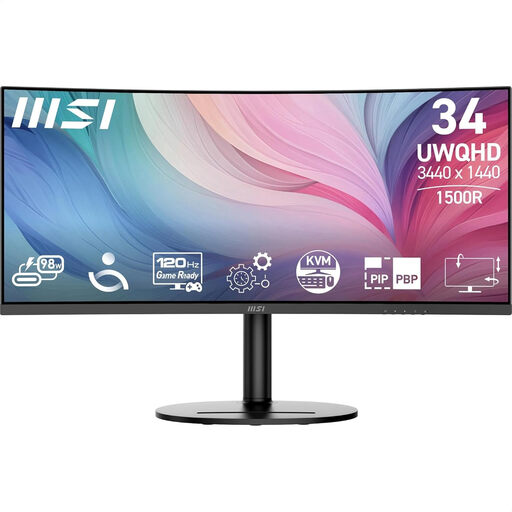 Image unavailable
MSI Modern MD342CQP
A 34-inch ultrawide option for working with windows side by side; check whether the 1500R curve suits your viewing preferences.
3440 × 1440 pixels; 21:9; USB-C, HDMI and DisplayPort; height, swivel and tilt adjustment; KVM.
View at Joybuy
 Image unavailable
INNOCN 40C1U
A 40-inch ultrawide option for working with multiple windows on one screen; bear in mind the stated width of 944,1 mm including the stand.
5120 × 2160 pixels; 21:9; IPS; 100 Hz; height adjustment; USB-C with 65 W Power Delivery; PIP and PBP.
View at Joybuy
 Image unavailable
iiyama ProLite 34-inch UWQHD Curved Monitor with USB-C Dock
A 34-inch ultrawide option for viewing recordings and text windows side by side; check whether the 1500R curve suits your workspace.
3440 × 1440 pixels; 21:9; 15 cm height adjustment; USB-C dock, LAN and KVM.
View at Joybuy
Frequently asked questions
Is 4K essential for indexing multilingual transcripts?
No, 4K is not essential based on the monitors reviewed. QHD and 4K have different stated resolutions, and your choice also depends on text scaling and window layout. Try the languages, characters and timecodes you use in your own application.
How should you set up a screen for long periods of indexing work?
Position an adjustable screen to suit your workspace and minimise distracting reflections. Arboportaal describes specific employer obligations when an employee works at a screen for more than 2 hours a day; these requirements do not automatically apply to every private buyer.
Can any USB-C monitor charge your laptop and connect a second screen?
No. Check your laptop’s video support, the charging power required and the monitor’s daisy-chaining function separately. EIZO lists power delivery up to 70 W and a daisy-chaining function for the EV2795, but that does not confirm that your computer is compatible.
What are your rights when you buy a monitor online?
Many online purchases from a business come with a 14-day cooling-off period, according to the Dutch government; check whether your purchase is covered by this scheme. For faults, statutory protection applies without a fixed statutory guarantee period, and the retailer is your point of contact.


