
Player with a story-game wishlist
Choose a console only after checking which platforms your specific interactive stories and editions are available on.


Start with the interactive stories you want to play: check the platform, edition and available languages for each title. Then choose a console that can output to your TV and decide whether you want to use physical games or play on the go as well. A console’s maximum resolution doesn’t guarantee that a game supports it.
Choose a console only after checking which platforms your specific interactive stories and editions are available on.
You want to follow text and choices comfortably on your big screen, so check the display output, game settings and supported languages.
You want to play a suitable game on the TV and away from it, too. The play modes and game compatibility of Switch models are therefore important.
Best for: players who mainly play on the TV and want to play specific PS5 story games.
Bear in mind: the Digital Edition has no disc drive. Also check whether the game itself supports 4K.
Best for: players who want to play interactive Xbox stories and choose between a digital model and one with a disc drive.
Bear in mind: check the exact model and its storage and resolution specifications.
Best for: players who want to play a suitable game on the TV and in handheld mode.
Bear in mind: Switch Lite doesn’t support TV mode. For Switch 2, check compatibility with older games.
| What to consider | What should you check? | Who is this important for? |
|---|---|---|
| Story game you want | Check the platform, game edition and compatibility for each title. | If you want to play a specific interactive game, first check whether it’s available on your console. Around 29% of consumers prioritise game availability above all else. |
| TV display and readability | Check the TV output and, where available, the game’s text and subtitle settings. | If you want to read lots of dialogue on a big screen, the console needs to connect to your display and the game needs to offer the settings you want. Around 23% of consumers prioritise TV display. |
| Discs and downloads | Check whether the console has a disc drive and how much storage the model offers. | If you want to use physical games, check whether the model you choose can read discs. For downloads, available storage matters. Around 18% of consumers base their choice mainly on discs, downloads and storage. |
| Game language | Check the language list for the exact title and edition. | If you want to follow the story in a language you’re comfortable with, check the languages available in the game itself, not just the language of the shop page. Around 18% of consumers prioritise being able to understand the story text. |
| Playing away from the TV | Check the model’s play modes and whether your games are compatible. | If you want to switch between playing on the TV and in handheld mode, the console you choose needs to support both. Around 12% of consumers prioritise this flexibility above all else. |
Nintendo says that Switch Lite doesn’t support TV mode, so it isn’t the right model for playing on a large external screen.
Before buying, check that the exact console model can output to a TV.
The PS5 Digital Edition and the Xbox Series S described here don’t have a disc drive and can’t play physical games.
Compare the full name of the console model with the edition of the game you want to use.
The languages listed for a game may differ from the language of its product page. Nintendo’s page for Apollo Justice: Ace Attorney Trilogy lists several languages, but not Dutch.
Before choosing a console, check the language list for the exact title and edition you want.
Nintendo says that 4K on Switch 2 requires support from both the game and the screen. A console’s specifications alone don’t tell you what resolution a specific game uses.
If 4K display is a requirement for you, check the game, console and TV together.
PlayStation 5 models are an option for players who play on the TV and have found the PS5 story games they want.
Xbox Series S and Series X are options for TV players considering interactive Xbox titles.
Nintendo Switch models are an option for players who want to play suitable story games on the TV and, if they choose, in handheld mode.
These console options are intended for interactive games on a big screen, with some bundles also offering a handheld play mode.
 Image unavailable
The bundle description mentions TV and handheld play, for anyone who wants to switch between the two.
Bundle with Nintendo Switch Sports Resort and 3 months of Nintendo Switch Online.
 Image unavailable
The bundle description mentions a dock and TV mode, making it a good fit if you want to play on an external screen.
32 GB; the bundle includes a physical Mario Kart 8 Deluxe game card and TV, tabletop and handheld modes.
Nintendo lists Phoenix Wright: Ace Attorney Trilogy for Nintendo Switch. Check the specific game and edition you want separately.
 Image unavailable
The description mentions a dock for TV play and handheld use, for anyone who wants to switch between the two.
256 GB; the bundle includes a Mario Kart World download and 3 months of Nintendo Switch Online.
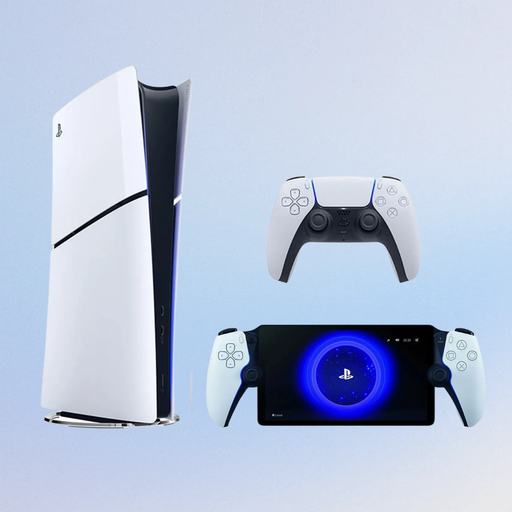 Image unavailable
This bundle combines a PS5 console for TV gaming with a PlayStation Portal Remote Player.
825 GB; Digital Edition without a disc drive. PlayStation lists Life is Strange: Double Exposure as a PS5 game.
 Image unavailable
The description mentions TV, tabletop and handheld modes for anyone who wants to play on a big screen and away from it.
Nintendo says 4K output requires support from both the screen and the game.
No, Nintendo Switch Lite doesn’t support TV mode. With Switch 2, use the dock to output to a TV or monitor, and check that the game is compatible too.
No, not to choose a console for a story game. According to Nintendo, 4K output on Switch 2 requires both a compatible TV and a supported game. For other consoles, also check the requirements for the specific game and screen.
No, a console without a disc drive can’t play physical game discs. Check the full name of the console model and the game edition before you choose.
It depends on the specific game and how you want to play it. The Xbox page for As Dusk Falls lists both a Game Pass option and a separate purchase option. Check the game’s current terms and any online features.
No, check compatibility separately for each older Switch game you want to play. Nintendo lists Phoenix Wright: Ace Attorney Trilogy for Nintendo Switch, but that alone doesn’t confirm compatibility with Switch 2.