Relevant brands to consider
The models mentioned offer different combinations of USB-C power delivery, screen size and built-in audio. Check the specifications for the exact model before you decide.
Dell
Dell’s Plus range includes a 27-inch QHD model and a 34-inch ultrawide model. Dell says both models mentioned support USB-C power delivery of up to 65 W and have built-in speakers.
- The S2725DC combines QHD, 144 Hz and built-in speakers; the S3425DW offers an ultrawide resolution of 3440 × 1440 and 120 Hz.
- Whether 65 W is enough for your laptop depends on the laptop. The 34-inch S3425DW also needs more desk space.
BenQ
According to BenQ, the MOBIUZ EX2710U is a 27-inch 4K monitor with built-in 2.1-channel speakers.
- BenQ lists HDMI and DisplayPort connections, as well as integrated audio.
- The listed connections do not confirm USB-C video input with laptop power delivery. The audio quality has not been assessed in an independent listening test.
Philips
Philips lists a 23.8-inch screen, Full HD resolution and a 144 Hz refresh rate for the E Line 242E1GAJ/00.
- The more compact screen size may suit you if a 34-inch monitor takes up too much desk space.
- Don’t assume this model offers USB-C laptop power delivery or built-in speakers unless this is confirmed in its specifications.
Joybuy products for this use case
This selection includes portable monitors and desktop models for compact setups, USB-C laptop use and wider screen layouts. Check which connections and features suit your laptop and gaming space for each model.
 No image available
TECLAST V16H portable monitor, 144 Hz
This portable 16-inch monitor with a built-in kickstand and stereo speakers suits a compact gaming space.
1920 × 1200, IPS, 16:10, 144 Hz, FreeSync and HDR. The specifications list two USB-C ports and Mini HDMI.
Joybuy
 No image available
TECLAST V16Q portable monitor, 2.5K 144 Hz
The 16-inch 16:10 layout and built-in speakers may suit you if you’re looking for a portable screen for both text and gaming.
2560 × 1600, IPS and 144 Hz. The product description lists two USB-C ports for power, video and data, plus Mini HDMI and a kickstand. Check compatibility with your laptop.
Joybuy
 No image available
Dell Pro P3426WEB 34 USB-C Hub Conferencing Monitor
The wide screen layout may suit you if you want room for a second window or notes while following a story.
34.1 inches, 3440 × 1440 and 100 Hz. The specifications list USB-C with Power Delivery of up to 90 W and built-in speakers. Laptop power delivery over USB-C requires a compatible laptop with USB Power Delivery and DisplayPort Alt Mode.
Joybuy
 No image available
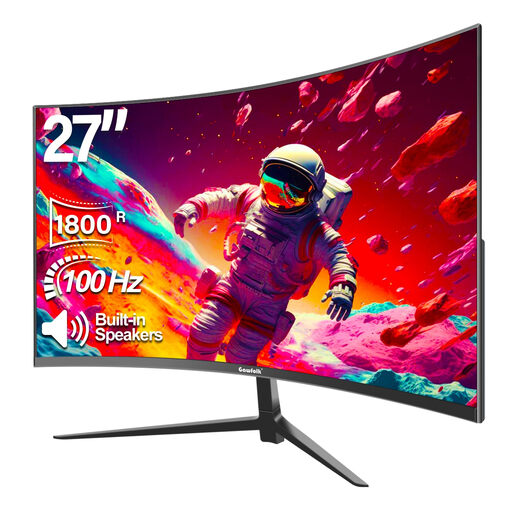
Gawfolk 27-inch curved Full HD monitor
The built-in speaker feature may suit you if you’d rather not use a separate speaker set.
Full HD 1080p, 100 Hz and 1800R curvature; the product name lists built-in speakers.
Joybuy
 No image available
Shark 23.8-inch Full HD IPS gaming monitor, 200 Hz
The 23.8-inch size may suit a compact desk; the built-in speakers are handy if you don’t want a separate speaker set.
1920 × 1080, IPS and 200 Hz. The specifications list HDMI, DisplayPort and an adjustable stand.
Joybuy
Frequently asked questions
Can one power socket power both your monitor and your laptop?
A monitor may eliminate the need for a separate laptop charger if your laptop supports USB-C video and enough Power Delivery. Dell lists up to 65 W through the USB-C upstream port for the S2725DC and S3425DW; the monitor itself still needs to be plugged into the mains. Before buying, check how much power your laptop needs.
How can you connect audio without an extra speaker set?
Choose an exact monitor model with built-in speakers and check whether your laptop or console sends audio through the video connection you’re using. Also check the source’s audio output settings; a speaker specification doesn’t confirm that setting.
How do you compare monitor power consumption?
Compare the energy information for the exact models on the same basis of use. The European Commission describes the EU energy label as a standardised scale for electronic displays; typical and maximum power figures may describe different conditions of use.
What warranty applies if a product is faulty, and how long is the cooling-off period for an online purchase in the Netherlands?
In the Netherlands, statutory warranty applies alongside any manufacturer’s warranty: if a product breaks sooner than you could reasonably expect under normal use, the seller is responsible for providing an appropriate solution, according to ACM ConsuWijzer. For a standard online product purchase, the cooling-off period is usually 14 days from delivery; statutory exceptions still apply.
Can I connect extension leads together if I don’t have many power sockets?
The Dutch Fire Service advises against connecting extension leads to each other and recommends using approved, undamaged extension leads with multiple sockets. Plan the connections you need in advance and follow the safety instructions for the extension lead.


