
Story seeker
You start by choosing specific story-driven games and want to make sure you can play them on your new system.


Start with the interactive stories you want to play: a great screen or a long quoted battery life won’t help if your games don’t work on the console. Then decide between a portable screen and playing at home on an external display. For long sessions, check readability, controls, power options and the terms for digital games.
You start by choosing specific story-driven games and want to make sure you can play them on your new system.
You read lots of dialogue in one sitting and care most about a suitable screen, adjustable display settings and comfortable controls.
You want to move around during a long session without unexpectedly running out of power.
First, check whether your chosen games are available on the system. Then compare where you’ll play, how easy the screen is to read and how you’ll power the console with the way and places you enjoy long sessions.
| What to consider | What should you check? | Who is this important for? |
|---|---|---|
| Game availability | Search for the exact title and edition in the platform’s store. Check older Switch games individually, and look at the Steam Deck compatibility rating for Steam games. | I want to know first whether my chosen story works on the console; around 29% of consumers put game availability first. |
| Readability and controls | Check text size and zoom at both system and game level. Also consider whether the controls suit you when making repeated choices in menus. | When I read and make choices for long periods, I want text and controls that are easy to follow; around 29% of consumers give reading and control comfort top priority. |
| Portability and power | Nintendo quotes around 2–6.5 hours of battery life for Switch 2, depending on software and features; Valve quotes 3–12 hours of play time for Steam Deck. Neither range guarantees how long a specific game will run. | I want to be able to keep playing in different places and know where I can charge in advance; around 24% of consumers put portability and power first. |
| Total cost and purchase format | Check whether your console plays discs, which purchase format you’ll need for your games and how much storage suits the way you play. | I want to weigh up the console, the games I want and any extras together; around 18% of consumers put total cost first. |
Nintendo says some original Switch games are not compatible, or may not be fully compatible. Certain titles may require the original Joy-Con controllers.
Check the exact game against Nintendo’s compatibility information and see which controllers it requires.
Depending on the title, you may need a different edition of the game or an additional controller.
Quoted battery life ranges depend on software and use, and don’t tell you how long your particular story will run on a single charge.
Plan for a long session with battery life variations in mind, and check whether you can charge where you’ll be playing.
The PS5 Digital Edition has no disc drive, and Microsoft describes the Xbox Series S as all-digital. This means you can’t use your existing disc games on these consoles.
Before you buy, check which console edition you’re choosing and whether the games you want are available digitally.
If you only own the games you want on disc, you may need to buy digital copies.
Switch 2 combines a built-in screen with the option to play on a TV, which could be useful if you move between places to play.
Steam Deck OLED is a portable option if the games you want are in your Steam library.
The PS5 Digital Edition is designed for playing at home on an external display, if the story-driven games you want are available for PS5.
Xbox Series S is an all-digital console for playing at home on an external display.
These Joybuy product picks cover gaming consoles for interactive play. Check that each title you want is available and that the controls suit the way you play.
 No image available
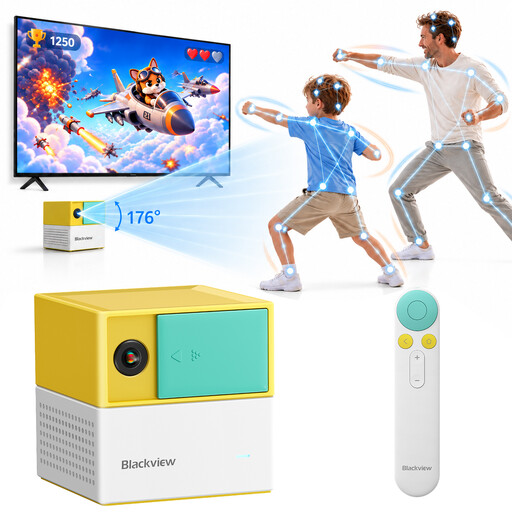
For anyone looking for a gaming console with built-in games and motion controls; check whether the interactive story you want to play is supported on this system.
The product information lists 22 built-in games, AI motion tracking and support for up to four players. There is no built-in battery.
 No image available
A portable gaming PC to consider if you want to play your chosen PC games on the go; check compatibility for each title beforehand.
The product information lists Windows 11 Home, an 8.8-inch OLED touchscreen and a 74 Wh battery capacity.
 No image available
A handheld with SteamOS to consider if the games you want are available on the relevant PC gaming platform; check compatibility for each title.
The product information lists an 8-inch WUXGA screen, a 55.5 Wh battery capacity and a touchpad.
 No image available
Handheld, tabletop and TV modes give you different ways to play; check whether your specific interactive story is available for Switch 2.
The product information lists a 7.9-inch built-in screen and a dock for TV play. Nintendo warns that some original Switch games are not compatible, or may not be fully compatible.
 No image available
The bundle description lists handheld, tabletop and TV play; check separately whether the interactive story you want is available on the console.
According to the product information, the bundle includes a dock, Joy-Con controllers and a physical Mario Kart 8 Deluxe game card.
Start by choosing a few games you genuinely want to play, then check which console editions they’re available for. Check older Switch games individually for Switch 2, and look at the Steam Deck compatibility rating for Steam games.
Nintendo says Switch 2 takes longer to charge while the system is in use. If your session might last longer than the battery charge, make sure you have a suitable way to charge it; play time depends on the software and features in use.
According to ACM ConsuWijzer, the retailer must offer an appropriate free solution if a product breaks down under normal use sooner than you could reasonably expect. A manufacturer’s warranty period does not automatically define the limit of your statutory rights.
ACM ConsuWijzer says that products bought online generally have a statutory cooling-off period of up to 14 days after delivery. Exceptions may apply to games and other digital content; check before buying a download or a sealed game.
The Dutch government describes age ratings for computer games as age recommendations. Use the rating to assess the content for a child; it does not set a general legal minimum age for playing on a console.