First, check whether the specific story supports controller input. Valve explains that Steam Input can map keyboard and mouse actions to controller buttons on a compatible PC, but that doesn’t automatically make every story suitable for a gamepad. Then choose based on your device and the connections available: a wired controller needs a free USB port, while wireless models may need batteries or time to recharge.
Who is this guide for?
Player of text-based PC fiction
You want to make choices or enter commands using buttons, so first check whether the game supports controller input or needs input mapping. Valve explains how Steam Input can map controller input to keyboard or mouse actions.
Player without a spare charging socket
You don’t want to rely on an extra socket while playing, so you’re comparing replaceable batteries with a controller that charges via USB. Xbox Support says rechargeable AA batteries don’t charge inside the Xbox controller.
Player with a free USB port
You’re happy to use a cable if it means you don’t need to charge a separate controller battery. Logitech describes the F310 as a wired PC gamepad with a USB cable.
What should you consider when choosing?
Wireless with replaceable batteries
A good fit if: you use a supported device and don’t want to connect your controller to a charging cable while playing.
Bear in mind: you’ll need spare batteries or a separate charger. Rechargeable AA batteries don’t charge in the Xbox controller, according to Xbox Support.
Wireless with a built-in battery
A good fit if: you can charge it in advance and choose a controller that suits your device, such as a Switch Pro Controller for Nintendo Switch.
Bear in mind: you’ll need to recharge the battery later. Connections and available features vary by model and platform.
Wired to your gaming device
A good fit if: you have a free USB port and enough cable length, and don’t want to charge a separate controller.
Bear in mind: the cable stays connected and takes up a port. A USB connection doesn’t automatically mean the story supports controller input.
Start by checking the game’s input options and the device you’re using. Then compare the power options and the ports available to you.
| Concern |
What to check |
Who is this most relevant to? |
| Input for the specific game |
Check whether the game supports controller input and whether keyboard or mouse actions can be mapped. |
If I want to control interactive fiction with buttons, I first check which inputs the specific story accepts; around 39% of consumers prioritise game input that works. |
| Playing without a charging socket |
Check the battery type, charging method and what’s included with the exact version. |
I don’t want to need a socket to charge my controller during a gaming session, so I compare batteries with a built-in battery; around 31% of consumers prioritise not needing a charging socket. |
| Platform and available connection |
Check the connection for your device and whether it needs a USB port. |
If I’m not sure whether my device can connect to the controller, I check the platform and available ports; around 15% of consumers prioritise platform connectivity. |
| Simple power options |
Check whether you’ll need a cable, batteries or a separate charger. |
I want to keep extra charging or battery accessories to a minimum, so I check the power method carefully; around 15% of consumers prioritise simple power options. |
Common buying mistakes
-
Assuming every interactive story supports a gamepad
Text commands may require keyboard or mouse input. Mapping controller buttons can help with compatible games, but it doesn’t guarantee that entering free text will be comfortable with a gamepad.
Check the specific game’s input options before choosing a controller. For a game played through Steam, Valve explains how Steam Input can map controller buttons to keyboard or mouse actions.
-
Assuming wireless means you won’t need a port at all
A wireless connection may still need a USB receiver. The 8BitDo Ultimate 2C Wireless uses a USB-A receiver for wireless play on Windows.
As well as checking that you have enough power sockets, check your USB ports and the connection method for your device.
-
Expecting rechargeable AA batteries to charge inside the controller
Xbox Support says rechargeable AA batteries don’t charge inside the Xbox controller.
Check the battery type and what’s included; work out in advance whether you’ll need batteries or a separate charger.
-
Assuming an extended warranty replaces your statutory guarantee
Statutory guarantees apply in the Netherlands. The Dutch government says that if a product doesn’t meet the terms of the agreement, the seller must provide a solution.
Check what an additional warranty offers and compare it with your statutory rights before paying for it.
Brands to consider
Xbox
The wireless Xbox controller is an option for supported Xbox, Windows and mobile devices if you want to use replaceable batteries.
- Xbox lists Bluetooth and button mapping for this model.
- Rechargeable AA batteries don’t charge in the controller. Also check whether your story supports the input you want to use.
Nintendo
The Switch Pro Controller is designed for interactive stories on Nintendo Switch where controller input is suitable.
- Nintendo lists a USB-C charging cable and an estimated battery life of around 40 hours, which varies with use.
- This information isn’t a general compatibility claim for PC games.
8BitDo
The Ultimate 2C Wireless offers a wireless connection for Windows via a 2.4GHz receiver and for Android via Bluetooth.
- 8BitDo lists button mapping and says a receiver and cable are included.
- Wireless use on Windows requires a USB-A port. The stated play time is based on 8BitDo’s own laboratory testing.
Logitech G
The F310 is a wired PC gamepad for anyone with a free USB port who doesn’t want to charge a separate controller battery.
- Logitech lists a USB cable and support for XInput and DirectInput.
- The cable limits how far you can sit from the device; check separately whether the game supports controller input.
PlayStation
DualSense is relevant for PS5 and certain supported PC and mobile devices.
- PlayStation documents USB-C and Bluetooth support on compatible devices.
- According to PlayStation, haptic feedback on PC requires a USB connection when the game supports this feature.
Controllers at Joybuy
This selection includes wireless and wired controllers for PC, Xbox, PS4 and Switch. Always check that your game supports your setup and that you have the necessary connections.
 No image available
Wireless Dualshock controller for PS4 and PC
A wireless option if you’re looking for a controller described in the product title as compatible with PS4 and PC. Check whether your game supports gamepad input.
The product description says you’ll need the included USB cable for the initial pairing.
View at Joybuy
 No image available
Game controller with dual vibration and gyroscope for Switch and PC
The product title mentions Switch and PC. Check whether the controller input is suitable for the specific story and your device.
The title mentions dual vibration and a gyroscope.
View at Joybuy
 No image available
Xbox Wireless Controller Robot White
A wireless Xbox controller for anyone looking for this specific product variant. Check compatibility with your device and the power method before buying.
The product name specifies the Robot White colour variant.
View at Joybuy
 No image available
GameSir G7 SE Dynamic Blue, wired
A wired controller for anyone with a USB port to spare who is happy to use a cable. Check that your game and device are supported.
The product title lists Xbox Series X/S, Xbox One and Windows 10/11. The USB connection uses a port on your gaming device.
View at Joybuy
 No image available
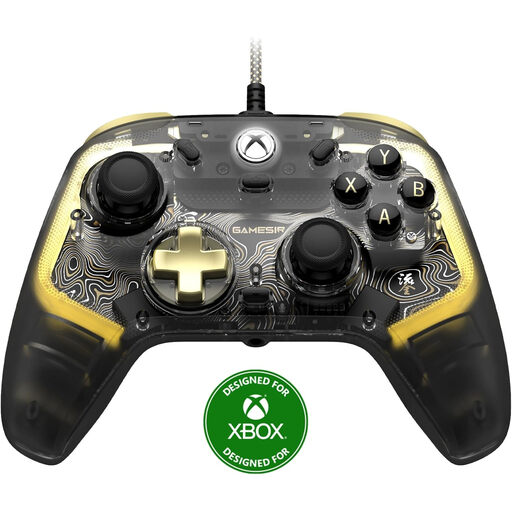
GameSir Kaleid Flux Smoke Transparent RGB, wired
This wired Xbox controller is a good choice if having a free connection matters more than playing wirelessly. Check that the listed platforms and the game suit your needs.
The product title lists Xbox Series X/S, Xbox One and Windows 10/11. The wired connection uses a port on your gaming device.
View at Joybuy
Frequently asked questions
Does all interactive fiction work with a controller?
No, it depends on the input options for the specific game. For a game played through Steam, Steam Input can map controller buttons to keyboard or mouse actions. Also check whether entering free text works well with the controls you want to use.
How can I play without an extra socket for my controller?
A wired controller uses a USB port on your gaming device, while a wireless controller may need batteries or a battery charged in advance. Check the available ports, the power method and whether you can charge a battery while playing.
Do rechargeable AA batteries charge inside an Xbox controller?
No. Xbox Support says rechargeable AA batteries don’t charge inside the controller. You’ll need a separate way to charge them, so also check which batteries are included with the version you’re buying.
Can a wireless controller always be used without a USB connection?
No. The 8BitDo Ultimate 2C Wireless uses a USB-A receiver for wireless play on Windows. Check the connection method for the exact model and make sure you have an available port.
What rules apply when buying a controller online in the Netherlands?
The Dutch government says that, in many cases, you have 14 days to change your mind when buying online; terms and exceptions may vary by purchase. The Dutch Authority for Digital Infrastructure explains that electrical, electronic and radio equipment sold in Europe must meet the applicable requirements. Check the information that applies to your specific purchase.


