What should you look for?
First, check whether your game supports the controls you need. Then compare device compatibility, connection options and running costs.
| What to consider |
What should you check? |
Who should consider this? |
| In-game controls |
Check the information for the specific game you play and note which actions you’ll still need to perform with a keyboard or mouse. |
If I want to make choices or enter commands from my chair, I want to know whether the game supports that; around 33% of consumers give game controls top priority. |
| Compatibility |
Compare the full controller model, your operating system and the required connection method with the manufacturer’s information. |
If I want to use the same controller with different devices, each device needs to be supported separately; around 33% of consumers put compatibility first. |
| Connection and seating position |
For wired use, check that the connection and cable length suit your setup. For wireless use, check Bluetooth support and the power requirements. |
If my desk has limited space, I want to know whether the cable will reach my seat or whether wireless play would be more practical; around 17% of consumers give their setup top priority. |
| Power and extra costs |
Check which batteries, cables or other components are included with the specific model, and distinguish your statutory rights from paid extra cover. |
If I want to plan my spending in advance, I want to know what I’ll need in addition to the controller; around 17% of consumers focus mainly on the total cost. |
Joybuy products
These product picks are controllers described in their titles or descriptions as being for PC and/or consoles. Check that each model is supported by your device and game.
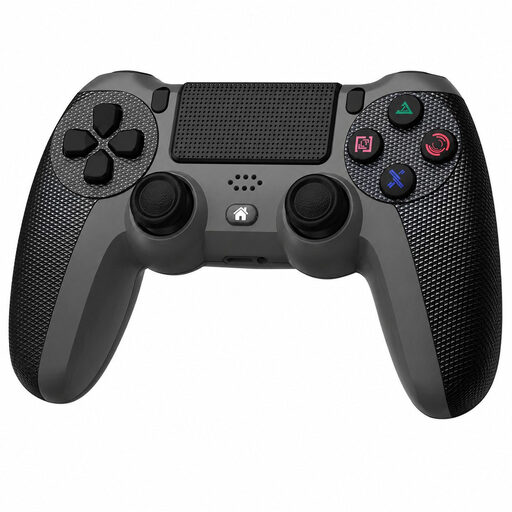 Image unavailable
Wireless DualShock controller for PS4 and PC
An option to compare if you’re looking for a wireless controller for PS4 or PC; check that your specific game supports it.
The product title lists PS4 and PC as compatible devices. The description mentions a wireless connection and an included charging cable.
View at Joybuy
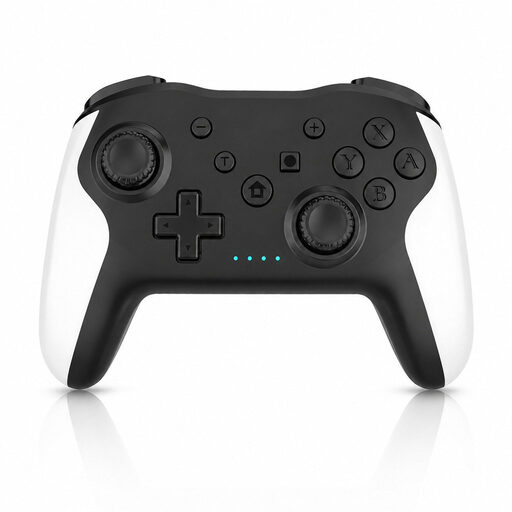 Image unavailable
Game controller with dual vibration and gyroscope for Switch and PC
This controller is an option if you’re looking for a model for Switch or PC; check that it works with your game and device.
The product title lists Switch and PC. The description mentions a wireless connection, dual vibration motors and gyroscope controls.
View at Joybuy
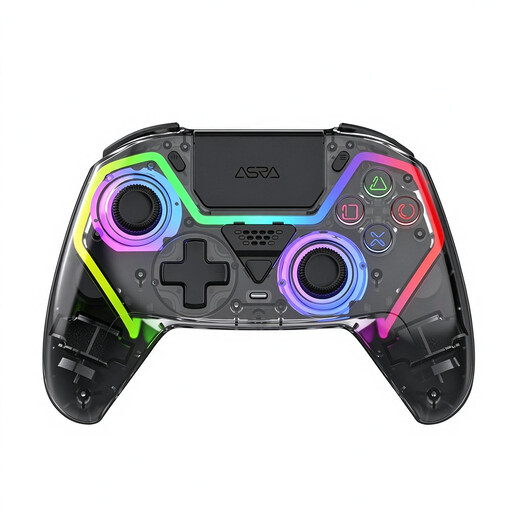 Image unavailable
VIELLAN wireless controller with Hall effect joysticks
An option to compare if you’re looking for a wireless controller for PC; the title mentions a PS5 layout, which alone doesn’t confirm compatibility with a PS5.
The product title lists programmable rear buttons, Hall effect triggers with 255 levels, RGB lighting and a 1000 mAh battery. The description mentions USB-C charging.
View at Joybuy
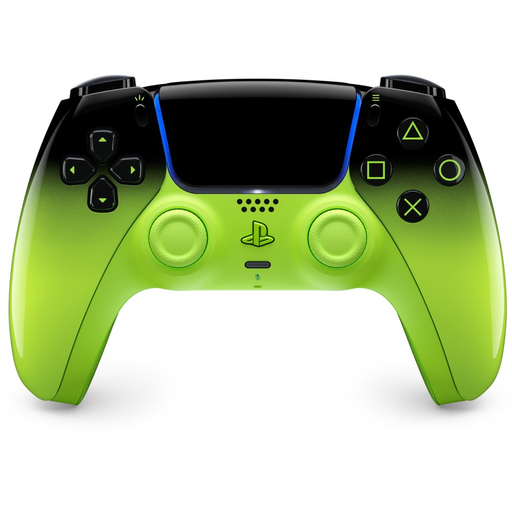 Image unavailable
PlayStation DualSense Wireless Controller V3, Remix Green Edition
This version is an option if you’re looking for a wireless controller and the listed devices suit your needs; check compatibility for each game.
The product title lists PS5, Mac, Android, iOS and PC. The description mentions USB-C charging.
View at Joybuy
 Image unavailable
GameSir Cyclone 2, Black-Bundle Edition
An option if you’re looking for a controller for PC and other listed devices, with a choice of connection methods; check that your game supports it.
The product information lists PC, Switch, iOS and Android, TMR sticks, and Bluetooth, a wireless dongle or a wired connection. The product title mentions a bundle with a charging dock.
View at Joybuy
Frequently asked questions
Can you play every interactive story entirely with a controller?
No, don’t assume you can based on the genre alone. Check the information for the specific game you play: Steam lists The Yawhg as having full controller support and mentions Xbox controllers, but that doesn’t automatically tell you anything about other games or controllers. A custom keyboard or mouse layout can sometimes help, but it won’t automatically replace free-text input.
How do I connect and set up a controller?
Follow the instructions for the exact model and device. Sony describes connecting DualSense to supported devices via Bluetooth or USB; in Steam, you can choose a layout with keyboard, mouse or gamepad commands for a game if needed.
What should I check about power and charging?
Check the power system of the version you’re considering and what’s included in the box. Microsoft lists tests using AA batteries for the Xbox controller described. Nintendo lists USB-C charging for the Switch Pro Controller and notes that estimated battery life depends on use.
What are my rights if I’m not happy with a controller bought online or it develops a fault?
According to ACM ConsuWijzer, for a standard online purchase of a product in the Netherlands, you generally have a 14-day cooling-off period from delivery, subject to statutory exceptions. If a product is faulty, you also have statutory rights against the seller, subject to the applicable conditions; these are separate from any paid additional warranty cover.


