First, check whether your game and gaming device support the controller input you want; this varies from title to title. Then choose based on where you connect your headphones: plugging them into the controller has different audio requirements from connecting them directly to your PC or console.
Who is this guide for?
Players who want to check game support
You play interactive stories on PC or console and want to know whether you can use a controller with your game. Valve lists different levels of controller support for two text-based games, so check the information for the title you want to play.
Players with wired headphones
You want to connect your headphones to the controller while you play. What’s possible depends on the platform and, with DualSense on PC or Mac, how the controller is connected.
Players who read a lot and make choices
You read longer dialogue or make frequent choices, so you’ll want to consider the button layout and connection. Some manufacturers list extra mappable buttons on certain models; the best way to find out whether a controller feels comfortable in your hands is to try it yourself.
What should you look for when choosing?
Start by checking support for your specific game and device. Then decide whether to connect your headphones to the controller or directly to your gaming device.
| What to consider |
What should you check? |
Who should consider this? |
| Game and device support |
Check the information for your game and the exact controller model. |
I don’t want to assume that support for one narrative game also applies to my title. Around 33% of consumers give game and device support top priority. |
| Audio connection |
Decide whether to connect your headphones to the controller or gaming device; check the connection method too. |
I want to connect my wired headphones to the controller and need to know whether that works with my platform and connection. Around 27% of consumers prioritise this audio setup. |
| Controls while reading |
Check the button layout and any mappable buttons on the exact model. |
When reading long dialogue and making repeated choices, I want to use buttons that are easy for me to reach. Around 20% of consumers prioritise comfortable, customisable controls. |
| Cable and power |
Compare the connection and power requirements with your seating position and how you use audio. |
I want to know in advance whether a cable will restrict where I can sit or whether I need to consider the power requirements of a wireless controller. Around 20% of consumers choose mainly based on connection and power. |
Avoid common buying mistakes
-
Assuming a headset socket guarantees every audio connection will work
According to Sony, the DualSense headset socket only works on PC and Mac when the controller is connected to the computer by cable; this option isn’t compatible with mobile devices.
Check the platform, controller connection and where you plug in your headphones as one complete setup.
-
Assuming support for one narrative game applies to all games
Valve lists different levels of controller support for the text-based games Pet and Katawa Shoujo. So, support for another game doesn’t automatically tell you whether your title will work.
Check the store or support information for the game you actually want to play.
-
Confusing the Switch Pro Controller with the Switch 2 Pro Controller
Nintendo says the Switch 2 Pro Controller only works with Nintendo Switch 2, not the original Switch.
Check the full model name against your console before ordering.
-
Choosing a wired controller without considering the cable
A wired controller connects to your gaming device with a cable. This can affect where you can sit while playing.
Check the specified cable and make sure it’ll work with your gaming setup.
Brands to compare
Microsoft Xbox
An option for Xbox players who also want to play on another compatible device and connect headphones to the controller.
- Microsoft lists wireless connectivity and a 3.5mm headset socket.
- Check audio output separately when you’re not playing on an Xbox console; the presence of a socket doesn’t confirm that every connection offers the same audio features.
Sony PlayStation
DualSense is designed for PS5 and can also work with compatible games on PCs, Macs and mobile devices supported by Sony.
- Sony describes haptic feedback and adaptive triggers for games and devices that support these features.
- According to Sony, you need a wired connection to use the headset socket on PC or Mac; this option doesn’t work on mobile devices.
Nintendo
The Switch 2 Pro Controller is designed for players who want to connect headphones to the controller while playing on Switch 2.
- Nintendo lists an audio socket and GL/GR buttons that can be assigned the functions of other buttons.
- Nintendo says this model doesn’t work with the original Switch.
GameSir
The G7 SE is a wired option for the Xbox consoles and Windows 10/11 listed by the manufacturer.
- GameSir lists a 3.5mm socket, two mappable rear buttons and a detachable 3 m USB-C cable.
- The cable connects the controller to your gaming device. The stick description isn’t an independent assessment of how long they’ll last.
PowerA
According to PowerA, the Enhanced Wired controller is designed for certain Xbox consoles and Windows, with wired controls and headset features.
- PowerA lists a 3.5mm socket, volume control with mic mute and a detachable 3 m cable.
- The cable limits how far you can sit from your gaming device. Details for one version don’t automatically apply to every controller from the brand.
8BitDo
The Ultimate 2C Wireless is a separate option for Windows or Android if you connect your headphones directly to your gaming device.
- 8BitDo lists 2.4GHz and wired use for Windows, and Bluetooth for Android.
- The Ultimate 2C Bluetooth is a separate model designed for Switch; check the full model name.
Controller options at Joybuy
This selection at Joybuy includes controllers for PC, Xbox and Switch-related gaming setups. Check whether each model supports your game and preferred audio connection.
 No image available
VIELLAN Wireless Game Controller, PC & PS5 Layout
The title mentions PC use; check support for your game and device before choosing.
The description lists Hall Effect joysticks and Hall triggers, programmable rear buttons, and a 1000 mAh battery with USB-C charging.
The description also mentions a 3.5mm socket; check whether it works with your preferred connection.
View at Joybuy
 No image available
GameSir G7 SE Dynamic Blue
A wired option for the Xbox consoles and Windows listed, if you want to use your headphones through the controller.
The title mentions Xbox Series X/S, Xbox One and Windows 10/11. The description lists a 3.5mm socket, two programmable rear buttons and a detachable USB connection.
The cable connects the controller to your gaming device.
View at Joybuy
 No image available
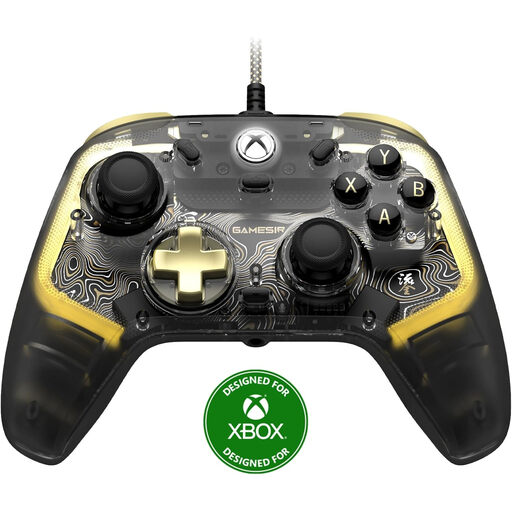
GameSir Kaleid Flux, Smoke Transparent RGB
The title mentions use with Xbox Series X/S, Xbox One and Windows 10/11; also check whether your game is supported.
The title describes a wired controller with RGB lighting.
Check that the audio socket and connection method work with your headphones.
View at Joybuy
 No image available
BEITONG PanGu Modular Wireless Gaming Controller
The listed platforms include PC, Nintendo Switch, Switch 2, Steam and Android; check support for your specific game.
The description mentions interchangeable joysticks, buttons and D-pads, as well as wired, wireless and Bluetooth connections.
According to the description, the battery has a capacity of 1000 mAh.
View at Joybuy
 No image available
BEITONG KP70 Elite Wireless Gaming Controller
The listed platforms include PC, Nintendo Switch, Switch 2, Steam and Android; check that your game works with this controller.
The title lists six programmable buttons. The description mentions wired, wireless and Bluetooth connections, and a 1500 mAh battery.
Before buying, check which connection method works with your device and headphones.
View at Joybuy
Frequently asked questions
Does every interactive story work with a controller?
No. Don’t assume that every game in the genre supports controllers. Valve lists partial support for Xbox controllers for Pet, and full support for Xbox and PlayStation controllers for Katawa Shoujo. Check the information for your own game.
Does the DualSense headphone socket work over Bluetooth on a PC?
According to Sony, not through that socket: headset audio on PC and Mac requires a wired connection to the computer. Sony also says this option isn’t compatible with mobile devices.
Does the Switch 2 Pro Controller work with the original Nintendo Switch?
No. Nintendo says the Switch 2 Pro Controller only works with Nintendo Switch 2. So check the full model name and your console before ordering.
Do I need batteries for a wired Xbox controller?
Not for the GameSir G7 SE or PowerA Enhanced Wired when you use them with the USB cable. Do bear in mind the cable connecting the controller to your gaming device.


