
Players who want to check game support
You play story-driven games on PC or console and want to know whether choices and menus work directly with a controller or require some setup first.


First, check whether the specific game and device support controller input. Then choose a layout that feels comfortable to use and a power option that suits your sessions. Playing wired means you won’t need to recharge the controller or change batteries mid-session, but it does limit how far you can move. With wireless play, you’ll need to check the connection mode and power requirements. Remapping buttons can be useful on PC, but it takes time to set up and won’t necessarily feel comfortable in every game.
You play story-driven games on PC or console and want to know whether choices and menus work directly with a controller or require some setup first.
You want the buttons to be easy to reach and don’t want to be caught out by a flat battery. Wired and wireless models each involve different practical trade-offs.
A standard handheld controller doesn’t suit your reach or mobility. You want to find out whether external switches or other input devices could meet your needs.
Start by checking support for the exact game and device. Then choose between wired and wireless, and check whether the button layout suits you.
| What to consider | What to check before buying | Who might value this most? |
|---|---|---|
| Game support | Check the listing for your platform and exact game version. If you use Steam Input, test the menus and text input too. | I want to know in advance whether choices and menus in my specific game work with a controller. Around 36% of consumers say game compatibility is their main concern when buying. |
| Buttons and controls | Check where the main actions are and whether you can reach them comfortably; fit is a personal matter. | When I play for a long time, I want to reach frequently used buttons without holding my hands uncomfortably. Around 29% of consumers prioritise comfort and ease of use. |
| Power and connection | For wired use, check that the cable reaches where you sit. For wireless models, check the power requirements and connection mode for your device. | I don’t want to stop during a long story to recharge or change batteries. Around 21% of consumers prioritise uninterrupted play. |
| Custom input | Work out which actions you want to control, then check which switches or other input devices you’ll need. | If standard buttons are out of my reach, I want to be able to adapt the inputs to suit what I can use. Around 14% of consumers say custom input is their main concern when buying. |
Just because a controller connects to your PC doesn’t mean every text-based game supports using it directly for choices and menus.
Check the listing for the specific game. If you’re mapping inputs, test the menus and text input too before settling in for a long session.
Remapping buttons takes time to set up and test.
The 8BitDo Ultimate 2C Wireless specifies a 2.4 GHz adapter or wired use for Windows; Bluetooth is listed in the specifications for Android.
Check which devices and connection modes the exact model supports, and whether you’ll need an adapter.
Microsoft describes the Xbox Adaptive Controller as a hub for external input devices. The switches, buttons or joysticks you need are sold separately.
First work out which inputs you need, then check whether the connections and separate accessories are suitable.
You may also need separate switches, buttons, joysticks or mounts.
The features below apply to the product lines mentioned; they aren’t a general assessment of an entire brand.
The Xbox Wireless Controller is an option for Xbox and supported PCs. The Xbox Adaptive Controller is a separate option for custom input.
The DualSense is designed for PS5 users who also want to control compatible PC games.
The Ultimate 2C Wireless is an option for Windows users who want to play wirelessly via 2.4 GHz or use a wired connection.
The Enhanced Wired Controller for Xbox Series X|S is a wired option for Xbox or Windows.
The Nova Lite is another multi-platform option for anyone looking for Hall Effect sticks and analogue triggers.
This selection includes wired and wireless controllers, including models with programmable buttons and models designed for mobile use. Check compatibility with your specific game and device; a product title doesn’t confirm that every feature will work in every game.
 Image unavailable
A wireless option if you don’t want a cable trailing across your play area. Check that your game and device are supported first.
Colour: Robot White.
 Image unavailable
A wired option if you don’t want to rely on a controller battery; consider how the cable will run to where you sit.
The product name lists Xbox Series X|S, Xbox One and Windows 10/11.
 Image unavailable
A wireless model to consider if you’re looking for a controller with programmable buttons.
The product name lists six programmable buttons and compatibility with PC, Nintendo Switch, Switch 2, Steam and Android.
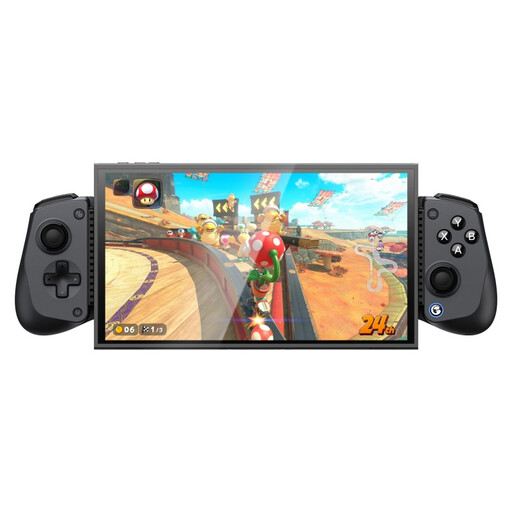 Image unavailable
A phone controller to consider if you’re looking for mobile controls. Check that the model suits your device and game.
The product name lists Bluetooth and compatibility with Switch 2, Android, iOS and PC.
 Image unavailable
A model to consider if you want different connection modes for Xbox, PC or mobile. Check which mode is right for your device.
The product name lists Xbox Series X|S, Xbox One, PC, Android and Steam.
No, support varies by game. The Steam page for Disco Elysium – The Final Cut lists full controller support for Xbox and PlayStation controllers. With a suitable setup, Steam Input can also map keyboard and mouse actions to controller inputs. Check the listing and controls for your specific game.
First, check whether the game supports controller input directly. If you use Steam Input, map the actions you use most often, then test the menus and any text input before starting a long session.
The 8BitDo Ultimate 2C Wireless specifications list a 2.4 GHz adapter or wired connection for Windows, and Bluetooth for Android. On Windows, use the connection mode specified for this model.
For online purchases in the Netherlands, you’ll often have a 14-day cooling-off period; check whether the terms apply to your purchase. If a product doesn’t conform to the agreement, the Dutch government advises contacting the seller to resolve the issue. This is separate from any manufacturer’s warranty.