
Vandaag of morgen in huis

Kwaliteit gegarandeerd

Welkomstaanbiedingen ontgrendelen: GRATIS bezorging | Tot 80% korting | Gratis 30 dagen JoyPlus-proefperiode
Download de app
An Insta360 Link 2 4K webcam is a great option for people working from home, streamers and professionals who want a sharper picture than a standard laptop camera can provide. But “4K” alone doesn’t tell you everything. A webcam may have a high resolution, but still disappoint in a dark home office, with poor autofocus or underwhelming software.
So, when buying a 4K webcam for PC and Mac, don’t just look at the image resolution. The sensor, autofocus, microphone, compatibility and framing features all affect how convenient it is to use in practice.
4K means an image resolution of 3840 × 2160 pixels. This delivers more detail, but video services such as Zoom and Teams, along with some streaming platforms, may limit the final quality. 4K also puts greater demands on your USB connection, computer and internet connection.
Check whether your software supports 4K input and whether your computer can process the webcam feed without lag. For simple video calls, 1080p may be enough. For recording, presenting or streaming, 4K is more appealing because you can crop the image later without immediately losing a lot of detail.
A webcam with AI tracking or automatic framing can try to keep someone in the picture. This is useful if you move around while presenting, but how well it works depends on the software, lighting and distance from the camera.
Also check whether you can turn the feature off. For a meeting where you’ll be sitting still, you may prefer a fixed view without constant zooming or adjustments.
A webcam with noise reduction may, according to its product description, try to reduce background noise. That doesn’t mean every sound will disappear, or that the webcam will perform as well in a busy room as a separate microphone.
Consider the number of microphones, the position of your desk and the room’s acoustics. A quiet space and a microphone close to the speaker still matter.
The sensor determines how much light the camera can process. According to the product specifications, the Insta360 Link 2 uses a 1/2-inch sensor. A larger sensor can help capture more light information in certain conditions, but the final result also depends on the lens, software and lighting.
A webcam with HDR tries to balance the light and dark areas of a scene more effectively. This can be useful if you’re sitting in front of a window. However, HDR is no substitute for a well-positioned light: avoid having a bright light source directly behind you where possible.
The Link 2 features Phase Detection Auto Focus (PDAF). Autofocus is especially useful if you switch between showing your face, documents and objects on your desk. When buying, also check the available resolutions and frame rates. The product specifications include 1080p at 60 fps; not every mode supports the same video encoding.
For a webcam for gaming or streaming, a higher frame rate at 1080p may look smoother than 4K at a lower fps. For business video calls, stable focus, clear audio and reliable software are usually the priorities.
According to the specifications, the Insta360 Link 2 has a fixed field of view of 79.5° DFOV and 67° HFOV. This is worth considering if you’ll be the only person at your desk. If you need to fit several people in the frame, check in advance that the field of view is wide enough.
Position the webcam roughly at eye level, directly in front of you. A camera placed too low can create an unflattering angle, while positioning it too high can make eye contact harder. Also check that your monitor, laptop or stand can hold the camera securely.
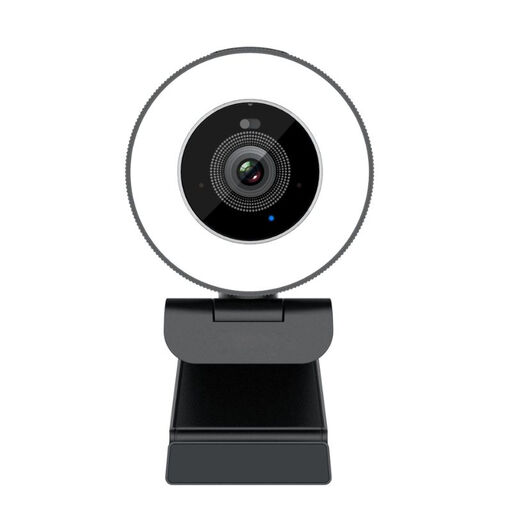
Why it suits this user type: This 4K webcam is designed for everyday video calls and, according to its product name, features autofocus, built-in dual microphones and a privacy cover.
The listed autofocus feature is a reason to look beyond resolution alone. The privacy cover also gives you a physical way to cover the lens when the camera isn’t in use.
4K UHD, autofocus, built-in dual microphones and a privacy cover, according to the product information.
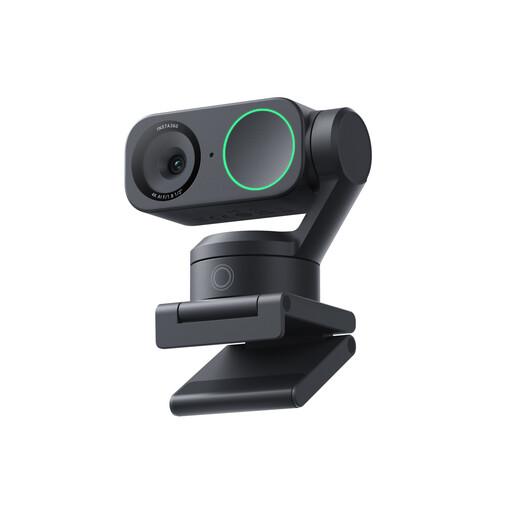
Why it suits this user type: The combination of 4K, a 1/2-inch sensor, AI tracking, automatic framing, HDR and PDAF autofocus makes this a good fit for professional video calls and presentations.
The specifications clearly state which sensor, field of view and focusing method the camera uses. This makes it easier to compare with other models than if you were relying on the term 4K alone.
4K video, HDR, PDAF autofocus, AI tracking, automatic framing and a microphone with AI noise reduction, according to the product information.
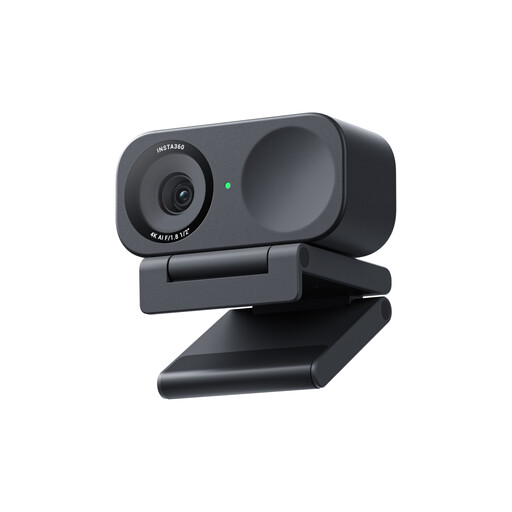
Why it suits this user type: This model is designed for streamers, content creators and users who want to use DeskView, Whiteboard Mode, portrait mode and smartphone or gesture controls.
The product specifications list more than just 4K: they also include PDAF autofocus, HDR, automatic framing and a physical privacy switch. However, check in advance that your computer doesn’t use an ARM-based Windows system.
4K, HDR, automatic framing, DeskView, Whiteboard Mode, 4K portrait mode and gesture or smartphone controls.
We’ve put together a complete, up-to-date list of products that meet these strict selection criteria and the applicable European safety regulations.
Use this checklist when setting up your webcam for the first time:
Also check software compatibility. The Link 2C product information lists support for services including Microsoft Teams, Zoom and Twitch, but doesn’t mention compatibility with ARM-based Windows systems or Windows Hello facial recognition.
According to the product information, the webcam is designed for PC and Mac and is compatible with Zoom. In practice, you’ll still need to select the camera in Zoom’s video settings after connecting it. Also check that your operating system and the Link Controller software are supported.
Not always. For everyday one-to-one calls, 1080p may be enough. A 4K webcam is especially useful for recording, streaming, presentations, cropping your footage and situations where you want to retain more detail. Your internet connection and the video service you use will still affect the final image quality.
A webcam doesn’t have a fixed lifespan. Keep the lens free from dust, don’t pull the cable out of the port while it’s under tension, and position the device securely on your monitor. If you use it intensively, check for firmware and software updates regularly. The statutory guarantee and your consumer rights apply in accordance with the terms relevant to your purchase.
