
Vandaag of morgen in huis

Kwaliteit gegarandeerd

Welkomstaanbiedingen ontgrendelen: GRATIS bezorging | Tot 80% korting | Gratis 30 dagen JoyPlus-proefperiode
Download de app
Would you like to create smoother videos with your iPhone or Android phone while travelling, vlogging, livestreaming or recording family events? Then an Insta360 Flow 2 smartphone gimbal may seem appealing thanks to features such as AI tracking, a built-in tripod and a selfie stick. However, not every smartphone stabiliser is suitable for every phone or situation.
Before buying, pay particular attention to three common pitfalls:
The Insta360 Flow 2 is presented in the product description as a foldable AI smartphone gimbal for iPhone and Android. According to Insta360’s product description, the model includes features such as a 3-axis gimbal, automatic subject tracking, multi-person tracking, active zoom tracking, gesture control, a built-in tripod and an extendable selfie stick. Always check the current specifications of the selected version and your phone model before ordering.
A gimbal must hold your phone securely without pressing any buttons or blocking the camera. Therefore, check:
The product description mentions active zoom tracking of up to 15x for certain iPhone Pro and Pro Max models from the iPhone 12 through the iPhone 16 series. This is not a general guarantee for every iPhone or Android phone. Treat it as a model-specific feature and check the compatibility list.
A 3-axis gimbal corrects movement across multiple directions. This can help when walking, panning and filming handheld. However, a gimbal does not replace careful walking technique: rapid arm movements, strong wind and a heavy accessory can still affect the result.
Also consider the total weight of your setup. A phone case, light or microphone all contribute to the load. Separate phone stands often have their own limit. The Ulanzi MT88, for example, has a stated maximum load capacity of 500 grams and, according to the safety information, is intended for smartphones and action cameras—not heavy mirrorless or DSLR cameras.
For travel and vlogging, a foldable phone gimbal is practical, but check how long you can realistically film. The Flow 2 product description lists battery life of up to approximately 10 hours as part of the product information. Elsewhere in the same information, different figures are given for continuous recording. Therefore, check the current manual and product specifications for the version you are buying.
Also consider:
A gimbal is not automatically waterproof. Do not use a non-waterproof model in the rain or during water sports. The operating temperature stated in the product information ranges from -20 to 40°C; prolonged exposure to heat, sand or moisture can still cause problems.
The choices below are based on the listed features, materials, compatibility and safety information. Brand claims regarding tracking or image quality are presented as information from the product description, not as independently verified results.
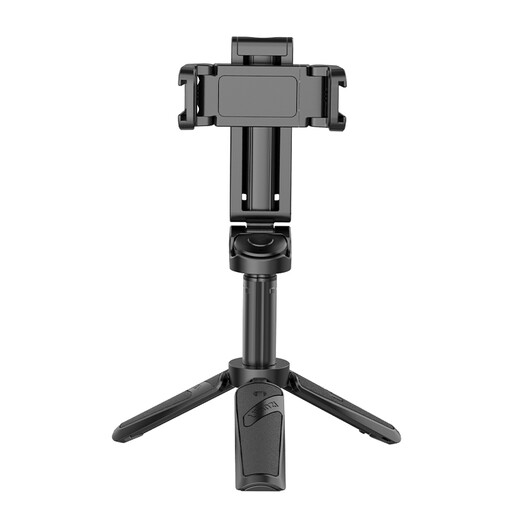
Why This Fits Their Persona: A simple 3-in-1 solution for anyone who wants to try hands-free filming without committing to a full AI gimbal straight away.
The phone holder, tripod and remote control are clearly listed as separate functions. However, pay attention to stability when fully extended and note that the Bluetooth remote control is not waterproof.
Bluetooth remote control, extendable selfie stick and mini tripod; suitable for iPhone and Android according to the product name.
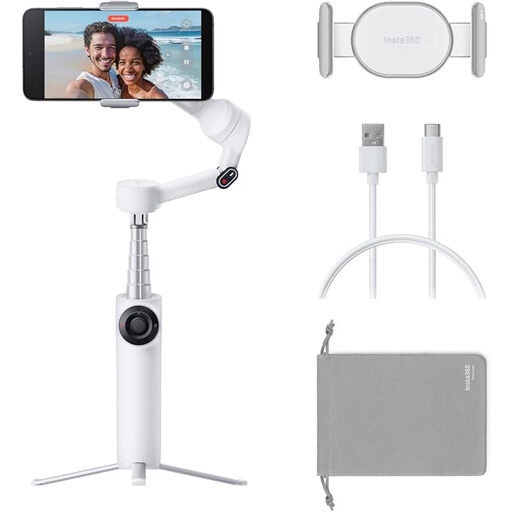
Why This Fits Their Persona: For vloggers, influencers and families who want tracking, composition assistance and hands-free control in one foldable device.
The product description mentions multi-person tracking, gesture control, a built-in tripod and a remote-control function. However, check which features are available through the app and on your phone.
3-axis stabilisation, built-in tripod and selfie stick; the product description also mentions teleprompter and power-bank functionality.
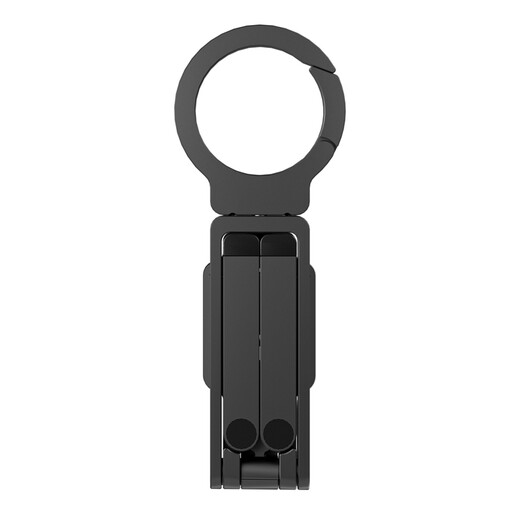
Why This Fits Their Persona: A compact choice for iPhone users with MagSafe who want to switch quickly between handheld filming, tabletop use and selfie shooting.
Compatibility with MagSafe and an optional magnetic ring for Android are listed. Check that the ring fits securely, and do not use the holder beyond its stated load capacity.
Approximately 108 grams, foldable design, 180° adjustable head and support for Arca-Swiss and 1/4-inch mounting.
Browse a current selection of mobile stands and accessories based on compatibility, intended use and safety information.
According to the product description, the Flow 2 is designed for iPhone and Android. The availability of features such as active zoom tracking, multi-person tracking and app-based control may vary by phone model. Therefore, check both your model and the required app version before buying.
Not necessarily. The Flow 2 product description mentions a built-in tripod and selfie stick. A separate stand can still be useful if you use a heavier setup, need a fixed angle or want to position multiple devices.
Its lifespan depends on charging habits, hinges, drops, moisture and transport. Fold the gimbal carefully, do not force its pivot points and store it in a dry place. Allow a warm battery to cool down before charging it again, and follow the manufacturer’s safety instructions.
