
Vandaag of morgen in huis

Kwaliteit gegarandeerd

Welkomstaanbiedingen ontgrendelen: GRATIS bezorging | Tot 80% korting | Gratis 30 dagen JoyPlus-proefperiode
Download de app
A smartphone gimbal can add a lot to your videos, but not every model is equally practical for everyday use. A gimbal that is awkward to fold, fails to balance your phone properly or only tracks under ideal conditions can quickly end up unused in a cupboard.
For vloggers, travellers, families and small content teams, the choice is therefore not just about having lots of features. Focus especially on the elements you use during every shoot: stabilisation, tracking, compatibility and battery life.
An AI smartphone gimbal sounds appealing, but tracking depends on the app, smartphone and shooting conditions. Dark scenes, busy backgrounds or multiple people can affect recognition.
The Insta360 Flow 2 lists features including multi-person tracking, gesture control and pet tracking. According to the product description, the model can follow movement at up to 15x zoom. This claim comes from Insta360’s product information and should not be taken as a guarantee for every phone, app or situation. Therefore, check in advance whether your iPhone or Android model supports the features you want.
A selfie stick with tripod saves space in your bag, but stability remains important. On a smooth table, uneven ground or outdoors in windy conditions, a compact tripod may be less stable than a separate video tripod.
Look at how the legs unfold and only use the tripod on a level surface. A built-in tripod is useful for group photos, presentations or a fixed vlog setup, but do not place your smartphone somewhere it could easily be knocked over.
Manufacturers sometimes state battery life based on mixed usage, while continuous recording, tracking and wireless connections require more energy. The Flow 2’s product information states a battery life of up to 10 hours. The technical specifications also mention approximately 60 to 120 minutes of continuous recording, depending on the model and usage. Treat these as product specifications to check before purchase, rather than as a universal recording time.
For longer days travelling, take a USB-C cable or power bank with you. This helps prevent a situation where your gimbal is still working but your smartphone has run out of battery.
A 3-axis smartphone stabiliser corrects movement in three directions. This helps when walking, panning and creating smoother camera movements. Stabilisation does not automatically make a video good: a steady walking style, sufficient light and good composition remain important.
The Flow 2 uses a 3-axis gimbal construction. The product description also mentions a built-in 9-point composition grid based on the golden ratio. This can help align a subject, but it does not replace checking the frame yourself.
A gimbal for iPhone and Android must do more than physically fit. Also check:
The product information states support for iPhone and Android, but specifically lists iPhone models from certain generations for some Pro and Pro Max features. Check Insta360’s current compatibility list before placing your order.
A foldable gimbal is particularly useful if you travel frequently. Consider its folded dimensions, weight and how long it takes to attach your phone. The stated product specifications give a weight of approximately 100 to 200 grams, depending on the model.
Features such as hand gestures, using a second smartphone as a remote control and a built-in selfie stick can also be practical. According to the product description, you can activate tracking and recording with a hand gesture. Only use these features where it is safe to do so, for example not while crossing the road or cycling.
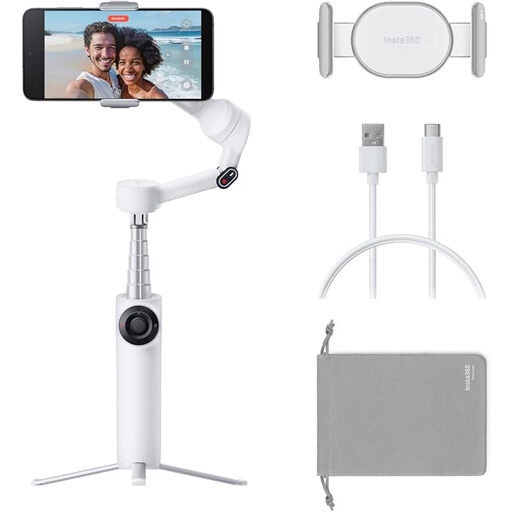
Why it suits this profile: The combination of a foldable body, built-in tripod and selfie stick reduces the number of extra accessories you need. This is practical for beginners who want to get started with a single device.
The product description explicitly mentions tracking, a tripod and a selfie stick. However, check compatibility and the actual continuous recording time for your phone.
3-axis stabilisation, multi-person tracking, gesture control and a foldable design for iPhone and Android.
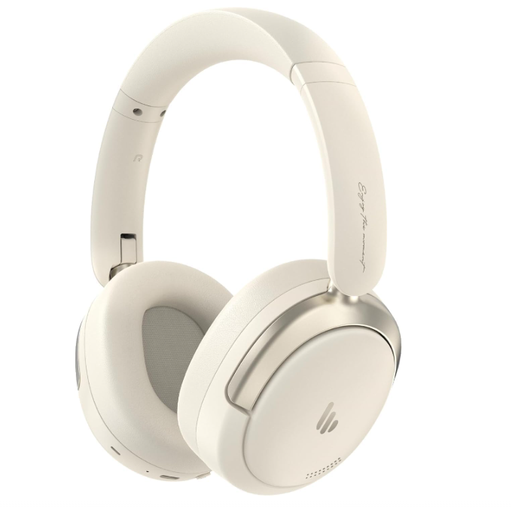
Why it suits this profile: Anyone using a smartphone gimbal for vlogging often also needs a practical audio solution for editing, monitoring or conversations on the go.
The headset is foldable and has an integrated microphone. Check the connection and usage conditions when pairing it with your smartphone.
Bluetooth 5.4, hybrid active noise cancellation according to the product description, 45 hours of stated playback time and USB-C fast charging.
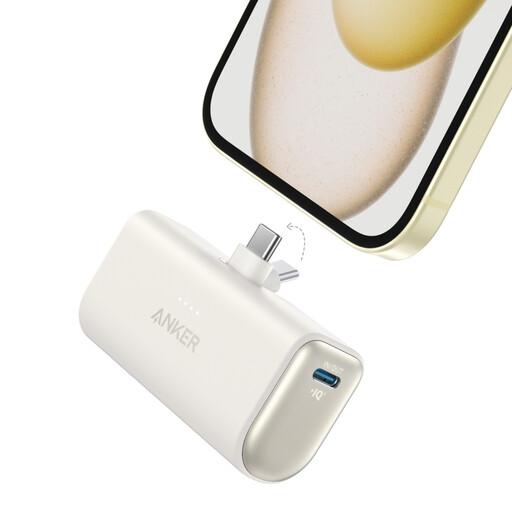
Why it suits this profile: For travel, events and long shooting days, a compact power source is useful alongside a smartphone gimbal. The power bank is designed to charge devices, not to replace the gimbal battery.
The built-in USB-C connector and compact size reduce the need for loose cables. Check in advance which port your phone or gimbal requires.
Stated capacity of 5.002 mAh, maximum output of approximately 22,7 W and a foldable USB-C connector.
We have put together a complete, up-to-date list of products that fully meet these strict selection criteria and the applicable European safety regulations.
When using it outdoors, be mindful of rain and moisture. The stated water-resistance information only applies to selected models and may require a special housing. With the Flow 2, therefore, do not automatically assume that it is waterproof.
No. Physical fit, weight, operating system and app support together determine whether the features work properly. Check Insta360’s compatibility list and pay particular attention to features listed only for specific iPhone models.
The combination of 3-axis stabilisation, tracking, selfie stick and tripod is designed for filming independently. For good vlog audio, you may need a separate microphone or headset. Also check that your chosen phone has enough storage and battery capacity during recording.
The product information states a battery life of up to 10 hours, but also mentions approximately 60 to 120 minutes of continuous recording depending on the model and usage. Tracking, brightness, wireless connections and the weight of your phone affect power consumption. For longer recordings, take a suitable USB-C power source with you.
