
Vandaag of morgen in huis

Kwaliteit gegarandeerd

Welkomstaanbiedingen ontgrendelen: GRATIS bezorging | Tot 80% korting | Gratis 30 dagen JoyPlus-proefperiode
Download de app
A smartphone gimbal can make your videos smoother, but not every Insta360 Flow 2 gimbal is right for every user. If you focus mainly on AI tracking or a low promotional price, you could overlook important details. These include limited compatibility, features that only work with certain phones, and a gimbal that turns out to be too heavy or cumbersome for everyday use.
The Insta360 Flow 2 is designed for vloggers, travellers, families and social media users who want to film with an iPhone or Android smartphone without carrying a separate tripod or selfie stick. Read on to find out which specifications to check before you order and which version best suits your needs.
An AI gimbal for smartphones can be useful when you’re filming by yourself. However, tracking varies depending on the app, phone model and software version. According to the product description, the Flow 2 supports tracking of people, multiple people and pets, among other things. That doesn’t automatically mean every feature is available in every camera app.
Before you buy, check:
A gimbal with a built-in tripod is handy for a quick shot on a table, cabinet or flat floor. Uneven surfaces, windy conditions and busy places call for extra stability. The tripod makes the gimbal more versatile, but it’s still a compact accessory.
That’s usually an advantage when travelling: you don’t have to bring a separate phone holder, tripod and selfie stick. For longer outdoor shoots, it’s worth considering the surface you’ll be filming on and the weight of your smartphone before making your choice.
According to the product description, the Flow 2 has a battery life of up to 10 hours. Actual battery life depends on tracking, Bluetooth, app use, charging your phone and the conditions. If you’re filming all day, it’s a good idea to charge the gimbal beforehand and bring a power bank.
Remember to charge it safely, too: let the device cool down after use, charge it in a well-ventilated place and don’t use it if the casing or battery is damaged.
The Flow 2 uses a three-axis gimbal to compensate for movement while walking, turning and filming. This is particularly useful if you’re looking for a gimbal for vlogging or travel videos. Stabilisation makes footage steadier, but it won’t remove every bump. A steady walking pace and a well-balanced phone still matter.
Also check that your smartphone fits securely in the clamp. A very heavy phone case, an extra lens or a magnetic accessory can affect the balance and range of movement.
According to the product information, the Insta360 Flow 2 smartphone gimbal offers active zoom tracking up to 15x for certain iPhone 12 to iPhone 16 Pro and Pro Max models. So you shouldn’t automatically expect this feature to work with every Android phone or every standard Flow 2 version.
For most users, standard subject tracking, multi-person tracking and gesture control matter more than a high zoom level. Keep some distance from your subject and test that tracking works in your recording app before you start filming.
A foldable gimbal is easier to carry in a rucksack or hand luggage. According to the product description, the Flow 2 combines a phone stabiliser, smartphone selfie stick, tripod, remote control and power bank function in one device.
That saves space, but do check:
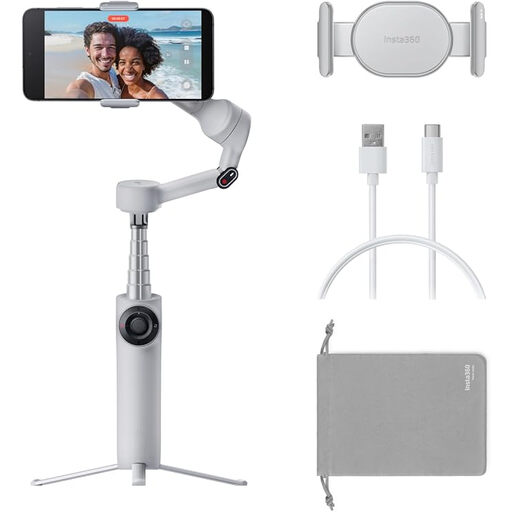
Why it suits this user: An accessible choice for anyone just starting out with filming who wants to combine a phone holder, tripod and selfie stick in one device.
The product description lists the key features separately: three-axis stabilisation, tracking, a built-in tripod and up to 10 hours of battery life. Be sure to check app and phone compatibility beforehand.
Foldable design; integrated tripod and selfie stick; supports multi-person tracking according to the product description.
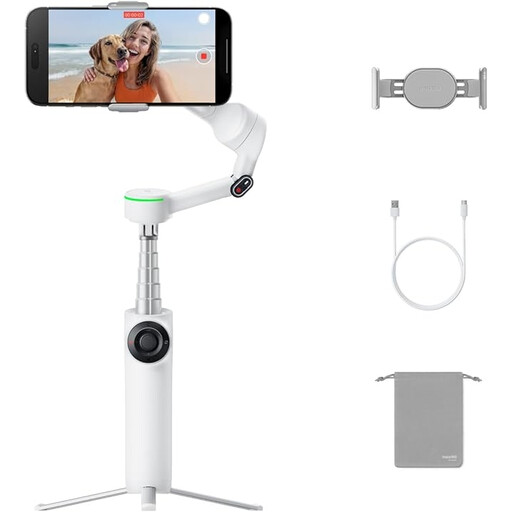
Why it suits this user: A good fit for creators looking for extra tracking options and wider app integration, provided their iPhone and apps are supported.
The product information refers to tracking in many apps and Apple DockKit. Check current support for your iPhone before choosing this version.
Supports 360° pan tracking according to the product description; the built-in tripod and selfie stick are included too.
Why it suits this user: The foldable design, tripod, remote control and battery life make it a practical choice for travel videos, family footage and regular use.
According to the product description, you don’t need to bring a separate tripod or selfie stick. Remember to plan when to recharge it and protect the gimbal from water, sand and hard knocks.
Up to 10 hours of stated battery life; multi-person tracking and gesture control according to the product description.
We’ve put together a complete, up-to-date list of products that meet these strict selection criteria and the applicable European safety regulations.
According to the product information, the Flow 2 is designed for iPhone and Android. The exact features available may vary depending on the model, operating system and app. Before you buy, check Insta360’s compatibility list, particularly if you want to use tracking, gesture control or the remote control.
Yes, a foldable gimbal can be handy for travel because the tripod and selfie stick are built in. Bear in mind the extra weight in your luggage, and store the device somewhere dry and protected. The gimbal isn’t automatically waterproof, so avoid rain, seawater and damp conditions unless the manufacturer explicitly says otherwise for your version.
Its lifespan depends on how you charge, transport and use it. Don’t charge the battery straight after intensive use while the device is still warm. Avoid storing the gimbal completely flat for long periods, take care not to drop it and clean it with a soft, dry cloth. This will help reduce wear to the clamp, hinges and motors.
