
Vandaag of morgen in huis

Kwaliteit gegarandeerd

Welkomstaanbiedingen ontgrendelen: GRATIS bezorging | Tot 80% korting | Gratis 30 dagen JoyPlus-proefperiode
Download de app
A smartphone gimbal can reduce camera movement, but not every offer will suit your phone or filming style. According to the product description, the Insta360 Flow 2 gimbal combines a 3-axis stabiliser with tracking, a selfie stick and a built-in tripod. That sounds versatile, but there are a few points to consider before placing your order.
This buying guide helps content creators, vloggers, travellers and families distinguish marketing claims from practical product specifications.
A gimbal with tracking follows a subject using software and the smartphone camera. According to Insta360’s product description, the Flow 2 supports multi-person tracking and pet tracking, among other features. Active zoom tracking up to 15x is also mentioned. However, these functions may depend on the iPhone model being used, the app and the recording settings.
For some tracking functions, the product information refers to iPhone Pro and Pro Max models within a specific compatibility range. Before buying, check:
An AI gimbal for smartphones is therefore not automatically suitable for every camera app or device.
The product description states a battery life of up to 10 hours. Actual usage time may vary depending on tracking, Bluetooth, brightness, remote control use and charging your phone through the gimbal. If you are out all day, it may therefore be worth bringing a separate power bank.
Also consider the charging method. Check whether the supplied cable and your phone use the same connection. This prevents you from having to buy an additional cable while you are out and about.
A 3-axis gimbal helps correct pan, tilt and roll movements. This generally makes walking footage smoother than filming handheld. However, the gimbal cannot prevent jolts if you run, bump into an object or balance the phone incorrectly.
Also consider the overall combination of phone, case and any accessories. A heavy phone can put more strain on the motors and affect battery life. Temporarily remove a thick case if the phone does not sit securely or straight in the clamp.
A 3-axis gimbal corrects movement across three axes. This is particularly useful for walking vlogs, travel videos, family recordings and presentations. Do not just look at the number of axes; also check the adjustment options. Can the phone be used horizontally and vertically, and does the holder remain securely fastened?
A gimbal with tracking is useful when you are filming on your own. The Insta360 Flow 2 features gesture control, with the product description stating that a hand gesture can activate tracking or recording. A second phone can also be used as a remote control. This is practical for group photos, dance videos or presentations from a distance.
However, check whether both phones can connect and whether you need an account or app for certain functions.
A foldable gimbal takes up less space when travelling. A built-in tripod means you do not need to bring a separate tripod. Consider the surface you place it on: a small built-in tripod is convenient on a table or floor, but may be less stable in windy conditions or on an uneven surface.
The product information describes the Flow 2 as a combination of gimbal, selfie stick, tripod and power bank. When your order arrives, check which accessories are actually included in the package and read the instructions before putting the gimbal under prolonged strain.
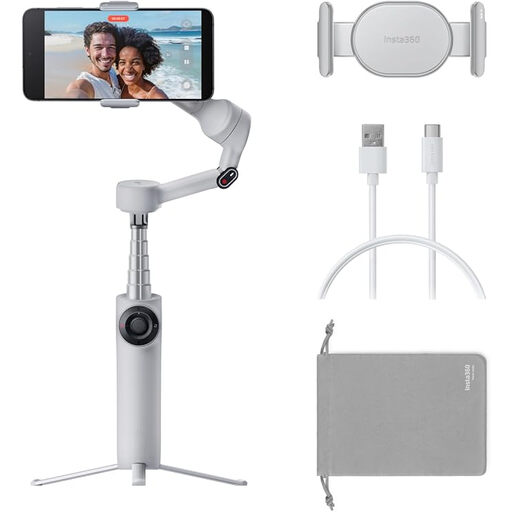
Why it suits this profile: This foldable smartphone gimbal combines several functions in one device: a 3-axis stabiliser, selfie stick and built-in tripod for iPhone and Android.
The functions are clearly listed in the product description. Even so, check compatibility with your phone and app before ordering.
Foldable design, built-in tripod, selfie stick, gesture control and, according to the product description, up to 10 hours of battery life.
Why it suits this profile: Content creators and vloggers get features for filming independently, recording groups and tracking moving subjects.
The product information distinguishes between multi-person tracking, pet tracking and active zoom tracking. Availability may vary by phone model.
3-axis stabilisation, gesture control and the option to use a second phone as a remote control.
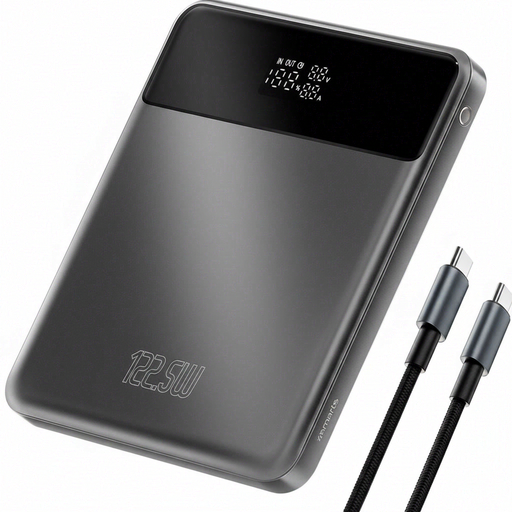
Why it suits this profile: Travellers and event videographers can bring an additional power source when using their gimbal and smartphone for extended periods.
You are less dependent on the gimbal’s internal battery life. However, check which charging cable and charging protocols your devices require.
20,000 mAh capacity, LCD screen, pass-through charging and support for Power Delivery and Qualcomm Quick Charge, according to the product description.
We have compiled a complete, up-to-date list of products that fully meet these strict selection criteria and the applicable European safety regulations.
According to the product description, the gimbal is designed for iPhone and Android. The functions available may vary by device, operating system and app. Check the latest compatibility list and remove a thick phone case if it prevents the clamp from closing properly.
That is one of the device’s key intended uses. According to Insta360’s own product information, the Flow 2 supports features including gesture control, multi-person tracking and pet tracking. How well these work in practice depends on lighting, distance, movement and smartphone compatibility.
The product description states a battery life of up to 10 hours. This is not a fixed usage time for every situation. Tracking, remote control, charging the phone and frequent movement can increase power consumption. For long days, a suitable power bank is a sensible addition.
