
Vandaag of morgen in huis

Kwaliteit gegarandeerd

Welkomstaanbiedingen ontgrendelen: GRATIS bezorging | Tot 80% korting | Gratis 30 dagen JoyPlus-proefperiode
Download de app
At first glance, the Insta360 Flow 2 looks like a simple phone holder, but the difference between a handy smartphone gimbal and a purchase you regret often comes down to the details. Think about compatibility, your phone’s weight and how tracking works in practice. Features such as a built-in tripod or selfie stick may sound appealing, but they’re only useful if they suit the way you film.
This buying guide explains what to look out for before buying an Insta360 Flow 2 gimbal. Then you’ll find options for different types of users, from first-time video makers to vloggers who use their smartphones extensively.
According to Insta360’s product information, the Flow 2 supports automatic subject tracking, multi-person tracking, gesture control and pet tracking, among other features. That doesn’t automatically mean every feature works in exactly the same way with every iPhone or Android phone.
So, check:
Always check the manufacturer’s compatibility list before buying. If a thick case prevents the clamp from gripping securely, remove it.
A foldable gimbal with a built-in tripod is handy for travel, presentations and group photos. However, its stability still depends on the surface, how far it’s extended and the weight of your smartphone. A compact gimbal can topple over on an uneven table or in windy conditions.
Use the tripod on a flat surface and check that your phone is securely attached before filming. For outdoor filming in strong winds, a separate, low-profile tripod may be a better choice.
The Insta360 Flow 2’s product information gives a battery life of up to around 10 hours. This is the stated operating time; tracking, Bluetooth, screen use and charging your phone can all affect the actual result.
For a full day of filming, it’s a good idea to:
A 3-axis gimbal counteracts movement across multiple axes. This can make footage look steadier as you walk than if you simply hold your smartphone in your hand. Bear in mind, though, that a gimbal isn’t a substitute for good walking technique. Avoid sudden movements and make sure your phone is well balanced in the clamp.
Check that your phone, including its case, falls within the supported range. A heavy phone on one side can put extra strain on the motors and make the controls less responsive. With a gimbal for iPhone and Android, software compatibility matters, but so does the physical fit of the phone holder.
Features such as automatic subject tracking and gesture control are handy for vlogging, travel and family videos. According to Insta360’s own product information, the Flow 2 can also track multiple people and pets. Treat this as a useful tool, not a guarantee that your subject will always stay in frame. Obstacles, low light and sudden changes in direction can affect tracking.
Using a second phone as a remote control can be useful for presentations or group videos. Check in advance that both devices can connect and that the required app features are available.
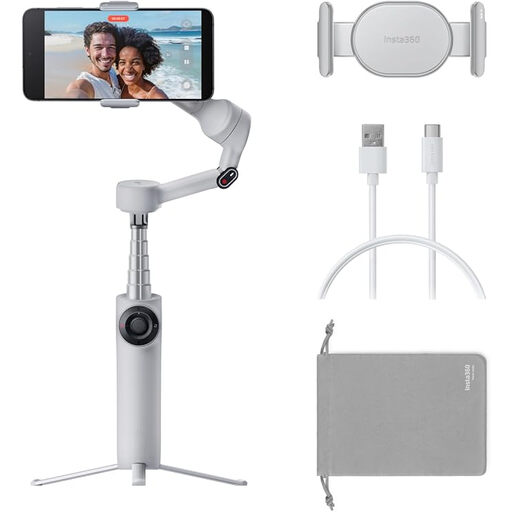
Why it suits this type of user: The foldable design, integrated tripod and selfie stick make this an easy option for smartphone users who want to film at home, on the go or on holiday.
The product description clearly lists the key features: three-axis stabilisation, a built-in tripod and control via a second phone. Be sure to check compatibility with your device.
Foldable design, stated battery life of up to around 10 hours, and support for tracking people and pets according to Insta360.
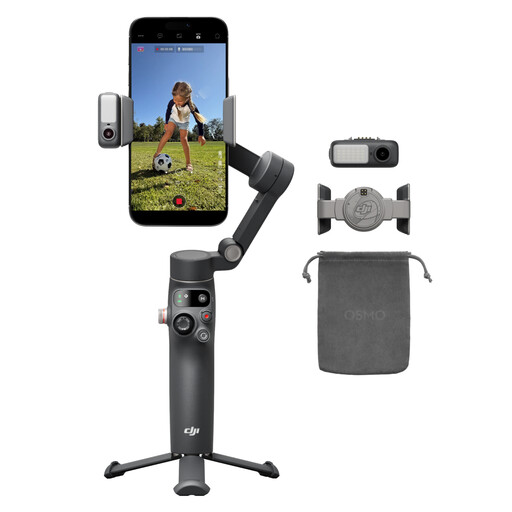
Why it suits this type of user: This option is aimed at users who value extra features for longer recordings, presentations and social media content.
The product details give the weight including the clamp and module. This makes it easier to compare its portability with your own needs before buying.
Three-axis stabilisation, an integrated extension rod extending up to 215 mm, and stated operating time of up to 10 hours according to the product information.
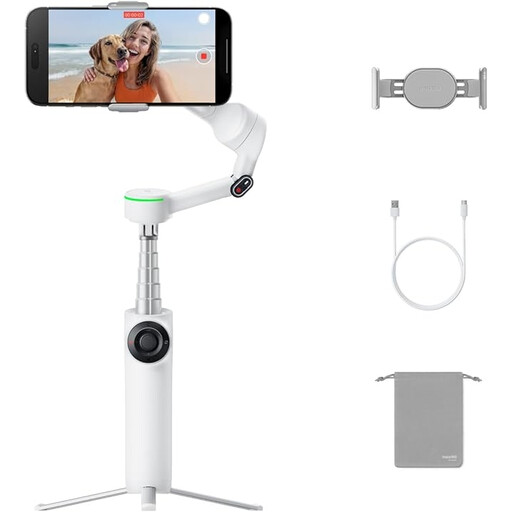
Why it suits this type of user: The Pro bundle is worth considering if you’re looking for tracking across multiple apps, Apple DockKit and more advanced controls.
Before buying, check that the app and DockKit features listed are available with your phone and apps. A Pro model isn’t automatically necessary for simple holiday videos.
Supports tracking in more than 200 apps according to the product description, plus a built-in tripod, selfie stick and remote control.
We’ve put together a complete, up-to-date list of products that meet these strict selection criteria and comply with current European safety regulations.
The product information states that it supports iPhone and Android. Available tracking and app features may vary by model, operating system and app. So, check the latest compatibility information before buying.
It can be, particularly thanks to its foldable design, built-in selfie stick and tripod. When travelling, remember to factor in the combined weight of the gimbal, phone and case. Take a charging cable with you on longer days, too.
Insta360 states that the battery lasts for up to around 10 hours. Actual battery life depends on tracking, Bluetooth, app use and whether the smartphone is being powered. Treat the stated time as a guide, not a guaranteed filming time.
