
Producing regular print runs
You print programmes for several performances on a regular basis and want to match ink use and paper feeding to your double-sided printing needs.


For larger, regular print runs, a refillable ink tank printer with automatic double-sided printing is a sensible choice, as long as the paper is suitable for this feature. For small, irregular jobs, a cartridge-based inkjet printer may be a better fit. Start by deciding on the size and type of paper: borderless printing is not the same as automatic double-sided printing on cover stock.
You print programmes for several performances on a regular basis and want to match ink use and paper feeding to your double-sided printing needs.
You want the inside pages and cover to line up properly when folded. Your choice of paper and how both sides are printed are important here.
You work with photos or illustrations and want to check whether borderless A4 printing and your chosen paper are suitable for the cover.
Best for: regular colour print runs and inside pages on paper suitable for double-sided printing.
Bear in mind: automatic duplex does not mean you can automatically print on every type of heavy or glossy cover paper.
Best for: image-rich designs where a borderless A4 cover matters and you can turn the pages yourself.
Bear in mind: when printing double-sided manually, keep a close eye on the paper orientation and page order.
Best for: occasional, smaller print runs where the printer is not used constantly for production work.
Bear in mind: automatic duplex and borderless printing are only available under the paper and size conditions specified for the particular model.
| What to consider | What should you check? | Who should pay particular attention? |
|---|---|---|
| Ink for regular print runs | Estimate the number of pages and print runs. Compare the type of ink and expected usage by making a complete test print of your own design. | If I’m printing for several performances, I want to know how much ink my colourful programmes will use. Around 36% of consumers are mainly concerned about regular print runs. |
| Double-sided printing and paper | Check the paper sizes, paper types and automatic duplex requirements for each model. First, make one test booklet using your chosen paper. | For a folded programme, I want the front and back to line up properly when folded. Around 29% of consumers prioritise booklet layout and paper type. |
| Image-rich or borderless cover | Check whether the size you want can be printed borderlessly and whether the cover paper is suitable for duplex printing. | If photos or illustrations are central to the cover, I want to check the design on my own paper. Around 21% of consumers put an image-rich cover first. |
| Occasional use | Choose a printer to suit how often you expect to print, and check the maintenance instructions for long gaps between jobs. | If I only print occasionally, I want to factor in maintenance when the printer has been left unused for a long time. Around 14% of consumers list occasional use as their main priority. |
A model may support borderless A4 printing but only offer manual duplex. Automatic duplex may also be limited to plain paper and certain sizes.
Check the size, paper type and duplex specifications separately before choosing your design and paper.
A failed test print can use extra paper; turning sheets over manually also means paying attention to the feed direction and page order.
Manufacturer yield figures are not a measure of how much ink your programme will use. Colour coverage and the number of pages can vary from one design to another.
Print a complete test copy of your own file and use it to estimate the ink needed for your print run.
According to the Dutch Consumers’ Association, an inkjet printer that is used infrequently can develop a clogged print head; cleaning cycles may use ink.
Take how often you will use it into account and follow the maintenance instructions for your chosen model.
The EcoTank ET-2950 is a refillable A4 ink tank printer with automatic duplex for regular printing.
The Smart Tank 7305 is a refillable ink tank printer with automatic duplex and an automatic document feeder.
The DCP-T780DW is an ink tank printer with features suited to regular, office-style print jobs.
The PIXMA G650 is designed for image-rich projects, while the PIXMA TS7750i offers automatic duplex under specific paper conditions.
These models are suited to regular colour print runs and smaller print jobs at home. For programmes, always check that the duplex function is compatible with the paper you want to use.
 No image available
An option for regular colour programmes on paper suitable for automatic double-sided printing.
The product description lists refillable ink, automatic double-sided printing, a 250-sheet paper tray and a 35-sheet automatic document feeder.
HP advises against automatic double-sided printing on glossy paper and photo paper.
 No image available
An option for small colour print jobs at home where printing, scanning and copying are useful together.
The product information lists A4, a 60-sheet paper feed, USB 2.0 and a print resolution of 4800 x 600DPI.
 No image available
A refillable ink tank option for regular colour printing on paper suitable for automatic double-sided printing.
The product information lists a 250-sheet paper capacity, automatic duplex, Wi-Fi, a resolution of 4800 x 1200DPI and a print speed of 37ppm.
 No image available
A refillable ink tank option for regular colour print runs, with automatic double-sided printing on suitable paper.
The product information lists a 250-sheet paper tray and automatic double-sided printing.
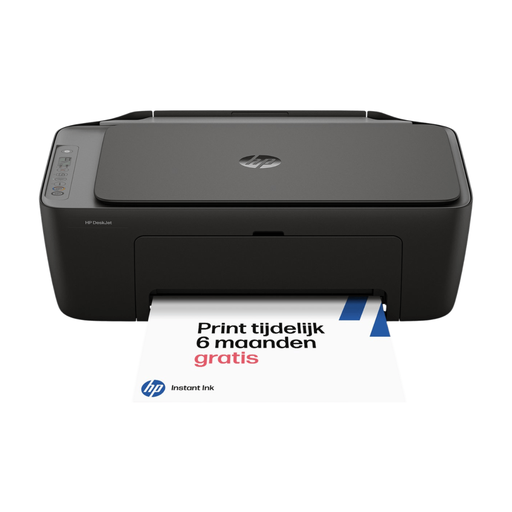 No image available
An option for occasional colour printing at home when you want wireless printing, scanning and copying.
The product information lists wireless operation and manual double-sided printing. For a folded programme, you’ll need to turn the paper over yourself and check the page order.
Only if the specific model supports automatic duplex with your chosen paper. Canon specifies automatic duplex on plain A4 paper for the PIXMA TS7750i; for the PIXMA G650, Canon lists manual duplex. Check the page order by making one test booklet.
Don’t assume so without checking. In its duplex instructions, HP advises against double-sided printing on glossy paper and photo paper. For other models, check the paper and duplex requirements for the exact model.
First, follow the model’s maintenance instructions and make a test print. According to the Dutch Consumers’ Association, infrequent use increases the risk of a clogged print head; a cleaning cycle may use ink.
Don’t assume that the private-copying exception allows this. According to the Dutch Government, a private copy made for personal use must not be distributed or made public. Ask the creator for permission before including protected photos or text in programmes you hand out.
When you buy from a business online, you generally have a 14-day cooling-off period, according to the Dutch Government. Check the terms of the specific purchase; purchases from private individuals are not covered by the same distance-selling rules.