Choose based on how often you print and whether staff need to print from different devices. Then compare the ink and paper handling of models suited to that usage. A cartridge printer may suit smaller print runs, while a tank printer is worth comparing for regular printing. An ADF is especially useful if you need to scan several completed forms one after another; if they contain personal data, you’ll also need appropriate procedures for handling them.
Who is this guide for?
Shared reception desk coordinator
You want several staff members to be able to print forms without having to switch computers or cables each time. So check the connections and controls on the exact model. The Consumentenbond includes ease of use in its printer tests.
Coordinator of regular print runs
You regularly print new batches and want to weigh the purchase price against ink consumption, paper handling and, if needed, double-sided printing. Compare running costs based on your own print volume, not just the stated page yield.
Handler of completed forms
You sometimes need to scan several forms and, if they contain personal data, want to prevent unauthorised access to paper documents or digital files. The Dutch Data Protection Authority stresses that organisations must protect personal data appropriately.
What should you consider when choosing?
Start with a cartridge printer without an ADF
A good fit if: you mainly print individual blank forms and rarely scan batches. According to Brother, the DCP-J1310DW has Wi-Fi, USB and automatic double-sided printing.
Consider: comparing the compatible cartridges and allowing for ink used in automatic cleaning if you print infrequently. The Consumentenbond highlights this as a consideration for inkjet printers.
Cartridge printer with an ADF
A good fit if: staff regularly scan or copy several forms in one go. Canon and Brother list a 20-sheet ADF for the PIXMA TR4755i and MFC-J4350DW respectively.
Consider: comparing the cartridges for the exact model too; an ADF does not automatically keep completed forms confidential.
Refillable ink tank with an ADF
A good fit if: you regularly print larger batches and scan multi-page forms. Epson lists refillable tanks and an ADF for the EcoTank ET-3950.
Consider: weighing the purchase price and bottled ink against your own print volume. Manufacturers’ savings claims don’t automatically predict costs in your workplace.
| What to consider |
What to look for when buying |
Who should give this more weight? |
| Printing from several workstations |
Check Wi-Fi and USB compatibility with the intended devices and network setup. |
I want to print from different workstations without having to keep switching cables. Around 29% of consumers put shared access first. |
| Cost of regular print runs |
Estimate your monthly print volume and compare the printer, refills and page yield on the same usage basis. |
If I regularly print new batches, I want to factor in ink costs rather than look at the printer alone. Around 22% of consumers prioritise the cost of regular print runs. |
| Confidentiality of completed forms |
Establish whether forms contain personal data and agree how they will be collected, stored and shared digitally. The Dutch Data Protection Authority requires personal data to be protected appropriately. |
I want to prevent unauthorised access to completed forms or scans. This is the top priority for around 21% of consumers. |
| Scanning or copying batches of forms |
Check the ADF capacity and whether double-sided scanning is supported. |
When I need to process several forms in one go, I want to know whether automatic feeding will help. Around 14% of consumers prioritise processing batches. |
| Infrequent and irregular printing |
Compare costs at your expected print frequency and allow for any ink used in cleaning. |
If the printer sometimes goes unused for weeks, I also want to account for ink that doesn’t end up on a form. This is a top priority for around 14% of consumers. |
Common purchasing mistakes
-
Comparing only the purchase price
Ink costs depend on how much you print. If you print infrequently, an inkjet printer may also use ink for automatic cleaning.
Compare the purchase price and compatible refills based on your expected usage. Don’t treat stated page yields as a guaranteed result for your workplace.
-
Confusing double-sided printing with double-sided scanning
Automatic double-sided printing doesn’t necessarily mean the printer can scan both sides automatically. This distinction can matter if completed forms are printed on both sides.
Check both features separately for the full model variant, and decide whether your forms need to be printed on both sides.
-
Assuming a shared printer protects privacy
If forms contain personal data, unattended printouts or scanned files could be accessed by unauthorised people. The Dutch Data Protection Authority says organisations must protect personal data appropriately.
Alongside choosing a device, agree how access, collecting printouts, storage and sharing scanned files will be managed.
-
Budgeting for refills without checking model-specific terms
HP states that the OfficeJet Pro 8122e has dynamic security that may block cartridges without a new or reused HP chip, including after firmware updates. This is a model-specific consideration, not a statement about all HP printers.
Check the cartridge terms for the exact printer before calculating your expected running costs.
Relevant printer brands to consider
Brother
The DCP-J1310DW is worth considering for printing, scanning and copying at a smaller workstation; the MFC-J4350DW adds an ADF. This description applies to the models mentioned.
- Brother lists Wi-Fi and automatic double-sided printing for both models.
- Brother lists a 20-sheet ADF for the MFC-J4350DW.
- These features don’t automatically apply to other Brother models or indicate the final cost per print.
Canon
The PIXMA TR4755i is a cartridge printer with an ADF; the refillable PIXMA G3590 is a separate tank option for those who mainly print and don’t need an ADF as a priority.
- Canon lists two FINE cartridges and a 20-sheet ADF for the TR4755i.
- Canon lists refillable tanks and a 100-sheet paper tray for the G3590.
- The G3590’s specifications are no reason to assume that this model also has an ADF.
Epson
The EcoTank ET-3950 is an ink tank model worth comparing when regular print runs go hand in hand with scanning multiple documents.
- Epson lists refillable tanks, an ADF and double-sided functions for this model.
- The manufacturer’s claimed ink savings and page yields depend on conditions and don’t determine costs for your workplace.
HP
The OfficeJet Pro 8122e is a cartridge option to assess for its workplace features and ink terms.
- The manufacturer describes the features available on this model and its cartridge terms.
- HP states that dynamic security may block cartridges without a new or reused HP chip, including after firmware updates. Check the terms for the exact model.
Printer and ink options at Joybuy
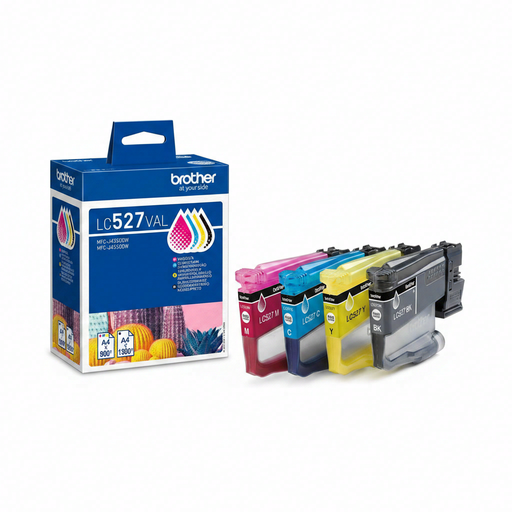
This selection includes inkjet printers for shared printing and one separate Brother LC527VAL cartridge multipack. Check that the cartridge in the pack is compatible with your exact printer model.
 No image available
HP Smart Tank 7305 wireless all-in-one colour printer
An option if printing from multiple devices and printing, scanning and copying are important to you.
Listed features include Wi-Fi, Wi-Fi Direct and automatic double-sided printing. The printer has a 250-sheet paper input capacity and a flatbed scanner; no ADF is listed.
Joybuy
 No image available
Canon PIXMA MG2556S A4 inkjet printer
An option if one computer will connect to the printer via USB and you need printing, scanning and copying.
The listed connection is USB 2.0. The paper input capacity is 60 sheets and the stated resolution is 4800 x 600 dpi.
Joybuy
 No image available
Epson WorkForce Pro WF-C5390DW A4 colour inkjet printer
An option for a shared workspace where network connectivity and automatic double-sided printing matter.
Wi-Fi and Ethernet are listed. The printer supports automatic double-sided printing and has a paper input capacity of up to 1,830 sheets.
Joybuy
 No image available
HP Smart Tank 7005 wireless all-in-one colour printer
An option if you need Wi-Fi, automatic double-sided printing, and printing, scanning and copying.
The listed paper input capacity is 250 sheets. The specifications don’t mention an ADF.
Joybuy
 No image available
Brother LC527VAL ink cartridge multipack
This is a cartridge multipack, not a printer. Before buying, check whether LC527VAL is compatible with your exact printer model.
Joybuy
Frequently asked questions
Do we need an ADF to print blank forms?
No. An ADF feeds documents in for scanning or copying; decide separately whether you need to digitise batches of completed forms. Canon and Brother list a 20-sheet ADF capacity for the PIXMA TR4755i and MFC-J4350DW.
What if the inkjet printer goes unused for weeks?
Allow for ink used in automatic cleaning when the printer is used infrequently. The Consumentenbond highlights this as a consideration, so compare running costs based on your expected print frequency rather than just the stated page yield.
What does the GDPR require if completed membership forms contain personal data?
The organisation must protect personal data appropriately. The Dutch Data Protection Authority describes a risk-based approach, so decide how paper documents and scanned files will be collected, stored and shared rather than treating a specific printer feature as complete protection.
Does consumer protection automatically apply if an association buys the printer?
Not automatically. First establish who the buyer is and whether they are acting as a consumer or a business. Business.gov.nl states that consumer law does not apply to sales to businesses, so check the buyer’s status and the applicable terms of sale.


