
Vandaag of morgen in huis

Kwaliteit gegarandeerd

Welkomstaanbiedingen ontgrendelen: GRATIS bezorging | Tot 80% korting | Gratis 30 dagen JoyPlus-proefperiode
Download de app
A blinking light on the printer and a faded printout. The ink has run out again, just when you need to print that important document. Quickly ordering new ink cartridges online seems simple, but the choices are overwhelming. This often leads to frustration and unnecessary costs. Many users fall into the same traps: they opt for the lowest price and end up with a cartridge that doesn't fit, leaves streaks, or even damages the printer.
As a Joybuy Product Recommendation Officer, I'll help you cut through the marketing jargon. We'll focus on what truly matters, so you can buy the right printer ink without any regrets. Let's look at the three most common mistakes when buying ink cartridges and how you can avoid them.
You don't need to be a tech expert to avoid a bad purchase. By paying attention to three specifications, you can always make an informed choice.
This is the most important step. A cartridge will only work if it is specifically made for your printer model. Finding the right number is easy:
Whether you're looking for an HP ink cartridge or a Canon ink cartridge, checking this number prevents 99% of problems.
The choice between original ink cartridges and third-party ink cartridges (also called compatible) is a matter of weighing the pros and cons.
Most cartridges are available in a standard and an XL (high-capacity) version.
To help you get started, we have highlighted a few cartridges that suit different user profiles. This selection is based on objective specifications such as capacity, ink type, and compatibility.
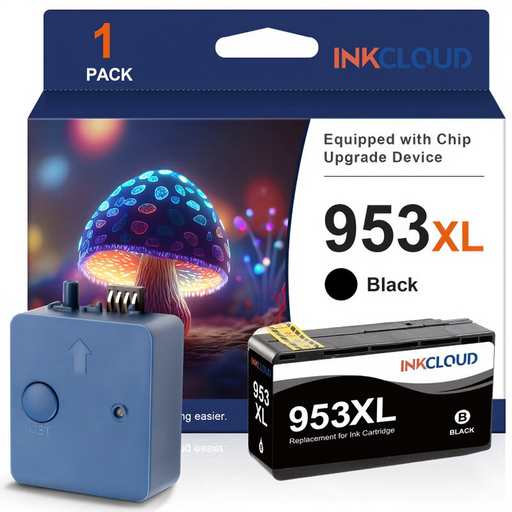
Why This Fits Their Persona: Ideal for students or remote workers who print a high volume of documents and want to keep the cost per page low without sacrificing reliability.
This third-party brand tackles the cost-per-page pitfall. Its XL capacity delivers significantly more prints than a standard cartridge, driving down the total cost of printing.
High page yield for a lower price. The advanced chip ensures excellent compatibility and ink level tracking on compatible HP OfficeJet Pro printers.
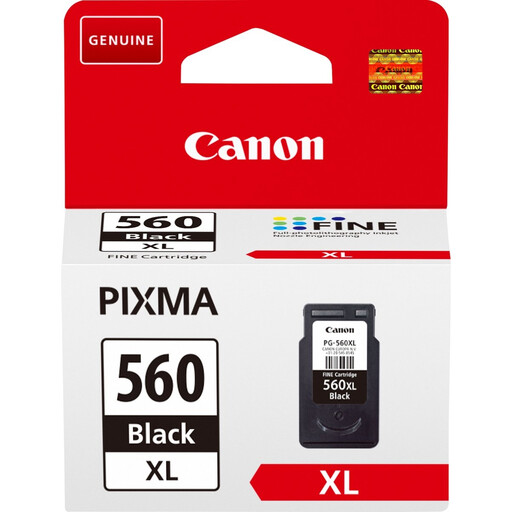
Why This Fits Their Persona: Perfect for those who regularly print reports, invoices, and other documents. Reliability and a high capacity are essential for staying productive.
This XL ink cartridge addresses the pitfall of focusing only on the purchase price. With a capacity of up to 400 pages, you'll replace it less often, and the cost per page is lower than the standard version.
Original Canon ink ensures consistent, sharp text documents. The pigment ink is smudge-resistant and durable, ideal for professional-looking work.
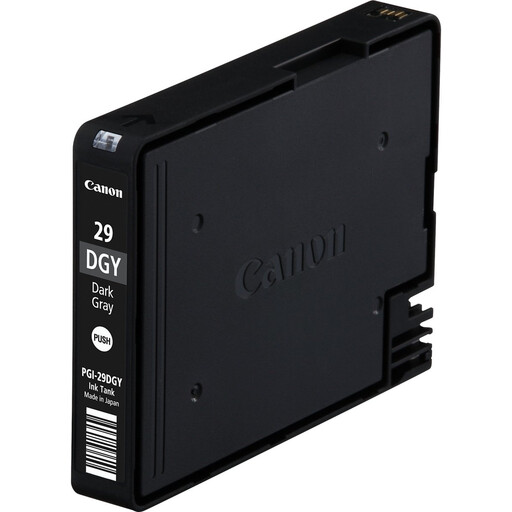
Why This Fits Their Persona: Specifically for photographers and graphic designers using a Canon PIXMA PRO-1 printer. For them, colour accuracy and the quality of greyscales are crucial for professional results.
This cartridge avoids the quality-loss pitfall. Cheap, generic inks cannot reproduce the subtle colour gradients and deep blacks required for photo prints, leading to wasted, expensive photo paper.
The pigment-based ink produces archival-quality prints with excellent durability and precise greyscales. It is an essential part of Canon's professional LUCIA ink system.
We have curated a complete and up-to-date selection of products that meet these strict criteria.
The easiest way is to check the number on your old cartridge. You can use this number (e.g., 'HP 305' or 'Canon PG-545') directly in the search bar. If you no longer have the old cartridge, check your printer's manual or look for a sticker inside the printer's cover.
An unopened ink cartridge in its original, sealed packaging typically has a shelf life of about two years. Store it in a cool, dark place. Once the packaging is opened, it is recommended to use the cartridge within six months. This prevents the printer ink from drying out and clogging the printhead.
The quality of third-party ink cartridges varies. Reputable third-party brands offer products designed to work well with your printer. However, printer manufacturers often state that any damage caused by non-original cartridges is not covered by the manufacturer's warranty. It's a personal trade-off between the lower cost of a third-party brand and the guaranteed performance and peace of mind of an original ink cartridge.
