
Vandaag of morgen in huis

Kwaliteit gegarandeerd

Welkomstaanbiedingen ontgrendelen: GRATIS bezorging | Tot 80% korting | Gratis 30 dagen JoyPlus-proefperiode
Download de app
Keeping an eye on your home without complex installations or high costs is a priority for many people, whether you live in a rental, an apartment, or a townhouse. An indoor Wi-Fi security camera offers a simple solution, whether you want to ensure your pet isn't destroying the sofa, check that your child is sleeping soundly, or simply gain an extra sense of security when you're away.
However, the market is saturated with options, specifications, and marketing jargon. This guide is designed to cut through the noise. We'll highlight several popular choices and explain the key features to look for, helping you find a camera that fits your needs—no drilling or technical expertise required.
Before we dive into the products, here are three key points to help guide your decision.
Image quality is crucial. Standard HD (720p) is often not sharp enough to make out important details. A 2K security camera (3MP or higher) provides a significantly sharper image, which is essential for identifying faces or other specifics. Also, pay close attention to night vision capabilities. While many cameras offer infrared (black-and-white) imaging in the dark, models with color night vision deliver a much clearer and more informative picture, even in low-light conditions.
A camera with a fixed lens can only cover a portion of a room. For comprehensive coverage, a 360-degree camera is a practical choice. These models, often equipped with Pan-Tilt-Zoom (PTZ) functionality, allow you to remotely rotate and tilt the lens via an app. Some cameras even feature 'auto-tracking', where the lens automatically follows a moving person or pet.
For renters or anyone who wants to avoid drilling holes, a plug-and-play security camera is ideal. You simply plug these cameras into a power outlet, connect them to your Wi-Fi network using the app, and they're ready to go. There are several installation methods:
A reliable security camera with an app is essential for viewing live footage, receiving notifications, and controlling the camera's functions.
Below is a selection of cameras that stand out for their specific features and user-friendliness.

Why it stands out: This camera is unique due to its built-in 2.8-inch screen and 'one-click calling' feature. This allows someone at home, like a child or an elderly person, to initiate a video call to the paired smartphone with a single button press. This makes it more than just a security camera; it's a communication hub.
Key Features:
Who is it for? Ideal for families who want to stay connected with children or elderly relatives remotely. It functions as an advanced baby monitor with camera and app or as a simple communication device for seniors.
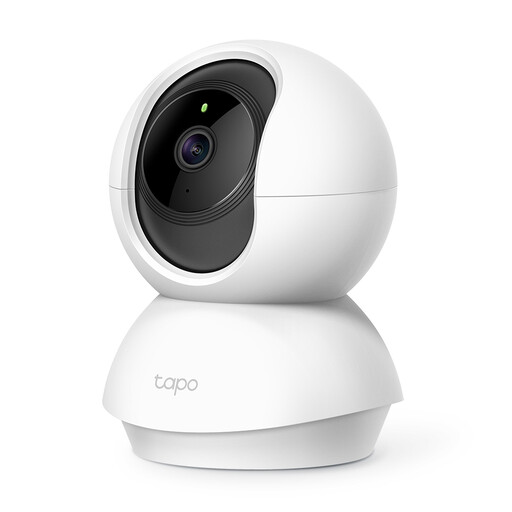
Why it stands out: TP-Link is a household name in networking equipment, and the Tapo C210 is a reliable all-rounder. The camera combines a sharp 3MP resolution with a full 360-degree viewing angle. A convenient feature is its privacy mode, which physically blocks the lens for moments when you don't want to record.
Key Features:
Who is it for? For anyone seeking a solid and dependable wireless indoor security camera for general monitoring of a living room, hallway, or office. It's also a great choice as a pet security camera.

Why it stands out: This camera is specifically designed to film through glass without suffering from reflections or glare. Its special anti-glare technology ensures you get a clear view of what's happening outside, day or night, while the camera remains safely indoors. Installation with a strong adhesive strip takes less than a minute and leaves no marks.
Key Features:
Who is it for? The perfect solution for renters and apartment dwellers who want to monitor their driveway, front yard, or balcony without installing an outdoor camera.
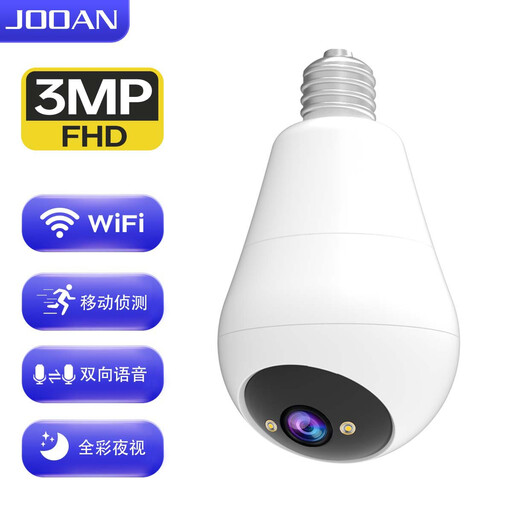
Why it stands out: This is the ultimate plug-and-play security camera. You simply screw it into a standard E27 light socket, just like a regular light bulb. No extra cables or adapters are needed. Despite its discreet design, the camera offers 2K resolution, 355-degree rotation, and color night vision.
Key Features:
Who is it for? For anyone looking for an inconspicuous and incredibly easy-to-install security solution for areas like a garage, hallway, landing, or utility room.
The cameras listed above are designed for indoor use and are not built to withstand rain, wind, or extreme temperatures. If you're looking for a solution to secure your garden, driveway, or the exterior of your home, you'll need a weatherproof model.
? View our recommendations for waterproof security cameras
1. Do I need a subscription for a Wi-Fi security camera? No, a subscription is usually not required. All the cameras recommended here support local storage on a microSD card (not included). You can record footage directly to the card and review it through the app. A paid cloud subscription is an optional extra for those who want to store footage externally and securely.
2. How does a plug-and-play security camera work? The process is designed to be as simple as possible. You connect the camera to a power source (via a plug or light socket), download the corresponding app on your smartphone, and follow the in-app steps to connect the camera to your Wi-Fi network. The camera will be operational within minutes.
3. Can I use a security camera as a baby monitor? Absolutely. Many modern IP cameras are highly suitable as a baby monitor with camera and app. Features like crystal-clear video (even at night), two-way audio to soothe your child, and motion or sound alerts on your phone often make them more versatile than traditional baby monitors. The JOOAN model with a built-in screen is a prime example of this.
