
Vandaag of morgen in huis

Kwaliteit gegarandeerd

Welkomstaanbiedingen ontgrendelen: GRATIS bezorging | Tot 80% korting | Gratis 30 dagen JoyPlus-proefperiode
Download de app
Keeping an eye on things when you're not home provides peace of mind. Whether you want to see what your pet is up to, check if the kids are safe, or simply secure your home without complex installations, an indoor WiFi security camera is an easy choice. But the market is vast, and the specifications aren't always clear.
As a Joybuy Product Recommendation Officer, I'm here to help you see past the marketing jargon. In this article, we'll discuss what to look for and highlight several popular choices based on their specifications and ease of use. This will help you make an informed decision that fits your specific needs.
Before making a choice, it's helpful to understand a few key features. This will help you determine which camera truly meets your requirements.
The days of grainy, blurry footage are over. A modern smart indoor camera should have at least Full HD (1080p) resolution. For more detail, such as for better facial recognition, a 2K security camera (or higher) is a great consideration. Also, pay attention to night vision. Standard infrared provides black-and-white images in the dark. A security camera with color night vision uses ambient light or a built-in spotlight to display clear color images even at night. This can be crucial for identification.
Nobody wants to deal with drilling and complicated wiring, especially in a rental property. Fortunately, most indoor cameras are plug-and-play: plug it in, connect to the app, and you're ready. Some models offer unique installation methods, like an E27 socket that you can screw directly into a lamp fitting. A 360-degree camera (also known as PTZ, for Pan-Tilt-Zoom) offers extra flexibility. You can remotely pan and tilt the lens via the app, ensuring you don't miss a single corner of the room.
A good camera with motion detection sends you a notification when something happens. More advanced models use AI to distinguish between people, animals, or, for example, moving curtains. This reduces the number of false alarms. Also, consider how you'll store your footage. Many cameras offer local storage on a microSD card. This is a one-time purchase, and your data remains under your control, with no monthly fees. Cloud storage is an alternative where footage is securely stored externally, but this often requires a subscription.
Below is a selection of cameras that stand out for their specific features and excellent value for money.

Why it stands out This model combines a security camera with a communication device. The built-in 2.8-inch screen and 'one-click calling' feature allow you to start a video call directly from the camera to the app.
Key Features
Who is it for? Ideal for families looking for an easy way to stay in touch with children or elderly relatives at home. It functions as an advanced baby monitor with a camera and app, but with the added features of a full-fledged security camera.

Why it stands out The ZOSI C680 is specifically designed to film through glass without reflections. According to the manufacturer, ZOSI, its anti-glare technology ensures you get clear images, even when the camera is placed behind a window.
Key Features
Who is it for? Perfect for apartment dwellers or renters who want to monitor their driveway, front yard, or entryway from the inside, without having to install an outdoor camera.
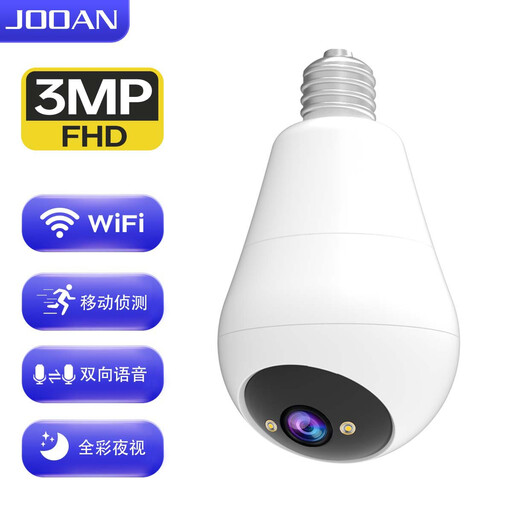
Why it stands out Installation couldn't be simpler: you screw this camera into a standard E27 light bulb socket. No cables, no adapters. It's a discreet and clever solution.
Key Features
Who is it for? For anyone looking for a discreet, hassle-free security solution. Ideal for hallways, garages, or living rooms where a light socket is already available.
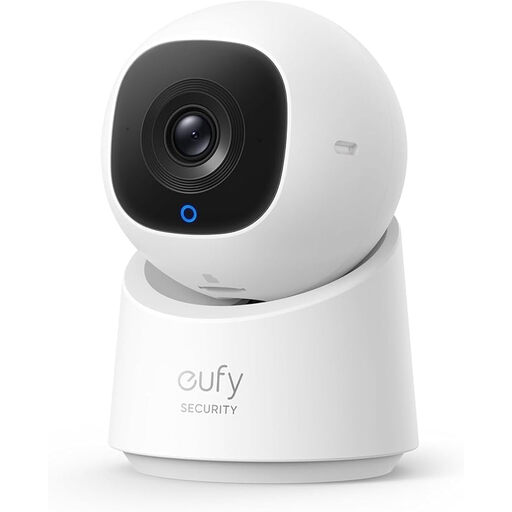
Why it stands out Eufy, a brand by Anker, is known for its focus on user-friendliness and privacy. This camera offers local storage without mandatory monthly fees and features a convenient privacy mode.
Key Features
Who is it for? For the privacy-conscious user who wants a reliable and smart indoor IP camera from a well-known brand, with the assurance of local data storage.
Every living situation is unique and requires a tailored approach. If the cameras above aren't quite what you're looking for, or if you're curious about other models, there's plenty more to discover.
Explore our full range and compare different specifications to find the camera that's a perfect fit for you.
? Discover more options in our home security cameras category
1. Do I need a subscription for an indoor security camera? No, it's not always necessary. Many cameras, including the models in this article, support local storage on a microSD card. This allows you to record footage without monthly fees. Cloud storage is often offered as an optional, paid service for those who want to store footage externally.
2. How does a 360-degree camera work exactly? A 360-degree camera (or PTZ camera) has a motorized lens. Using the companion app on your smartphone, you can remotely pan and tilt the camera. This allows you to view the entire room live. Many of these cameras also have an 'auto-tracking' feature that automatically follows a moving person or object.
3. Is an indoor WiFi security camera difficult to install? No, most modern cameras are designed for maximum convenience. They are often plug-and-play devices. You plug it into an outlet, download the app, scan a QR code, and follow the steps to connect the camera to your WiFi network. This process usually takes no more than a few minutes.
