
Vandaag of morgen in huis

Kwaliteit gegarandeerd

Welkomstaanbiedingen ontgrendelen: GRATIS bezorging | Tot 80% korting | Gratis 30 dagen JoyPlus-proefperiode
Download de app
Whether you want to see what your pet is up to, keep an eye on your sleeping baby, or simply for your own peace of mind, an indoor Wi-Fi security camera is a practical solution. However, the market is saturated with options, which can make choosing difficult. As a Joybuy Product Recommendation Officer, I'm here to help you cut through the marketing jargon. This article provides practical tips and a selection of cameras that stand out for their specifications and ease of use, helping you make an informed decision.
Before we look at the products, here are a few key points to consider. These will help you determine which features are truly important for you.
A camera is only as good as the image it produces. Full HD (1080p) is the standard today, but more and more models are offering 2K resolution. This provides sharper, more detailed images, which is useful if you need to zoom in. Just as important is night vision. Infrared LEDs provide clear black-and-white images in the dark, while some cameras even offer colour night vision. This is ideal if you're using the camera as an advanced baby monitor with camera.
A standard indoor IP camera has a fixed viewing angle. This may be sufficient for a small room. For larger rooms or if you want to eliminate blind spots, a 360-degree camera is a better choice. These models, often called pan-tilt cameras, can be remotely rotated and tilted via the app. This allows you to survey the entire room, from one corner to the other.
This is a crucial point. Many brands promote cloud storage, which often incurs monthly fees. If you want to avoid this, look for a security camera without a subscription. These cameras offer local storage via a microSD card. You make a one-time purchase of a card and save the footage directly on the device. This gives you complete control over your data and saves you recurring costs.
Based on the criteria above, we have selected a few cameras that excel in their functionality and value for money.
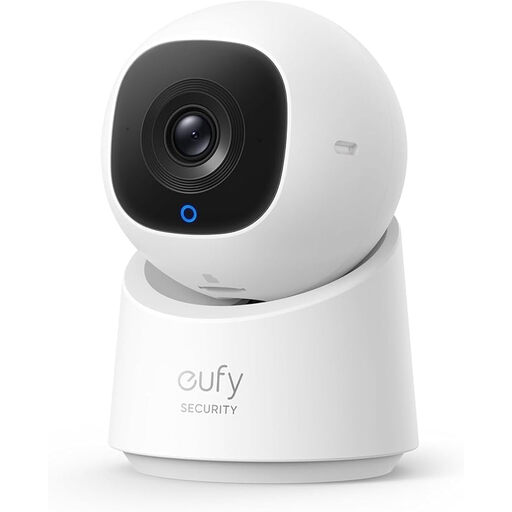
Why It Stands Out The eufy C220 is a strong all-rounder. It combines a sharp 2K resolution with full 360-degree coverage. The built-in AI is a major plus; according to the manufacturer, the camera can distinguish between people and other movements, and it automatically tracks individuals.
Pros
Who Is It For? This is an excellent choice for anyone looking for a reliable and complete smart camera with an app for general security, or as a monitor for children. The combination of high image quality, smart tracking, and the option for local storage makes it a very versatile device.
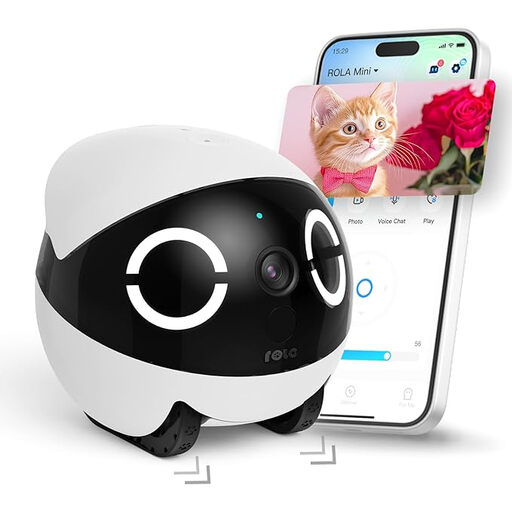
Why It Stands Out This is more than a camera; it's a roaming robot. The Enabot ROLA Mini is specially designed as a pet camera. You can control it remotely throughout the house to see where your dog or cat is and even communicate with them via two-way audio.
Pros
Who Is It For? Ideal for pet owners who want to do more than just observe. The interactive features make it a fun way to stay connected with your four-legged friend. It can also serve as a unique monitor for children or the elderly, thanks to its simple call function.
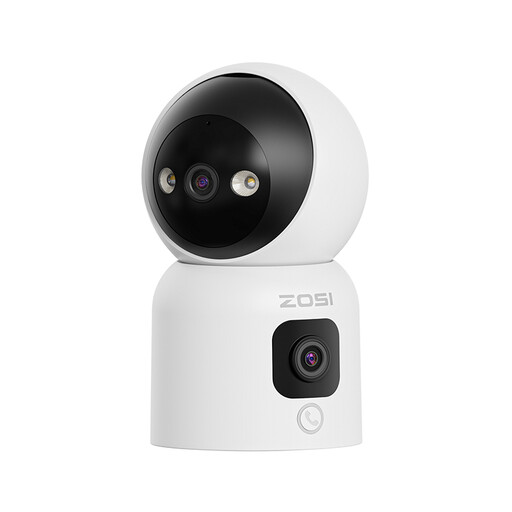
Why It Stands Out The ZOSI C528D4 takes a different approach with a dual lens. The top lens is a pan-tilt camera for a complete overview, while the bottom lens provides a fixed panoramic view. Its most unique feature is the ability to start a video call by pressing a button or making an "OK" gesture.
Pros
Who Is It For? Perfect for families looking for a simple way to stay in touch. The call function is a great solution for those who aren't comfortable with smartphones. The dual lens and dual-band Wi-Fi make it a technically advanced option for those seeking maximum coverage and a reliable connection.
These recommendations cover a wide range of needs, from general security to specific applications for pets and family. Is your ideal camera not among them? The world of smart cameras is vast, and more specialised options are available.
Explore More in Our Smart Devices Category
Yes, for the basic functions and local storage, it is. You pay nothing per month to record footage or watch live. The only costs are the one-time purchase of the camera and a microSD card. Some brands do offer optional, paid cloud storage services for extra backups, but these are not mandatory.
Privacy is a valid concern. Choose a camera with a physical privacy mode or a software option to disable the lens. Local storage on a microSD card gives you more control over your data than cloud storage. Additionally, always use a strong, unique password for your account to prevent unauthorised access.
Absolutely. Most modern Wi-Fi cameras are designed for easy installation. The process is typically: plug it in, download the corresponding app on your smartphone, and follow the in-app steps to connect the camera to your Wi-Fi network. You don't need any technical expertise or professional help for this.
