
Vandaag of morgen in huis

Kwaliteit gegarandeerd

Welkomstaanbiedingen ontgrendelen: GRATIS bezorging | Tot 80% korting | Gratis 30 dagen JoyPlus-proefperiode
Download de app
Leave home with peace of mind, whether you're heading to work, enjoying a night out, or going on holiday. The thought of what's happening at home can sometimes be a nagging concern. Is the dog tearing up the sofa? Is the baby sleeping soundly? Is everything okay with your parents living independently? A quality indoor Wi-Fi security camera can put those uncertainties to rest.
However, the market is flooded with options, all promising the world. That's why we've created this guide. We cut through the marketing jargon and focus on what truly matters. We'll provide practical tips and highlight some popular choices to help you make an informed decision.
Before you make a choice, it's helpful to know which specifications really count. Here are three key points to help you find the right smart indoor camera.
The purpose of a camera is to see what's happening. Resolution is crucial here. Full HD (1080p) is the standard today, but cameras with 2K or 4MP resolution offer significantly sharper details. This is especially useful if you want to zoom in on a situation.
Just as important is an indoor camera with night vision. Most incidents or concerns occur in low-light conditions. Standard infrared night vision shows images in black and white. However, some advanced models offer colour night vision, which can make a world of difference when identifying details.
A modern indoor IP camera is more than just a passive eye. Features like a camera with motion detection are standard, but the intelligence behind them varies. Look for models with AI detection that can distinguish between people, pets, and insignificant movements like rustling curtains. This significantly reduces the number of unnecessary notifications on your phone.
Other useful features include:
Ease of installation is a priority, especially for renters or those who aren't tech-savvy. Many Wi-Fi cameras are 'plug-and-play': plug it in, connect to the app, and you're done. Models that you can place without drilling, for example on a cabinet or with a special window mount, are a great solution.
Also, consider how you want to store the footage.
Privacy is another important point. Opt for a camera with features like customisable privacy zones, which allow you to block out certain parts of the image (like a bathroom door).
Based on the criteria above, we have selected a few models that stand out for their functionality and ease of use. These are popular choices for various situations.
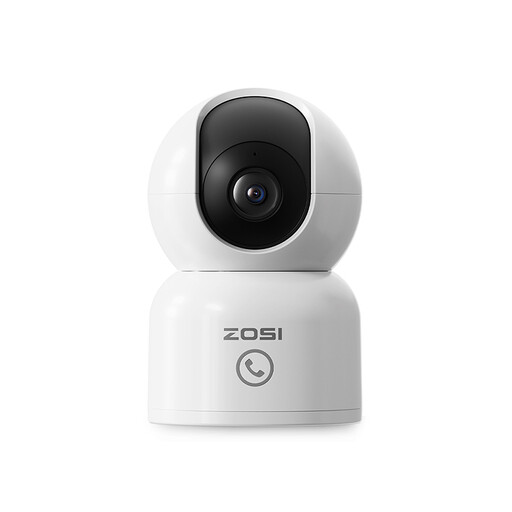
Why it stands out: This ZOSI camera combines a sharp image with smart tracking and a unique call function. When the camera detects a person, it automatically follows them by rotating 360 degrees. The 'One-Touch Call' button on the camera itself is a very practical addition, allowing children or the elderly to make direct contact without needing a phone.
Key Features:
Who is it for? This model is an excellent choice as a baby monitor with camera and app or as a pet camera. It is also ideal for families who want an easy way to stay in touch with elderly relatives living independently.

Why it stands out: Filming through a window often causes problems due to reflection and glare. The ZOSI C680 tackles this issue with special anti-reflection technology. You place the camera on the inside of the window and still get a clear view of what's happening outside, both day and night. The installation with a strong Velcro strip means no screws or drill holes are needed.
Key Features:
Who is it for? Ideal for apartment dwellers or renters who want to keep an eye on their driveway, front garden, or entryway without installing an outdoor camera.
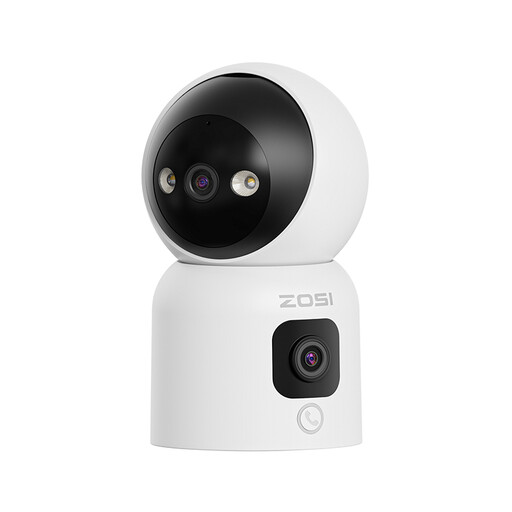
Why it stands out: This camera has not one, but two lenses. The top lens can pan and tilt 360 degrees for a detailed view, while the bottom lens provides a fixed, wide panoramic image. This gives you a constant overview while allowing you to zoom in on specific events simultaneously. Another smart feature is 'Gesture Calling': make an 'OK' gesture to the camera to start a video call.
Key Features:
Who is it for? Perfect for monitoring large, open spaces like a living room with an open kitchen. The dual lens ensures you don't miss a thing, making it a powerful solution for those seeking maximum coverage.
An indoor Wi-Fi security camera is a personal choice. If a ZOSI camera isn't exactly what you're looking for, or if you want to broaden your search to include other brands or types, such as outdoor cameras or complete camera systems, we've got you covered.
Check out our full collection in the Camera & Photo category for more options.
1. Is an indoor Wi-Fi security camera difficult to install? No, most modern cameras are designed for ease of use. The process usually involves plugging the camera into a power outlet, downloading the companion app on your smartphone, and following the steps to connect the camera to your Wi-Fi network. This often takes no more than a few minutes.
2. Do I need a subscription for an indoor IP camera? Not necessarily. Almost all cameras offer the option to store footage locally on a microSD card. In that case, you don't need a subscription. A cloud subscription is an optional service that offers extra benefits, such as access to footage if the camera is damaged or stolen.
3. What about privacy when placing a camera inside my home? Manufacturers are paying increasing attention to this. Features like 'privacy mode' completely disable the camera with a single tap in the app. With 'privacy zones', you can permanently black out specific parts of the image. By choosing local storage on an SD card, you also keep the footage within your own network.
