
Vandaag of morgen in huis

Kwaliteit gegarandeerd

Welkomstaanbiedingen ontgrendelen: GRATIS bezorging | Tot 80% korting | Gratis 30 dagen JoyPlus-proefperiode
Download de app
Keeping an eye on things when you're not home provides peace of mind. Whether you want to see if the kids got home safely, check that your pet isn't getting into mischief, or simply secure your property, an indoor WiFi camera is a simple and effective solution. But with so many options on the market, choosing the right one can be tricky.
As a Product Recommendation Officer at Joybuy, I'll help you cut through the specs and marketing jargon. In this guide, you'll find practical tips and a selection of popular models, so you can find a camera that truly fits your needs.
Before we look at the products, here are a few key points to consider. These will help you determine which features are essential for you.
The days of grainy, blurry footage are over. A modern 2K security camera (or 3MP) offers significantly sharper images than older 1080p models. This level of detail is crucial if you want to distinguish faces or other important details. Just as important is a good security camera with night vision. Most cameras use infrared LEDs for black-and-white images in the dark, but some advanced models now also offer color night vision, which can provide extra context.
A standard camera has a fixed viewing angle. This can be fine for a specific entryway or corner. However, if you want to survey an entire room, a 360-degree IP camera (a pan/tilt camera) is a better choice. With the app on your phone, you can remotely pan and tilt the lens, ensuring you don't miss a single corner. This is ideal for larger spaces or if you want to track a moving target, like a pet.
Modern cameras are more than just a lens. A camera with motion detection is standard, but pay attention to the intelligence behind it. Can the camera distinguish between people, animals, and, for example, a shadow? This prevents unnecessary notifications. Also, think about storage. Do you want to store footage locally on a microSD card, or do you prefer cloud storage? Local storage has no subscription fees, while the cloud secures your footage even if the camera is stolen.
Based on specifications, functionality, and user-friendliness, we have compiled a list of interesting options for you.
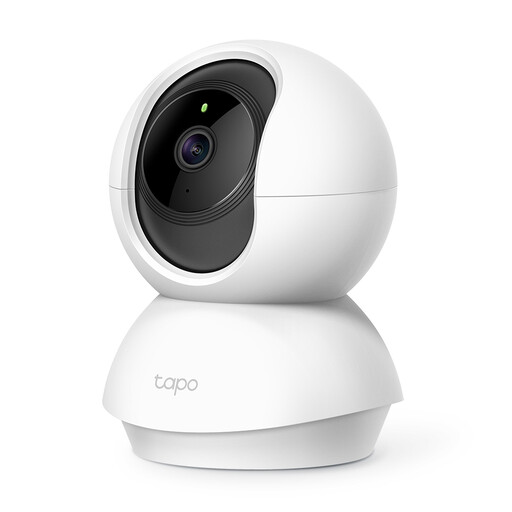
Why it stands out: The Tapo C210 is a popular choice for its versatility. The 360-degree pan/tilt function allows you to view the entire room with a single camera.
The camera records in 3MP Ultra-High-Definition, which is sharper than traditional 1080p. According to TP-Link, its advanced night vision provides a visual distance of up to 9 meters. A handy feature is the two-way audio, which lets you communicate via the built-in microphone and speaker. This makes it a suitable pet camera to reassure (or warn) your dog or cat.
Pros:
Who is it for? Ideal for those who want to monitor a large living room, playroom, or open space without installing multiple cameras.
View the TP-Link Tapo C210 on Joybuy.nl

Why it stands out: This camera from JOOAN stands out with a unique feature: a built-in 2.8-inch screen and a 'one-click calling' button. This turns the camera into a simple video communication device.
This makes it an excellent choice as a baby monitor with a camera and app, or for keeping in touch with elderly relatives who aren't comfortable with smartphones. They can start a video call with you at the touch of a button. The camera supports both 2.4Ghz and 5Ghz WiFi for a more stable connection and offers 2K resolution and color night vision.
Pros:
Who is it for? Perfect for families with young children or for those remotely caring for the elderly who need an accessible way to video call.
View the JOOAN 5G WiFi Camera on Joybuy.nl

Why it stands out: The ZOSI C680 is specially designed to solve a common problem: reflections and glare when filming through a window. According to the manufacturer, its anti-glare lens technology ensures clear images, even through double-paned glass.
This makes it an excellent security camera for an apartment, where you might want to see your driveway or front door without drilling outside. Installation is simple with an included mount that you stick to the glass. The camera offers 2K HD resolution and, thanks to its F1.0 lens, color night vision.
Pros:
Who is it for? The ideal solution for renters and apartment dwellers who want to monitor the outdoors without a permanent installation.
View the ZOSI C680 WiFi Camera on Joybuy.nl
The cameras above are designed for indoor use with a power adapter. If you're looking for an outdoor solution, or a model that is completely wireless and runs on a battery, there are other specifications to consider, such as weather resistance.
? Explore our range of battery-powered outdoor night vision security cameras for more options.
Privacy is a major concern. Always choose a camera from a reputable brand that releases regular firmware updates. Immediately change the default password to a strong, unique one. Many cameras, like the Tapo C210, offer a 'privacy mode' that physically blocks the lens or disables recording when you are home.
Not necessarily. Many cameras offer the option to store footage locally on a microSD card. This is a one-time purchase with no monthly fees. A cloud subscription is optional and offers the advantage of having your footage stored externally and accessible even if the camera is damaged or stolen.
Yes, a good security camera with night vision is essential. Most models use infrared (IR) for clear black-and-white images in complete darkness. Some newer models, like the JOOAN and ZOSI mentioned above, use sensitive sensors to capture images in color even in very low light, which can reveal more details. Always check the specifications for the distance the night vision can cover.
