
Vandaag of morgen in huis

Kwaliteit gegarandeerd

Welkomstaanbiedingen ontgrendelen: GRATIS bezorging | Tot 80% korting | Gratis 30 dagen JoyPlus-proefperiode
Download de app
An indoor security camera can be useful for keeping an eye on your home, baby, pets or home office remotely. However, an attractive product page does not automatically mean it is right for your situation. Some cameras, for example, can rotate through 360 degrees but only save footage with a paid cloud subscription. Other models advertise high resolution, while the Wi-Fi connection or night vision may be the limiting factor in practice.
As a Joybuy Product Recommendation Officer, I therefore start by checking verifiable specifications: image resolution, viewing angle, night vision, storage, app control and how notifications work.
A 360-degree camera usually rotates horizontally. Its vertical viewing angle may be much narrower. As a result, a camera placed on a high cupboard may not see the floor or the area directly beneath it. Check whether the model also tilts and how many degrees of vertical movement it offers.
A Wi-Fi security camera may respond to shadows, pets, changing light or movement outside the selected area. Check whether you can set motion zones and whether the product description distinguishes between general motion detection and person detection. Claims about reducing false alerts come from brands and should not be treated as guaranteed results.
Before buying, check whether the camera works with a microSD card, cloud storage or both. Also check the maximum capacity and whether a card is included. With some cameras, cloud storage is optional, but certain features or longer video histories may require a subscription.
For everyday monitoring, 1080p Full HD is a useful starting point. A higher resolution, such as 2K or 4K, can show more detail, but it also requires more storage and a stable connection. Night vision often uses infrared. Some models also offer colour viewing in low light. Always check the stated night vision range, as this varies between cameras and rooms.
A fixed indoor IP camera is suitable for a specific viewing direction, such as towards a door or desk. For a living room, pan-tilt functionality may be more practical. According to the product description, products with automatic tracking can follow a moving subject. This does not mean that every part of the room will always remain visible. Position the camera so that furniture and walls obstruct the view as little as possible.
An app-enabled security camera is only convenient to use if its connection to your router is stable. Check whether the model supports 2.4 GHz, 5 GHz or both. 2.4 GHz often offers greater range, while 5 GHz can provide faster data speeds when the signal is strong enough. Features such as two-way audio, push notifications and live viewing are useful for communicating with family members or talking to a pet. Use a unique password and install firmware updates when they become available.

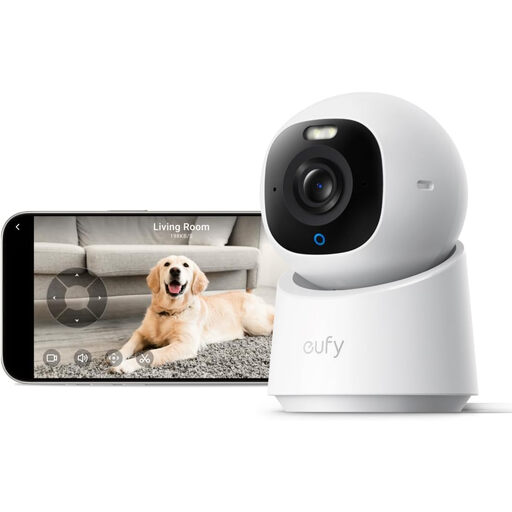
Why it suits this profile: This model combines 1080p video, horizontal and vertical movement, night vision and app notifications for basic monitoring in a living room, hallway or home office, for example.
The product information specifies local storage via microSD of up to 128 GB and adjustable motion zones. However, check whether the card needs to be purchased separately.
1080p resolution, 360° horizontal pan, 114° vertical movement, night vision up to 9 metres, two-way audio and support for Android and iOS.
Why it suits this profile: If you value fine detail, broad coverage and additional detection features, this model offers a more comprehensive package for monitoring several rooms.
The product description mentions local storage via an SD card and operation without mandatory subscription costs for the listed features. Check the current terms and card requirements before buying.
According to the product details: 4K UHD, 360° coverage, colour night vision, person and pet detection, automatic tracking and two-way audio.
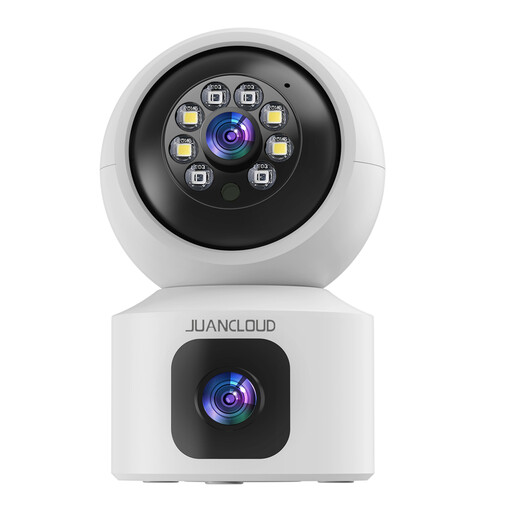
Why it suits this profile: The dual-lens design is intended to provide broad coverage of a room, for example as a video baby monitor, pet camera or for keeping an eye on family members.
The listing states support for 2.4 and 5 GHz Wi-Fi, as well as both SD card and cloud storage. Check the compatible card and the cost of any cloud backup in advance.
3MP 2K video, dual lens, 8× digital zoom, night vision, two-way audio and person-focused motion notifications according to the product description.
Do not install an indoor camera in a bathroom, someone else’s bedroom or any area where people have a reasonable expectation of privacy without their permission. Do not point the lens at neighbours or public roads. Inform housemates, babysitters or staff when they may be recorded, and check the current privacy rules issued by the Dutch Data Protection Authority.
Place the camera on a stable surface or mount it securely. Keep the power cable out of reach of young children and use only the supplied or specified adapter. An indoor camera is not automatically suitable for a damp area or outdoor use; an appropriate IP rating is required for this.
We have put together a complete, up-to-date list of products that fully meet these strict selection criteria and the applicable European safety regulations.
Most models use Wi-Fi for live viewing, notifications and remote control. Some cameras can record locally to a microSD card when the internet connection temporarily drops. Check each product to see whether local recording without a cloud connection is supported.
This depends on the resolution, frame rate and whether you record continuously or only when motion is detected. A 1080p camera generally uses less storage than a 2K or 4K model. Various models support a 128 GB or 256 GB microSD card, but the retention period varies depending on the settings.
After purchase, you may incur costs for cloud storage, a subscription or a microSD card. If you choose local storage, there are usually no recurring cloud charges for storing footage. However, check which features are available without a subscription and whether the card needs to be bought separately.
