
Vandaag of morgen in huis

Kwaliteit gegarandeerd

Welkomstaanbiedingen ontgrendelen: GRATIS bezorging | Tot 80% korting | Gratis 30 dagen JoyPlus-proefperiode
Download de app
Keeping an eye on things when you're not at home. That's a desire many people share. Whether you want to check if your baby is sleeping soundly, make sure your new puppy isn't getting into mischief, or simply want to be certain that everything is okay at home. An indoor security camera provides that peace of mind. But with so many options, the choice can be overwhelming.
As a Joybuy Product Recommendation Officer, my job is to help you. I filter through the specifications and features to give you clear, practical information. In this article, we'll discuss what to look for and highlight some popular choices, so you can make an informed decision.
Before you make a choice, it's helpful to know which features are important to you. Here are three key points to consider.
The clarity of the image is crucial. A camera with a higher resolution (measured in megapixels, MP) displays sharper details. 1080p (Full HD) is a solid baseline, but models with 4MP or 5MP offer even more clarity. Just as important is a good camera with night vision. Infrared LEDs ensure you can clearly see what's happening even in complete darkness, which is essential for 24/7 monitoring.
A standard camera has a fixed viewing angle. If you want to survey an entire room, a 360-degree security camera is a better option. These Pan-Tilt-Zoom (PTZ) cameras can be remotely rotated and tilted via the app. Another useful feature is a smart camera with motion detection. Advanced models can distinguish between people, pets, and other movements, reducing the number of unnecessary notifications you receive. Features like auto-tracking automatically follow a moving object or person.
Most modern indoor cameras are indoor Wi-Fi cameras, also known as IP cameras. Installation is typically straightforward: plug it in, connect to your Wi-Fi network via an app, and you're all set. Look for features like two-way audio, which allows you to talk and listen through the camera. This is ideal for reassuring your pet or if you're using the camera as a baby monitor with camera and app.
Based on product specifications and functionalities, we have selected a few models that meet common needs.
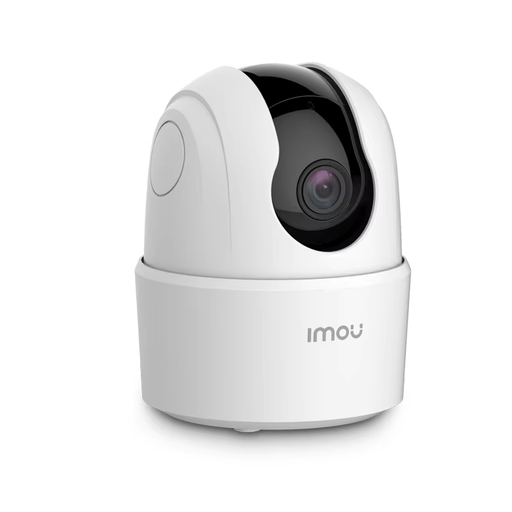
Why this model stands out: The IMOU Ranger 2C combines a very high 5MP resolution with a 360-degree field of view. This ensures exceptionally sharp images where you can easily zoom in on details while keeping an eye on the entire room.
Advantages:
Who is it for? This model is an excellent choice for those who don't want to miss a single detail. Ideal as an advanced baby monitor with camera and app or as a pet camera to accurately monitor your pet's behaviour, thanks to its high resolution and tracking function.
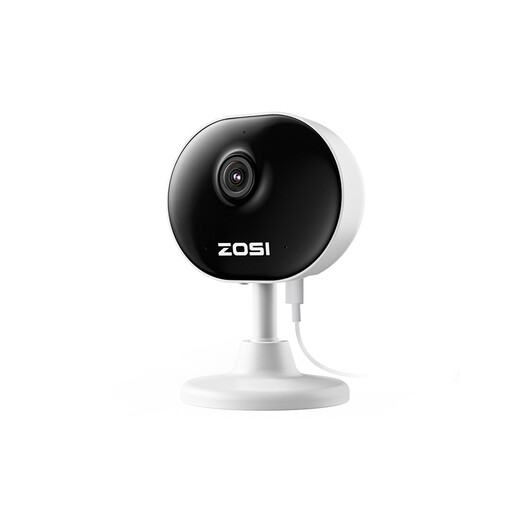
Why this model stands out: Weighing only 85 grams, the ZOSI C688 is one of the most compact and discreet cameras available. Thanks to its minimalist design and flexible mounting options (magnetic base or 3M tape), it fits unobtrusively into any interior.
Advantages:
Who is it for? Perfect for users looking for a reliable, no-nonsense indoor Wi-Fi camera that doesn't draw attention. Its discreet size makes it ideal for monitoring a living room, office, or an elderly family member's room without feeling intrusive.
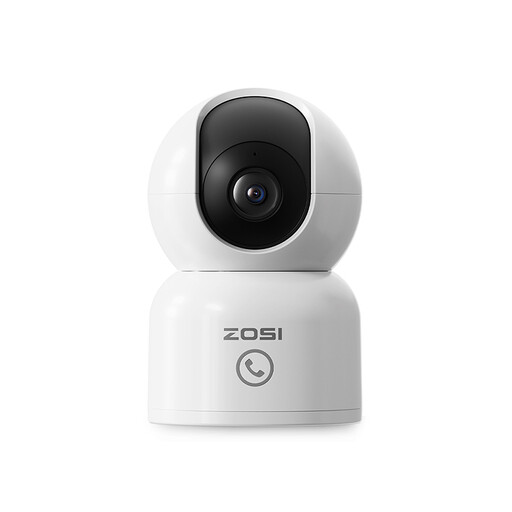
Why this model stands out: This ZOSI camera distinguishes itself with a unique 'One-Touch Call' feature. With the press of a button on the camera, children or elderly individuals can instantly send a call notification to your phone, making interaction much simpler.
Advantages:
Who is it for? An excellent choice for families and caregivers. The 'One-Touch Call' feature makes it a highly practical camera for households with children or elderly members. The combination of 4MP image quality and auto-tracking also makes it a versatile pet camera.
The models above provide a good starting point, but you may have other specific needs. There are countless options available, from simple cameras to systems with extensive features.
Explore more options in our Baby & Pet category to find a camera that perfectly suits your situation.
Not always. Most cameras, including the models mentioned above, support local storage on a microSD card (usually not included). This allows you to record and review footage without monthly fees. Many brands also offer an optional cloud storage service via a subscription. This can be useful if the camera is stolen, as the footage will be safely stored in the cloud. Some models, like the ZOSI 4MP, offer a free trial period for cloud storage.
The installation is typically very user-friendly. According to the manufacturers of the ZOSI and IMOU cameras, you usually follow these steps:
An IP camera is any camera that transmits video footage over an IP network (like the internet). A Wi-Fi camera is a specific type of IP camera that connects to this network wirelessly. Virtually all modern consumer indoor cameras are Wi-Fi IP cameras because they offer the convenience of a wireless installation.
