
Vandaag of morgen in huis

Kwaliteit gegarandeerd

Welkomstaanbiedingen ontgrendelen: GRATIS bezorging | Tot 80% korting | Gratis 30 dagen JoyPlus-proefperiode
Download de app
An indoor security camera can help you keep an eye on your home remotely, detect movement, or make audio contact. However, a more expensive model isn't automatically the right fit for your home. A tenant often has different requirements than a parent using a baby monitor with a camera, and a pet owner will look for different features than someone monitoring a small retail space.
What's more, the product description doesn't always tell the full story. So, pay particular attention to the following pitfalls.
A 4K camera can capture plenty of detail, but only when the lens is clean, the room is well lit, and the Wi-Fi connection remains stable. In a dark corner or behind reflective glass, a higher resolution won't get you very far. So, don't just look at pixels – also consider night vision, the viewing angle, and the camera's position.
A 360-degree security camera usually rotates horizontally. The vertical viewing angle can be more limited. A tall cupboard, a ceiling, or part of the floor could therefore fall outside the frame. So, check the pan and tilt values and think carefully about where the camera will be placed.
Many models offer local storage via a microSD card. That card is often not included. Cloud storage can also be optional or paid for. Also check whether certain notifications, longer video history, or advanced detection are only available with a subscription. A security camera with local storage can be appealing if you want to keep recurring costs down, but you'll need to buy and manage a suitable card yourself.
For a living room or hallway, 1080p Full HD is often sufficient to distinguish movement and people. A higher resolution, such as 3MP, 4MP, or 4K UHD, can show extra detail. The practical value depends on the distance to the subject and the lighting conditions.
Pay attention to the type of night vision:
A security camera with motion detection can send a notification with every movement. That can be handy, but it can also lead to lots of false alerts from shadows, pets, or changing light.
Person detection and pet detection can help make notifications more specific. According to a brand's own research, algorithms can reduce the number of unnecessary alerts, but the actual performance depends on the room, settings, and firmware. So, set up motion zones and check whether the camera sends notifications to your phone.
A Wi-Fi security camera usually works on 2.4GHz Wi-Fi. That range is often practical through walls, but it can be more congested than 5GHz. Dual-band models support both frequencies and can be more flexible, provided your router supports it.
A camera with two-way audio has a microphone and speaker. This is useful for talking to family members, reassuring a pet, or speaking to someone in a small business space. For baby monitoring, it's also wise to check whether the notifications, sound detection, and app suit your needs. A camera is not a substitute for supervision by an adult.
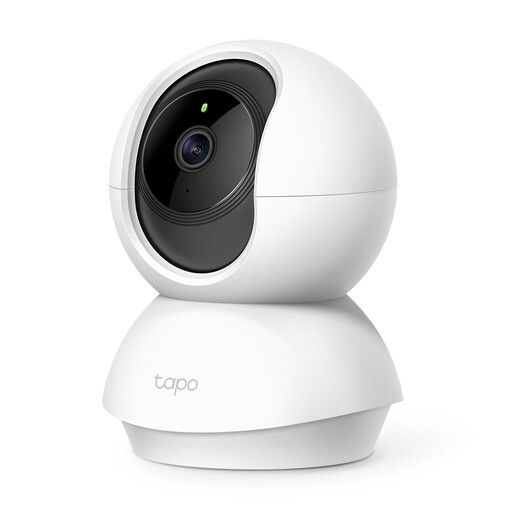
Why this fits the profile: This model is aimed at basic indoor use, such as monitoring a living room, hallway, or child's bedroom. Set-up is done via the Tapo app, and the model supports 1080p, motion alerts, and local storage.
The specifications list the horizontal and vertical rotation ranges separately. Local microSD storage of up to 128 GB is also mentioned, so you can factor the storage choice into your decision in advance.
1080p video, 360° horizontal rotation, infrared night vision up to 9 metres, two-way audio, and microSD storage.
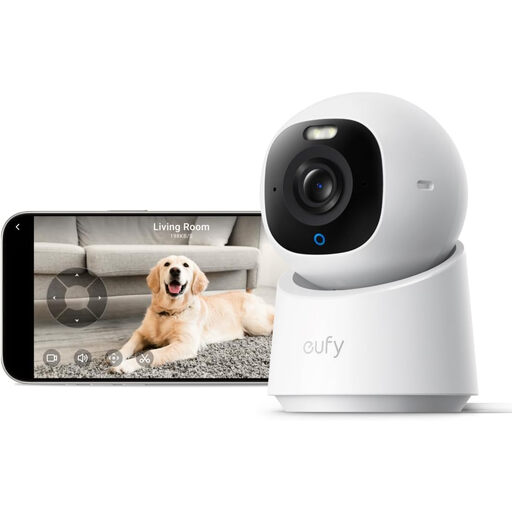
Why this fits the profile: The combination of 4K UHD, 360° pan and tilt, and automatic human and pet tracking suits anyone who wants to monitor multiple areas of a room.
The product description mentions colour night vision with a built-in spotlight, local SD storage, and on-device detection. Note: the SD card is sold separately, and HomeKit supports a maximum of 1080p according to the description.
4K UHD, 360° pan and tilt function, automatic human and pet tracking, two-way audio, and support for HomeKit, Alexa, and Google Assistant.
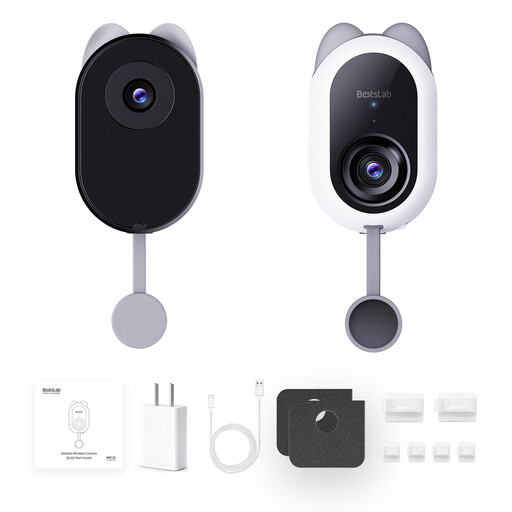
Why this fits the profile: This model is interesting for tenants or users who want to look outside through a window without drilling. The dual camera is designed for an external view and a live indoor feed.
The product description mentions an anti-reflection design for use behind glass, a stick-on mount that requires no drilling, and support for both 2.4GHz and 5GHz Wi-Fi.
4MP resolution, person, pet, and vehicle detection, local microSD storage up to 512 GB, and dual-band Wi-Fi.
We've put together a full, up-to-date list of products that fully meet these strict selection criteria and comply with current European safety regulations.
Place an indoor security camera on a stable surface and out of reach of children. Use the supplied adapter and cable when the manufacturer instructs you to. After installation, check the camera angle, motion zones, and notification settings.
Do not point the camera at bathrooms, other people's bedrooms, or your neighbours' homes. If you're recording in a shared space, you need to consider privacy rules and inform the people involved where necessary. Use a strong Wi-Fi password, change any default password, and install firmware updates.
For live viewing and remote notifications, a Wi-Fi or internet connection is usually required. Some models can record locally to a microSD card. The exact features without the internet vary by model and app.
In addition to the purchase price, costs can arise for a microSD card, cloud storage, or an additional subscription. If you choose local storage, there are typically no monthly cloud costs for saving footage, but always check which features are available without a subscription.
The lifespan depends on the power supply, heat, moisture, firmware support, and daily use. Do not place an indoor model in a damp room, do not use damaged cables, and keep the lens clean. Also check in advance whether the app and storage options will continue to suit your needs.
