
Vandaag of morgen in huis

Kwaliteit gegarandeerd

Welkomstaanbiedingen ontgrendelen: GRATIS bezorging | Tot 80% korting | Gratis 30 dagen JoyPlus-proefperiode
Download de app
Want to leave home with peace of mind? Whether you want to check if the baby is sleeping soundly, the dog isn't destroying the sofa, or keep an eye on an elderly family member, an indoor security camera is the solution. However, the options are vast, and the technical specifications can be overwhelming.
This guide is designed to help you. We'll explain the most important features and present a selection of cameras popular for their ease of use and functionality. This way, you can find a model that fits your needs, without the unnecessary marketing jargon.
Before making a choice, it's helpful to know which features are important to you. Here are three key points to consider when comparing different models.
Clear video is essential. A resolution of 1080p (Full HD) is sufficient for most situations to recognise faces or activities. For those who need sharper details—for instance, to monitor a baby's breathing or get a close-up view of a pet—a higher resolution like 4MP (2.5K) is worth considering. An indoor camera with night vision is indispensable for seeing everything clearly in the dark. Most cameras switch to this mode automatically.
A camera with motion detection automatically sends a notification to your phone as soon as activity is detected. This is convenient because you don't have to watch the live feed constantly. Some cameras offer smart detection that distinguishes between people, pets, and other movements. For full room coverage, a 360-degree camera is a great option. It can pan and tilt to follow movement, which is ideal as a pet camera or for keeping an eye on a playing child.
Footage can be stored in two ways: locally on a microSD card or in the cloud via a subscription. Local storage gives you complete control and involves no recurring fees. Cloud storage ensures your footage is safe, even if the camera itself is damaged or stolen. Nearly every modern IP camera works with a security camera app. This app allows you to watch live, review recordings, and adjust settings from anywhere.
Based on specifications and functionality, we have selected a few cameras that offer a good balance of price, performance, and ease of use.
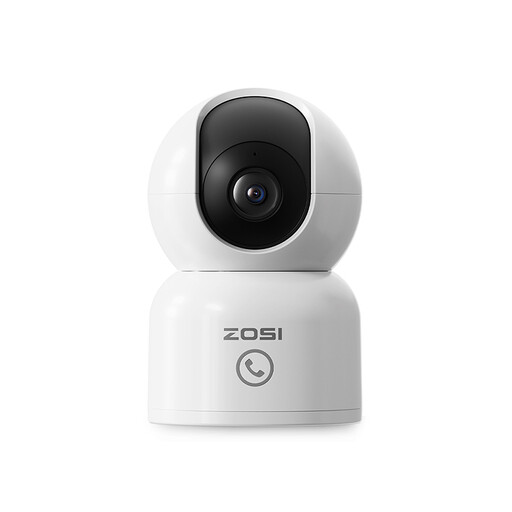
Why it stands out: This ZOSI camera stands out with its sharp 2.5K 4MP resolution, which is significantly more detailed than the standard 1080p. The auto-tracking feature, where the camera follows a moving person or pet, makes it particularly suitable for dynamic environments. The 'One-Touch Call' button on the camera is a unique addition, allowing children or the elderly to make instant contact.
Advantages:
Who is this camera for? Ideal for parents looking for a reliable baby monitor with a camera and app that offers extra-sharp video, or for pet owners who want to monitor their animal's behaviour closely. It's also a great choice for elderly care, thanks to the simple call function.

Why it stands out: The Tapo C200 from TP-Link is a popular choice due to its reliability and user-friendly Tapo app. It offers all the essential features in an affordable package. The camera delivers crisp 1080p Full HD video and has a 360-degree horizontal range. An interesting feature is the sound and light alarm, which can be activated to deter unwanted visitors.
Advantages:
Who is this camera for? An excellent all-rounder for anyone seeking a simple and reliable indoor Wi-Fi camera for general monitoring. Suitable for renters and homeowners who want an affordable solution for peace of mind.
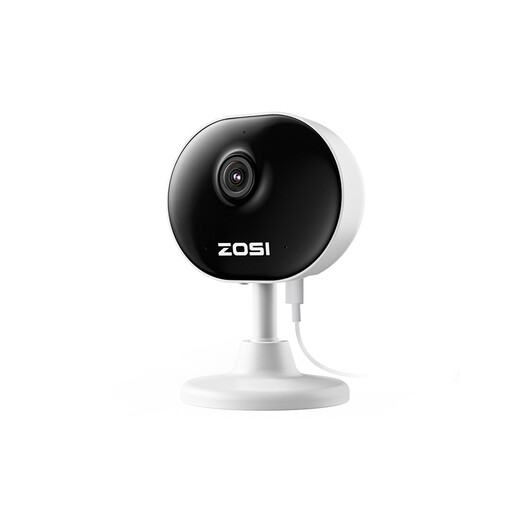
Why it stands out: The most striking feature of the ZOSI C688 is its compact and lightweight design. Weighing just 85 grams and featuring a magnetic base, this camera is highly discreet and offers flexible placement without drilling. Despite its small size, it provides 1080p HD video, night vision, and two-way audio. The ability to set motion zones helps reduce unnecessary notifications.
Advantages:
Who is this camera for? Perfect for those who want a discreet camera that blends seamlessly with their decor. Ideal for monitoring a specific area, such as a doorway, a pet's crate, or a nursery, without having a conspicuous device in sight.
This selection is a starting point to get you on your way. Many more models are available with different specifications and for various budgets. If you are looking for other features or a different type of camera, feel free to browse our full range.
Yes, for most features, you do. An indoor Wi-Fi camera connects to your home network to send footage to the app on your smartphone. This allows you to watch live and receive notifications. Without Wi-Fi, most cameras can still record to an SD card, but you won't be able to view the footage remotely.
Most cameras offer two options. The first is local storage on a microSD card that you insert into the camera. You purchase the card once and have no subscription fees. The second option is cloud storage, where footage is saved over the internet to the manufacturer's servers. This usually requires a monthly or yearly subscription, but your footage remains secure even if the camera is stolen.
No, installation is typically very straightforward these days. You connect the camera to a power source, download the corresponding app on your smartphone, and follow the in-app steps to connect the camera to your Wi-Fi network. This process usually takes no more than a few minutes.
