
Vandaag of morgen in huis

Kwaliteit gegarandeerd

Welkomstaanbiedingen ontgrendelen: GRATIS bezorging | Tot 80% korting | Gratis 30 dagen JoyPlus-proefperiode
Download de app
Keeping an eye on things has never been easier. Whether you want to see if the dog is jumping on the sofa, check that the baby is sleeping soundly, or simply want an extra sense of security, an indoor security camera is a practical solution. But the market is flooded with options promising the world. As a Joybuy Product Recommendation Officer, I'm here to help you make the right choices, based on facts, not hype.
Before you make a purchase, it's important to recognise a few common pitfalls. Many consumers fall for them, resulting in unnecessary costs and frustration.
night vision but deliver grainy, blurry images at night, making it impossible to identify anything. This renders the camera useless when you need it most.indoor Wi-Fi camera that constantly loses its connection or a camera with an app that freezes is a source of frustration. This is often due to outdated Wi-Fi technology or poorly developed software.To avoid these pitfalls, it's smart to focus on a few key specifications. These determine whether a camera is worth the money for your situation.
Image quality is expressed in resolution. A higher resolution means a sharper picture.
For nighttime, a good infrared sensor is fundamental. Some models also offer colour night vision, often with the help of a built-in spotlight. This can make a huge difference in identifying details in the dark.
A standard camera has a fixed viewing angle. If you want to monitor an entire room, you'll need multiple cameras or a model that can move.
A PTZ camera (Pan-Tilt-Zoom) can be remotely panned and tilted. With a 360-degree camera like this, you can survey the entire room via the app. This is ideal as a pet camera to follow your dog or as a baby monitor with camera to see the entire nursery.
Footage needs to be stored somewhere. Here are the two main options:
A smart camera that offers both options gives you the most flexibility.
Not everyone needs the same thing. Below are a few options, tailored to specific needs and situations.

Why This Fits Their Persona: Ideal for those seeking a reliable, straightforward solution without spending a lot. Perfect for monitoring a living room or as a basic baby monitor. The installation is simple and the features are straightforward.
This camera is designed for local storage via a microSD card. You are not forced into a subscription to save and review footage.
PTZ function (360°) for a complete room overview. Two-way audio to listen and speak. A very accessible price for a pan-tilt camera.
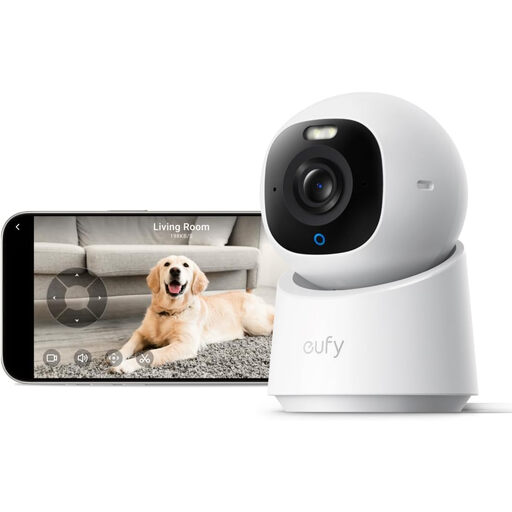
Why This Fits Their Persona: This camera is perfect for those who want to actively track what's happening. Its AI tracking automatically follows moving people or pets, so you don't miss a thing. The 4K resolution ensures crystal-clear images, even when zooming in.
eufy is known for its focus on local storage without mandatory monthly fees. AI detection happens on the device itself, which enhances privacy and reduces false alerts from shadows or light changes.
4K UHD resolution for superior detail. AI-powered tracking of people and pets. Colour night vision thanks to the built-in spotlight.
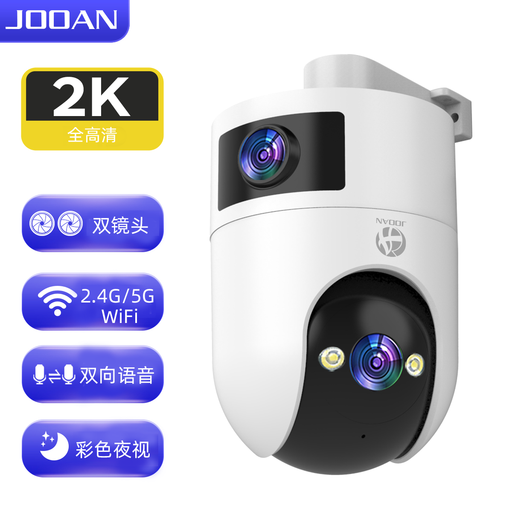
Why This Fits Their Persona: For those looking for more than a standard camera. This model has two lenses: one for a fixed overview and a second PTZ lens to zoom and track. Support for 5Ghz Wi-Fi ensures a faster, more stable connection.
It tackles the poor connection pitfall by supporting both 2.4Ghz and 5Ghz Wi-Fi. The dual lens is a tangible, functional upgrade, not a marketing gimmick. Here too, local storage is the default.
Dual lens for overview and detail simultaneously. 5Ghz Wi-Fi support for better performance. IP66 rating, which means it can also be used in a sheltered outdoor location.
We have compiled a complete, up-to-date list of products that meet these strict selection criteria.
Yes, most modern IP cameras for indoor use are designed for simple DIY installation. Usually, it's a matter of plugging the camera into a power source, downloading the companion app on your smartphone, and following the on-screen steps to connect the camera to your Wi-Fi network. This process often takes no more than a few minutes.
Data consumption depends heavily on the resolution and how much motion is recorded. A camera recording continuously in 4K will use significantly more data than a 1080p camera that only records upon motion detection. If you have a data cap on your internet plan, it's wise to set the camera to record only when motion is detected.
From a privacy perspective, local storage on an SD card is a secure choice because the footage doesn't leave your home via the internet. The risk is that if a burglar steals the camera, you also lose the footage. For this reason, some users opt for a combination: local recording as the default and a cloud subscription as a backup for important events.
