
Vandaag of morgen in huis

Kwaliteit gegarandeerd

Welkomstaanbiedingen ontgrendelen: GRATIS bezorging | Tot 80% korting | Gratis 30 dagen JoyPlus-proefperiode
Download de app
Keeping an eye on things when you're not home provides peace of mind. Whether you want to check on your pet, ensure the baby is sleeping soundly, or simply verify that everything is in order, an indoor security camera is the solution. However, the market is flooded with options, specifications, and marketing jargon. It can be challenging to determine which camera truly fits your needs.
As a Joybuy Product Recommendation Officer, my job is to help you make an informed choice. In this article, we'll explore some popular choices for 2026 and explain what to look for, so you can find a camera that meets your requirements without any unnecessary frills.
Before we dive into specific models, it's helpful to understand a few key features. This will help you better evaluate the specifications of a smart home camera.
Resolution determines how sharp the image is. Full HD (1080p) is often sufficient for a general overview, but a higher resolution like 2K offers more detail. This can be useful if you want to zoom in on a specific part of the room.
A camera with night vision is standard, but there's a difference between traditional infrared (black-and-white image) and colour night vision. A colour image in the dark can provide more context, such as the colour of clothing or objects. This is made possible by advanced sensors and large-aperture lenses.
No one wants a complicated installation involving drilling and pulling cables. Many modern cameras are 'plug-and-play': plug it in, connect to the app, and you're ready. Look for models with drill-free mounting options, which are ideal for rental properties.
A stable connection is crucial. An indoor Wi-Fi camera that supports dual-band Wi-Fi (both 2.4 GHz and 5 GHz) often provides a faster and more stable connection than cameras that only support 2.4 GHz. This reduces the chance of lag or stuttering during live viewing.
Modern cameras can do more than just record. Features like a 360-degree camera with pan and tilt capabilities let you view the entire room via the app. AI-powered detection can distinguish between people, pets, and insignificant movements, significantly reducing the number of unnecessary notifications.
Control via a camera with an app is the standard. Check if the app is intuitive and offers the features you need, such as two-way audio (talk and listen) or setting up privacy zones.
Based on the criteria above, we've highlighted a few interesting options for you.

Why it stands out: The anti-reflection technology makes this camera particularly suitable for monitoring through a window. Where other cameras suffer from glare, the C680 is designed to deliver a clear picture, even through double-glazed windows.
Key features:
Who is it for? Ideal for residents of apartments or houses who want to monitor their driveway, front yard, or street from inside, without installing an outdoor camera.

Why it stands out: The Tapo C200 is a popular all-rounder that combines reliable basic functions with a user-friendly app. The 360-degree pan/tilt function provides a complete overview of the room.
Key features:
Who is it for? A great choice for those looking for a reliable and affordable smart home camera for general surveillance, such as keeping an eye on the living room or as a simple video baby monitor.
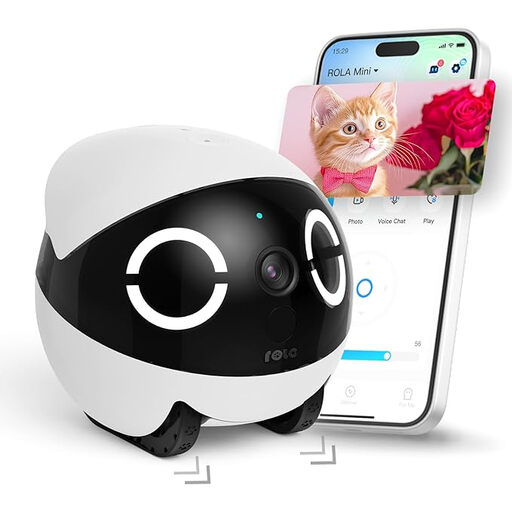
Why it stands out: This is more than a static camera; it's a mobile robot. You can remotely drive the ROLA Mini through your home to find and interact with your pets.
Key features:
Who is it for? Perfect for pet owners who want to do more than just watch. This pet camera is designed for active interaction with your dog or cat when you're not home.
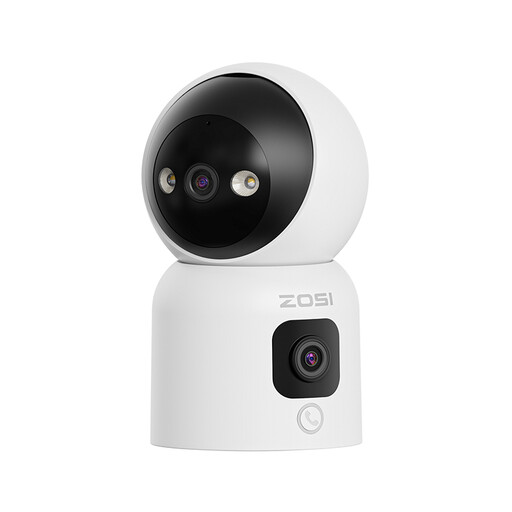
Why it stands out: This camera combines two lenses in one device. The top lens can rotate 360 degrees for a complete overview, while the bottom lens provides a fixed panoramic view. This way, you won't miss a thing.
Key features:
Who is it for? An excellent option for families, as a video baby monitor, or for monitoring the elderly. The simple call functions make it easy for children and seniors to get in touch.
The right camera depends heavily on your personal situation. Are you looking for other models or want to explore our full range? Check out our intelligent device category for more options.
Yes, placing a camera in your own home is permitted. However, you must respect the privacy of others. Do not film public roads, neighbours' property, or areas where people expect privacy (such as a bathroom). Always inform housemates, guests, and any domestic help about the camera's presence.
Not always. Many cameras, like the TP-Link Tapo C200 and the Enabot ROLA Mini, offer the option to store footage locally on a microSD card. This is a one-time purchase and does not require a monthly subscription. Cloud storage is an optional service offered by many brands. Its advantage is that your footage is stored securely off-site, even if the camera is stolen.
The 2.4 GHz band has a longer range but is often more crowded and slower. The 5 GHz band is faster and more stable but has a shorter range. A camera with dual-band Wi-Fi can connect to both networks and automatically chooses the best option. This ensures a more reliable streaming experience, especially when viewing high-resolution video.
