
Vandaag of morgen in huis

Kwaliteit gegarandeerd

Welkomstaanbiedingen ontgrendelen: GRATIS bezorging | Tot 80% korting | Gratis 30 dagen JoyPlus-proefperiode
Download de app
By Joybuy Product Recommendation Officer, July 18, 2026
Keeping an eye on things when you're not home provides peace of mind. Whether you want to see what your pet is up to, monitor the nursery, or simply know that everything is okay, an indoor Wi-Fi security camera is a simple and effective solution. However, the market is vast, and the specifications can be confusing.
This guide is designed to help you. We'll cut through the marketing jargon and focus on the specifications that truly matter. This will help you make an informed choice that suits your home and your needs.
Before we highlight some models, it's helpful to know which features are important. Here are three key points to consider.
Image clarity is crucial. Full HD (1080p) is the standard nowadays and offers sufficient detail for most situations. For those who want an even sharper image, a 2K resolution is a good upgrade.
A good night vision camera is at least as important. Most cameras use infrared (IR) for black-and-white images in the dark. Some more advanced models now also offer color night vision, which can help in identifying details such as the color of clothing.
A camera with a fixed lens only covers part of the room. For complete coverage, a pan-tilt camera is a popular choice. It can be remotely rotated (pan) and tilted, allowing you to survey the entire space. A 360-degree camera with its pan function offers a complete overview of the surroundings.
Additionally, a camera with motion detection is essential. As soon as the camera detects movement, you receive a notification on your smartphone via the corresponding camera with app. Some smart cameras can even distinguish between people, animals, and other movements to prevent unnecessary alerts.
Where is the footage stored? You typically have two options: a local microSD card or a cloud subscription. A microSD card is a one-time purchase and gives you full control over your footage, with no monthly fees. Cloud storage offers the advantage of having your footage securely stored off-site, even if the camera is stolen.
The installation of a modern indoor IP camera is usually straightforward: plug it in, connect to your Wi-Fi network via the app, and you're done. This makes them ideal for renters who aren't allowed to drill holes.
Based on the criteria above, we have selected cameras that offer a good balance between functionality and ease of use.

Why It Stands Out The Tapo C200 is a popular model due to its comprehensive features at an accessible price. It combines sharp image quality with a wide range of motion, making it suitable for various applications.
Pros
Who Is It For? Ideal for anyone looking for a reliable and affordable pan-tilt camera. Suitable as a pet camera to keep an eye on your dog or cat, or as a simple baby monitor with camera and app.
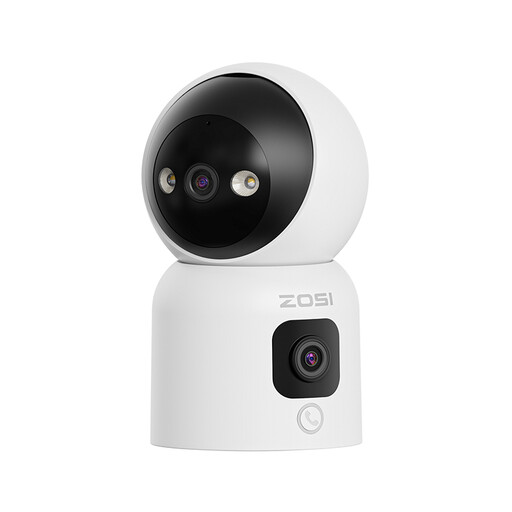
Why It Stands Out This ZOSI camera distinguishes itself with its dual lens and unique calling features. It offers two perspectives at once: a rotating lens for details and a fixed lens for a wide overview.
Pros
Who Is It For? Perfect for families who want an easy way to stay in touch with children or elderly relatives. Also a great choice for users who want the most complete view of a room with a single device.

Why It Stands Out The ZOSI C680 solves a common problem: filming through a window. Its special anti-reflection technology prevents glare and overexposure, giving you a clear view of what's happening outside while the camera remains safely indoors.
Pros
smart camera can distinguish between vehicles and people, significantly reducing false alerts.Who Is It For? The ideal solution for residents of apartments or rental homes who want to monitor their driveway, front yard, or street without installing an outdoor camera.
Is one of these models not quite what you had in mind? Every situation is unique and sometimes requires a different solution. For more options, such as cameras with specific smart home integrations or different form factors, you can browse our wider selection.
Check out our full range of Smart Cameras for more options.
Most standard indoor cameras perform poorly when filming through glass, especially at night. The infrared LEDs reflect off the glass, resulting in a white, unusable image. However, models like the ZOSI C680 are specifically designed with anti-reflection technology to bypass this problem and deliver a clear view through a window.
No, a subscription is not always necessary. Many cameras, including the TP-Link Tapo C200, offer the option to store footage locally on a microSD card. This is a one-time purchase. A cloud subscription is an optional service that can provide additional benefits, such as an off-site backup of your footage.
The installation is typically very simple. You position the camera, plug it in, and follow the steps in the companion app on your smartphone to connect the camera to your Wi-Fi network. This process usually takes no more than a few minutes and requires no technical expertise.
