
Vandaag of morgen in huis

Kwaliteit gegarandeerd

Welkomstaanbiedingen ontgrendelen: GRATIS bezorging | Tot 80% korting | Gratis 30 dagen JoyPlus-proefperiode
Download de app
Keeping an extra eye on your home provides peace of mind. Whether you want to check if the kids are home safe, make sure the dog isn't destroying the sofa, or simply secure your home while you're away, an indoor security camera is a simple and effective solution. However, the market is vast, and the specifications can be overwhelming.
This article serves as a practical guide. We cut through the marketing jargon and focus on what truly matters to you as a user. We'll examine features, ease of use, and costs, so you can find a camera that fits your needs without getting locked into expensive, mandatory subscriptions.
Before we dive into specific models, here are a few key considerations to help you make your choice.
Image quality is crucial. A camera must be able to capture clear footage, both day and night.
security camera with night vision uses infrared (IR) for black-and-white images in the dark. Some newer models offer 'color night vision', which can produce full-color images in very low light. This can make a significant difference in the recognisability of details.A common question is whether you can use an indoor camera without a subscription. The answer is yes, and the key lies in the storage method.
For most users who are budget-conscious and value their privacy, a camera with local storage is an excellent choice.
A smart indoor camera can do more than just record. The ability to survey an entire room and intelligently respond to movement is a key feature.
360-degree camera with pan and tilt functionality can be controlled remotely via the app to view the entire room.camera with motion detection sends a notification to your phone when something happens. Advanced models use AI to distinguish between people, pets, and other movements, significantly reducing the number of false alarms.Based on the criteria above, we have selected a range of popular and functional indoor cameras. These recommendations are based on their specifications and the value they offer for different users.

Why It Stands Out: The ZOSI C680 is specifically designed to film through glass without reflections. According to the manufacturer, its anti-glare technology ensures clear images, even through double-glazed windows. This makes it ideal for renters or anyone who doesn't want to drill into walls. The installation with an included mount is simple and leaves no trace.
Key Features:
Who Is It For? This camera is an excellent choice for people who want to monitor their driveway, front yard, or balcony from a window. It's also a practical solution for apartment dwellers who are not allowed to or do not wish to drill holes in the walls.
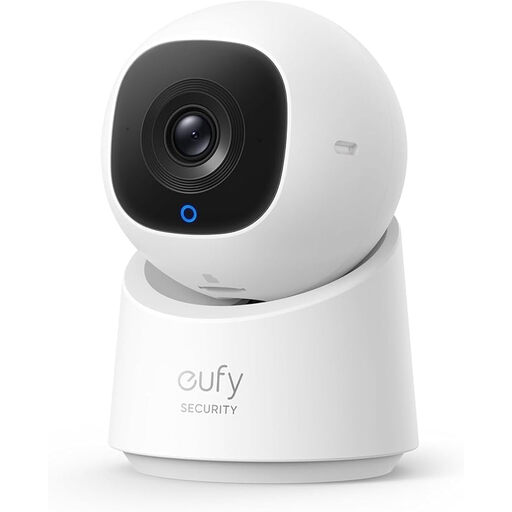
Why It Stands Out: The eufy C220 combines a sharp 2K resolution with full 360-degree coverage thanks to its pan and tilt function. What makes it truly smart is the built-in AI that, according to the manufacturer, can detect and automatically track people. The physical privacy mode, which turns the lens away, is a strong feature for those who value privacy.
Key Features:
Who Is It For? Ideal for monitoring a large open space like a living room or office. Thanks to its AI tracking and two-way audio, it's also a very capable baby monitor with camera and app or pet camera to keep an eye on your four-legged friend.
View the eufy Indoor Cam C220 on Joybuy

Why It Stands Out: The Tapo C200 from the well-known brand TP-Link is a very popular and reliable all-rounder. It offers all the essential features you would expect from a modern wifi camera indoor, such as 1080p HD video, pan and tilt capabilities, and two-way audio, packaged in an accessible and affordable product.
Key Features:
Who Is It For? This is an excellent entry-level camera for anyone looking for a reliable and simple solution without too many frills. Perfect for securing a student dorm, a garage, or as an extra camera in a child's room.
View the TP-Link Tapo C200 on Joybuy
The cameras mentioned above are perfect standalone solutions. However, if you are planning to set up a more comprehensive security system with multiple cameras and a central storage unit (NVR), then it is worth considering other options as well.
Discover our range of security camera recorders
No, it's not always necessary. All the models recommended above support local storage via a microSD card. This means you store the footage on the camera itself and have no monthly subscription fees for basic functions like recording and receiving notifications.
Privacy is a key concern. Opt for a camera with local storage if you prefer to keep your data in-house. Features like the physical privacy mode on the eufy camera provide an extra layer of security. Additionally, always ensure you use a strong and unique password for both your camera app and your Wi-Fi network.
Absolutely. Many modern indoor cameras are excellently suited for this. Features like two-way audio (to talk and listen), clear night vision, and instant notifications for sound or motion on your smartphone make them a versatile alternative to a traditional baby monitor with camera and app or a dedicated pet camera.
