
Vandaag of morgen in huis

Kwaliteit gegarandeerd

Welkomstaanbiedingen ontgrendelen: GRATIS bezorging | Tot 80% korting | Gratis 30 dagen JoyPlus-proefperiode
Download de app
Keeping an eye on things has never been easier. Whether you want to see if the dog is on the sofa, check if the baby is sleeping soundly, or simply want extra peace of mind when you're away from home, an indoor Wi-Fi security camera is a practical solution. However, the market is flooded with options, specifications, and promises. It can be challenging to determine which camera truly fits your needs without paying for features you don't require.
As a Product Recommendation Officer at Joybuy, I'm here to help you navigate the choices. In this article, we'll cut through the marketing noise and focus on what really matters. We'll discuss the key considerations and highlight some popular choices for 2026, so you can make an informed decision.
Before we dive into specific models, it's useful to know which features make a difference. Here are three key considerations.
A static camera can cover part of a room, but what happens outside its frame? A 360-degree camera, often called a PTZ (Pan-Tilt-Zoom) camera, offers a complete solution. These cameras can be remotely panned and tilted, allowing you to survey the entire room without blind spots. This is ideal for larger living rooms, playrooms, or for tracking a moving pet.
Modern cameras are more than just a passive eye. A smart indoor camera can distinguish between different types of motion. Thanks to AI algorithms, the camera can specifically recognise people, pets, or even crying babies. This reduces the number of unnecessary notifications, such as from a curtain blowing in the wind. Features like automatic tracking ensure the camera follows a moving person, so you always have a clear view of the situation.
Clear image quality is essential. A resolution of 1080p is the standard today, but 2K resolution offers even sharper details. Just as important is a good security camera with night vision. Standard infrared provides a black-and-white image in the dark. However, some models also offer color night vision, which gives a much clearer and more natural view of what's happening at night. This is a major advantage for those using the camera as an advanced baby monitor with camera and app or to monitor a pet camera at night.
Based on functionality and ease of use, we have selected a few cameras that meet the needs of many households.
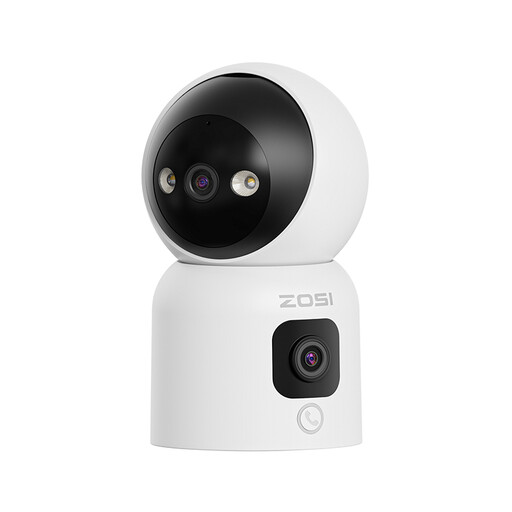
Why it stands out: This camera combines two lenses in one device. The top lens can rotate 360 degrees, while the bottom lens provides a fixed panoramic view. This allows you to zoom in on a detail while simultaneously maintaining an overview.
Pros:
Who is it for? Families looking for a versatile solution. The calling feature makes it an excellent communication tool for contacting children or elderly relatives. The dual lens is perfect for monitoring large, open spaces.

Why it stands out: The built-in 2.8-inch screen is a unique feature. This enables two-way video calling, making it more than just a security camera. You can not only talk but also see each other.
Pros:
Who is it for? Ideal for caregivers or families with young children. The screen adds a personal dimension to communication, turning it into an advanced baby monitor with camera and app or a communication device for the elderly.
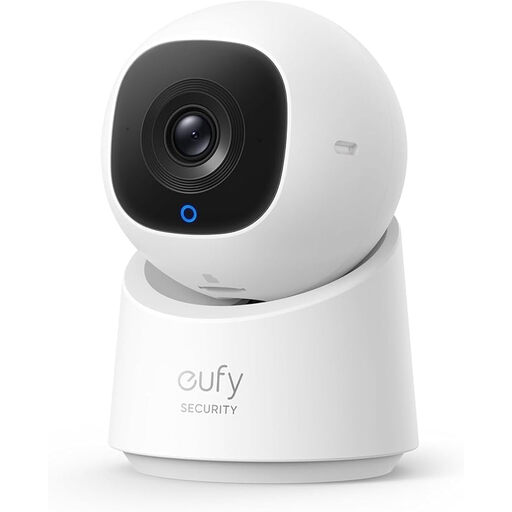
Why it stands out: eufy (an Anker brand) is known for its focus on user-friendliness and local storage without mandatory subscription fees. This camera is a prime example of that philosophy.
Pros:
Who is it for? For anyone looking for a reliable and straightforward indoor IP camera without being tied to monthly fees. The combination of sharp image quality, smart tracking, and a focus on privacy makes it a solid all-rounder.
The models above are popular choices, but your situation might require something different. Perhaps you're looking for an outdoor camera, a battery-powered model, or a complete camera system.
? Explore our full range of security cameras for more options.
Not always. Many cameras, including the models mentioned above, offer the option to store footage locally on a microSD card. This means you can use basic functions like live viewing, receiving notifications, and reviewing recordings without any monthly costs. Cloud storage is often an optional service that does require a subscription.
Installation is generally very simple. You plug the camera into a power outlet, download the corresponding app on your smartphone, and follow the in-app steps to connect the camera to your Wi-Fi network. This process usually takes no more than a few minutes and requires no technical expertise.
A 360-degree camera is very useful for monitoring larger, open spaces. However, if you only want to monitor a specific spot, such as a doorway or a baby's crib, a fixed camera with a wide viewing angle may also be sufficient. The choice depends on the size of the room and what exactly you want to keep an eye on.
