
Vandaag of morgen in huis

Kwaliteit gegarandeerd

Welkomstaanbiedingen ontgrendelen: GRATIS bezorging | Tot 80% korting | Gratis 30 dagen JoyPlus-proefperiode
Download de app
Keeping an eye on your home when you're away provides peace of mind. Whether you want to check that everything is okay, see what your pet is up to, or need a modern baby monitor with camera and app, an indoor security camera is a practical solution. However, the market is vast, and the specifications can be confusing.
This guide is here to help. As a Joybuy Product Recommendation Officer, I filter the market and present the facts. No marketing jargon, just clear information about what a camera can do and who it's for, so you can make a choice that fits your needs.
Before we dive into the models, here are a few key considerations to help you choose the right indoor Wi-Fi camera.
The resolution determines how sharp the image is. Full HD (1080p) is sufficient for most situations to clearly recognise people and activities. 2K resolution offers even more detail, which can be useful if you want to be able to zoom in.
Night vision is just as important. Most cameras use infrared (IR) for black-and-white images in the dark. Some more advanced models offer colour night vision, which can help in identifying details like the colour of clothing.
An indoor camera with recording stores footage in two ways:
Many cameras offer both options, allowing you to choose what you prefer.
Modern indoor cameras are often smart cameras with handy extras. A pan-tilt camera can be remotely rotated and tilted, allowing you to survey the entire room. Two-way audio allows you to speak and listen through the camera, which is useful for soothing a pet or communicating with a family member. Also, check if the camera can be controlled with voice assistants like Google Assistant or Amazon Alexa if you have a smart home.
Based on specifications and functionality, we have highlighted some interesting options for you.

Why it stands out: The Tapo C200 is a versatile and affordable pan-tilt camera that gets the basics right. It offers a complete feature set at an accessible price point.
Pros:
Who is it for? Ideal for anyone looking for a reliable and easy-to-use ip camera for general purposes, such as monitoring a living room or playroom.
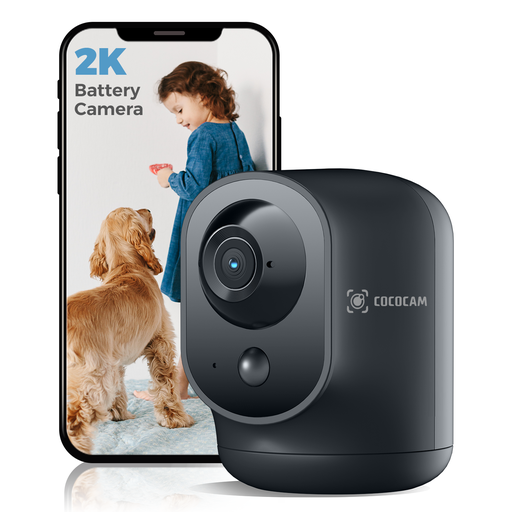
Why it stands out: This camera is completely wireless thanks to its built-in 5200mAh battery. You can place it anywhere without being dependent on a power outlet.
Pros:
wireless indoor security camera.Who is it for? Perfect for renters who don't want to drill holes or for those who want to use the camera in different locations. An excellent choice as a pet camera or as a flexible baby monitor with camera and app.

Why it stands out: This camera is unique due to its built-in 2.8-inch screen and two-way video calling feature. With a single press of a button, someone at home can initiate a video call to your smartphone.
Pros:
Who is it for? A great solution for families who want an easy way to stay in touch with children or elderly relatives at home. It's more than a security camera; it's a communication tool.

Why it stands out: This camera is specifically designed to film through a window without issues from reflections or glare, both day and night.
Pros:
Who is it for? The perfect solution for residents of apartments or houses who want to monitor their driveway, front yard, or street from inside, without having to install an outdoor camera.
The cameras mentioned above are designed for indoor use. Are you looking for a weather-resistant solution for the perimeter of your home? Then check out our range of wireless battery-powered outdoor security cameras for more options.
1. What is the difference between an IP camera and a Wi-Fi camera? An IP camera is any camera that transmits images over a computer network (Internet Protocol). An indoor Wi-Fi camera is a type of IP camera that connects wirelessly to your network. In practice, the terms are often used interchangeably for cameras that you view via an app on your phone.
2. Can I use an indoor security camera as a baby monitor? Absolutely. Many indoor cameras are an excellent alternative to a traditional baby monitor. Features like two-way audio, night vision, and motion or sound alerts on your phone make them highly suitable as a baby monitor with camera and app.
3. Do I need a subscription for an indoor camera with recording? Not necessarily. If you choose a model with a microSD card slot, you can store footage locally without monthly fees. Cloud storage is an additional service for which manufacturers usually charge a subscription.
I hope this guide helps you find the right indoor camera for your needs.
Best regards,
Joybuy Product Recommendation Officer
