You don’t necessarily need a programmable keyboard to index recorded interviews using custom fields. Start with the shortcuts and field navigation in your indexing software. Programmable keys can be useful for commands or text you enter frequently, but only if your software supports those actions. For long typing sessions, the keyboard layout and your workstation matter too.
Who is this relevant to?
Indexer who uses the same fields repeatedly
If you often enter the same custom fields or text values, first check which shortcuts your software supports. Transana and ATLAS.ti document shortcuts for transcription and coding; Logitech describes Smart Actions for automating repeated tasks.
Transcriber navigating audio
If you often switch between playing, rewinding and typing, check which playback controls are available in your programme. Transana describes shortcuts for audio controls and repeated text entry.
Frequent typist with long sessions
For extended interview work, you may also want to consider the keyboard layout, hand position and workstation setup. Kinesis describes adjustable keyboard halves; Arboportaal recommends varying your activities and taking microbreaks when working at a screen.
What should you consider when choosing?
First, try the shortcuts and field navigation in your current programme. Only then consider extra programmable features or a different keyboard, and assess comfort as part of your overall workstation setup.
| Consideration |
What to look for |
Who is this important for? |
| Repeating custom fields |
For each action, check whether your programme offers shortcuts, text entry or a reliable tab order. |
If I enter the same custom fields for lots of clips, I want to know whether my programme supports those actions. Around 31% of consumers prioritise repeated field entry. |
| Controlling audio |
Test play, pause and rewind while the cursor is in the indexing field. |
When I often need to return to the recording while typing, I want to be able to control the audio as part of my workflow. Around 31% of consumers give audio navigation top priority. |
| Long typing sessions |
Assess hand and mouse position, and factor in changes of activity and microbreaks. |
For long sessions, I consider how the keyboard fits into my workstation. Around 23% of consumers prioritise typing comfort. |
| Layout and connection |
Check the exact key layout, operating system and connection required. |
If an unfamiliar layout would get in the way of my everyday typing, I want to check the exact version in advance. Around 15% of consumers give layout or connection top priority. |
Common buying mistakes
-
Assuming a macro key can replace a missing software feature
A programmable key only performs an action you have set up. The shortcuts described by Transana and the ATLAS.ti 22 manual for Windows apply to that software and version; they don’t confirm that a custom field is accessible in your programme.
First, test a complete indexing task with your current keyboard and software. Only then set up a macro for a command that your programme actually supports.
Setting it up and checking it takes time; entering data in the wrong field may mean extra work to put it right.
-
Confusing ISO with a Dutch keyboard layout
The Keychron V6 Max ISO version mentioned here is DE-ISO. The ISO label alone doesn’t mean the layout is Dutch.
Check the exact version and the keys shown before buying.
-
Buying an additional keypad as a full keyboard
The CHERRY G84-4700 is a keypad and cannot replace a full keyboard for all your typing needs.
Choose this option only if your main keyboard already meets your needs and you require extra input keys.
-
Focusing only on the keyboard during long sessions
For screen-based work, Arboportaal also recommends varying your activities, maintaining a suitable working posture and taking microbreaks. A split keyboard doesn’t replace the need to consider your workstation.
Assess your keyboard and mouse placement alongside the length of your sessions and your habits.
Brands to consider
Logitech
The MX Keys S is a full-size keyboard for anyone who wants to set up actions in Logi Options+ as well as type.
- Logitech describes Smart Actions as a way to automate repetitive tasks with a single keystroke.
- This doesn’t confirm that a particular command or custom interview field is accessible in your software.
Keychron
The V6 Max ISO range is worth considering if you’re looking for a full-size mechanical keyboard with customisation options.
- Keychron specifies QMK and a full-size layout for the V6 Max ISO range.
- The ISO version mentioned is DE-ISO; check that the exact layout suits the way you type.
Kinesis
The Freestyle2 is a split keyboard for anyone who wants to adjust its physical position during long typing sessions.
- Kinesis describes adjustable keyboard halves and optional tenting accessories.
- These features don’t confirm support for custom field macros or guarantee a reduction in discomfort.
CHERRY
The G84-4700 is an additional programmable keypad for repeated input alongside an existing keyboard.
- CHERRY mentions software macros for the keys and lists Windows and USB-A for the G84-4700.
- It’s a keypad, not a full keyboard; key-reprogramming options may vary between keyboards.
Joybuy products for interview indexing
This selection includes keyboards and additional programmable input devices for repeated interview data entry. Check that the action you want works in your indexing software and that the key layout suits you.
 No image available
KEYSME Lunar 01 80% Tri-Mode Mechanical Keyboard
The programmable knob may be useful for recurring commands, provided your software supports the key action you want.
The product name specifies a QWERTY US layout; check that it suits the way you type.
View at Joybuy
 No image available
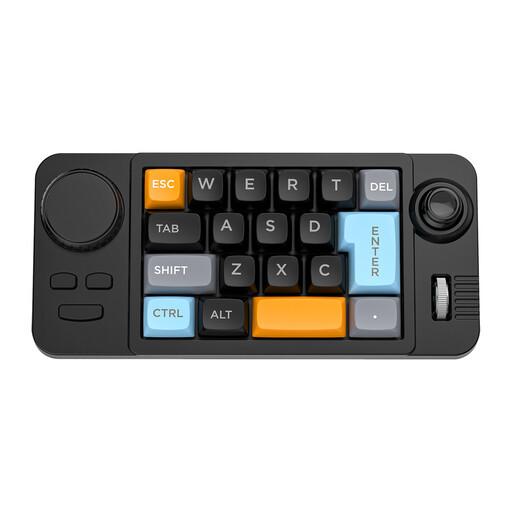
NAXSIR 19-key Wired Macro-Programmable Keyboard
The programmable controls may be a useful addition for repeated commands if your indexing software supports the actions you want.
The product name specifies 19 keys, a wired connection and hot-swappable switches. Also check that the stated QWERTY US layout suits you.
View at Joybuy
 No image available
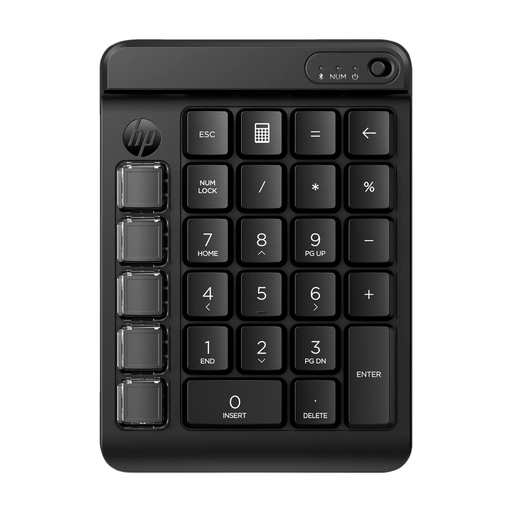
HP 435 Programmable Wireless Keypad
This programmable keypad is designed to complement an existing keyboard for recurring commands.
Before setting them up, check that the commands you want work in your indexing software.
View at Joybuy
 No image available
MageGee TS91 Wired Gaming Keyboard
This additional control is designed for repeated commands alongside an existing keyboard; check that the actions you want work in your software.
The product name specifies a wired connection. Check the exact version and layout to make sure they suit your needs.
View at Joybuy
Frequently asked questions
Can a macro key jump straight to any custom indexing field?
No, not automatically. Check whether the field is accessible in your programme using the command you’ve set up or a reliable keyboard sequence. Test the whole process in a sample file before working through lots of interviews.
Do I need to buy extra hardware to enter text repeatedly?
Not always. Transana offers shortcuts for inserting repeated text in its transcription feature. Before choosing a separate programmable device, check whether the software you use has a similar feature.
How should I set up for long indexing sessions?
Set up your workstation to suit your tasks, vary your posture and activities, and take microbreaks. Arboportaal recommends these measures for screen-based work; a keyboard alone can’t replace them.
Can I process identifiable interview recordings and index fields without restrictions?
If recordings or fields contain personal data, establish which GDPR lawful basis applies to your situation before processing them. The Dutch Data Protection Authority explains that you must determine the lawful basis in advance; which one applies depends on the specific processing involved.


