Who is this set-up for?

Singers who want to hear their own voice

If you’re practising timing and harmonies with backing tracks, you need a monitor mix that includes your own voice. Shure explains that the available monitor outputs and the number of mixes you need depend on your set-up.

Campers who are considerate of others

Well-fitting in-ears can help you hear the backing track through your earphones, but they won’t silence your voice for people outside them. So check the campsite rules before singing or using a microphone.

Singers who want room to move

A wireless monitoring system can remove the cable between the audio source and the singer. However, you’ll also need to consider the extra equipment, power, connections and possible interference.

What should you look for when choosing?

Wired in-ears connected directly to the audio source

Suitable when: you practise in one place and your audio source already provides a suitable mix through a headphone output.

Consider: you’ll need less extra equipment, but the cable will limit how far you can move.

Wired bodypack monitor amplifier

Suitable when: a mixer provides a suitable monitor feed and you want to control the volume from your bodypack.

Consider: an amplifier such as the Behringer P2 won’t create a vocal mix. It needs suitable connections and two AAA batteries, which Behringer says are not included.

Wireless monitoring system with separate in-ears

Suitable when: you want to move around while practising and have a suitable audio source and earphones.

Consider: you’ll be adding a transmitter, receiver and power supply. Also check the latency of the entire signal path and the risk of interference.

What to consider What to look for when buying Who should pay particular attention?
Your own vocals and timing Check that your microphone and backing track are included in the monitor mix, and assess the entire signal path. I want to hear my voice with the backing track while practising, without timing shifts distracting me; around 36% of consumers put vocals and timing ahead of other buying priorities.
Fit and quiet practice Check which tip sizes are included, start at a low volume and check the campsite rules on audible singing. When practising at the campsite, I want earphones that fit properly and to be considerate of others; around 29% of consumers prioritise fit and quiet practice.
Connections and equipment Check your microphone, mixer or interface, outputs, plugs and power supply before choosing your equipment. If you want to find out first what equipment you can already use and what else your set-up needs, you’re among the consumers who prioritise existing equipment and purchase costs; around 21% put these first.
Freedom to move For wireless use, check what’s included in the set, the power supply, frequency and applicable terms of use. I want to move around without a signal cable connecting me to the audio source, while allowing for extra equipment and the chance of interference; around 14% of consumers put freedom to move first.

Common buying mistakes

  • Buying earphones alone to hear your own vocals electronically

    Earphones don’t create a mix of your voice and the backing track. Without a suitable microphone path and monitor output, you can’t listen to your voice through the earphones as a monitor signal.

    Before buying, map out the signal path from your microphone and backing track to your earphones. You may also need a suitable mixer, interface, monitor amplifier or cable.

  • Assuming the stated wireless latency applies to the entire set-up

    The audio source, mixer and any software may also contribute to the latency you hear.

    Assess the entire monitor path using your own voice. If timing is your main concern, check whether your audio source can provide direct monitoring.

  • Confusing isolating earphones with silent singing

    Earphones reduce the sound coming from outside into your ears, but they won’t make your voice inaudible to other campers. Rules vary by location. For example, the rules published by Camping de Rietschoof on 27 May 2026 prohibit singing and using a microphone there; this is not a nationwide rule.

    Check the campsite’s current rules and local regulations before deciding how to practise. The Dutch government directs people to the Omgevingsloket for local rules and plans.

  • Forgetting about power and frequency when going wireless

    A wireless set-up adds equipment and uses radio spectrum that may be shared with other applications. The Dutch Authority for Digital Infrastructure warns that this can cause interference.

    Check whether the set includes a transmitter and receiver, how the earphones connect, what power supply is needed and which frequency conditions apply to the exact model.

Brands to consider

Shure

The SE215 is a wired in-ear for anyone looking for a replaceable cable and a choice of ear tips.

  • Shure lists a detachable MMCX cable and multiple ear tips for the SE215.
  • The noise isolation of up to 37 dB stated by Shure depends on the fit and isn’t guaranteed for every user. The earphones don’t create a vocal mix.

Sennheiser

The IE 100 PRO is a wired in-ear with a compact design and a choice of silicone or foam ear tips.

  • Sennheiser lists a 10 mm dynamic driver and interchangeable ear tips.
  • Sennheiser’s sound descriptions are manufacturer claims. Check that the connection and fit are right for your own set-up.

Behringer

The Powerplay P2 is a wired bodypack monitor amplifier for an existing, suitable monitor feed; it isn’t a pair of in-ears.

  • Behringer lists a mono/stereo switch and volume control on the belt pack.
  • The P2 doesn’t create a vocal mix and needs two AAA batteries, which Behringer says are not included.

Xvive

The U4 creates a wireless connection between a suitable audio source and separately connected in-ears.

  • Xvive specifies a 2.4GHz system with less than 5 ms system latency for the U4.
  • This specification doesn’t automatically describe the latency of the entire vocal signal path. The Dutch Authority for Digital Infrastructure warns that shared radio spectrum can cause interference.

Wired in-ears at Joybuy

This selection of Joybuy products focuses on wired in-ears for practising in one place. You’ll also need a suitable audio source that can combine your microphone and backing track in the monitor mix.

Bose Noise Cancelling wired in-ear earphones, black

Bose Noise Cancelling wired in-ear earphones, black

The wired design suits a fixed practice spot; you’ll also need a suitable audio source for your vocal mix.

The product description lists several ear tip sizes and stability wings.

View product at Joybuy
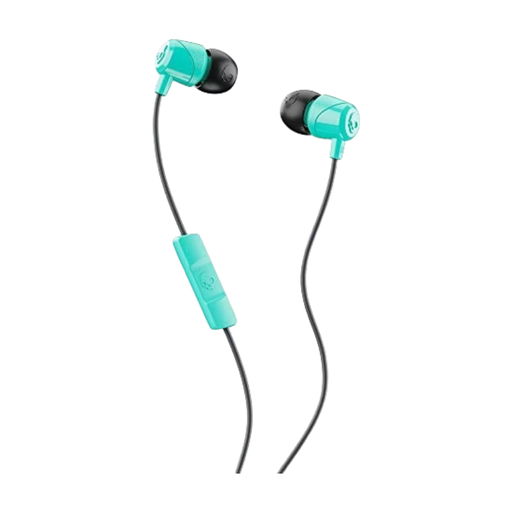
Skullcandy Jib In-Ear with microphone, Miami

Skullcandy Jib In-Ear with microphone, Miami

These wired in-ears suit a fixed listening spot; your audio source still needs to combine your vocals and backing track in the mix.

The product description lists a 3.5mm connection and three pairs of silicone ear tips.

View product at Joybuy
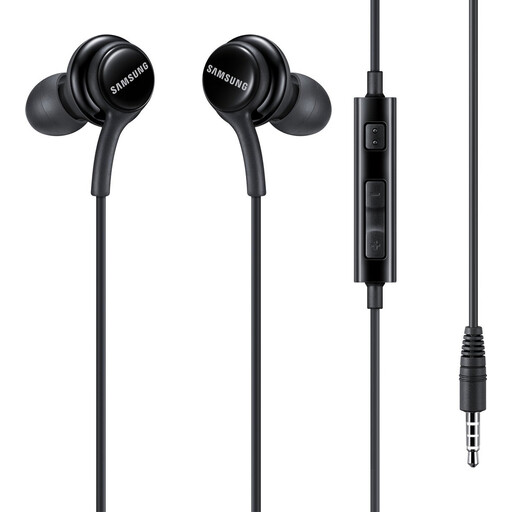
Samsung EO-IA500 in-ear stereo headset, black

Samsung EO-IA500 in-ear stereo headset, black

This wired headset is an option for a fixed practice spot with a suitable headphone output; your audio source provides the vocal mix.

The product information lists a 3.5mm connection.

View product at Joybuy

Samsung EO-IC100 wired in-ear headset, USB Type-C, black

Samsung EO-IC100 wired in-ear headset, USB Type-C, black

The wired design suits a fixed practice spot if your audio source has the right connection; you’ll also need a suitable monitor mix to hear your own voice.

The product name specifies USB Type-C. The product description lists several ear tip sizes.

View product at Joybuy
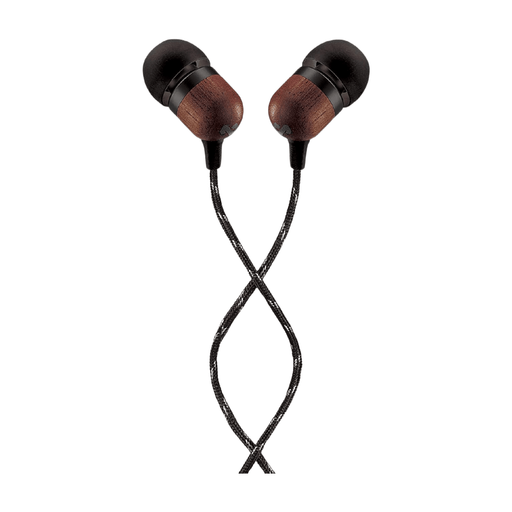
House of Marley Smile Jamaica, USB-C, 9.2 mm

House of Marley Smile Jamaica, USB-C, 9.2 mm

These wired in-ears are designed for a fixed listening spot with a suitable USB-C connection; they don’t create a monitor mix themselves.

The product name specifies a 9.2 mm driver. The product description mentions a noise-isolating design and a tangle-resistant cable.

View product at Joybuy

Frequently asked questions

Can I hear my own vocals with in-ear earphones alone?

Not as an electronic monitor signal. To do that, a microphone needs to be connected to a suitable audio source or mixer, and your voice needs to be sent to the headphone or monitor output. Also check that the backing track is included in the mix.

When should I choose a wired or wireless in-ear set-up?

A wired set-up is a good fit if you practise in one place and your audio source already has a suitable monitor output. Wireless can give you more room to move, but requires extra equipment and power. Also check the connection and the risk of interference.

Does latency of less than 5 ms mean the entire vocal signal path is that fast?

No. Xvive specifies less than 5 ms for the U4 system, not necessarily for the complete signal path through the microphone, mixer and any software. Assess the whole set-up if timing matters.

Can I sing or use a microphone at any campsite in the Netherlands?

You can only determine that by checking the campsite rules and the local situation. For example, rules published by Camping de Rietschoof on 27 May 2026 prohibit singers and microphones; this is not a nationwide rule. Check the campsite’s current rules and, where relevant, local regulations.

Do I need a licence for a wireless in-ear system in the Netherlands?

According to the Dutch Authority for Digital Infrastructure, a licence is generally not needed for wireless microphones and in-ear monitoring systems, but you must use the correct radio spectrum. Check which frequencies and conditions apply to your specific model and location.
