
Vandaag of morgen in huis

Kwaliteit gegarandeerd

Welkomstaanbiedingen ontgrendelen: GRATIS bezorging | Tot 80% korting | Gratis 30 dagen JoyPlus-proefperiode
Download de app
Choosing a new monitor can be a daunting task. Whether you're a professional needing more screen real estate for spreadsheets, a gamer seeking the fastest response time, or someone who wants a single display for both work and play, the range of options is vast. Iiyama is a brand known for its wide assortment, but which model is truly right for you?
As a Joybuy Product Recommendation Officer, I'm here to help you cut through the specs and marketing jargon. In this article, we'll highlight several popular iiyama monitors and provide practical tips to help you make a choice that perfectly matches your needs.
Before we dive into the models, here are three key factors to consider during your selection process.
Resolution determines the sharpness of the image. A QHD monitor (2560x1440 pixels) offers significantly more detail than a standard Full HD screen. This is ideal for graphic design, but also for reading text. For those who truly want to multitask, an iiyama ultrawide monitor is an interesting option. With a 21:9 aspect ratio, you get the space of nearly two monitors side-by-side, but without a distracting bezel in the middle.
For gamers, two specifications are crucial: the refresh rate (in Hertz, Hz) and the response time (in milliseconds, ms). The refresh rate indicates how many times the image is updated per second. A 240hz monitor provides extremely smooth visuals, which can be a significant advantage in fast-paced games. The G-Master series from iiyama is specifically aimed at this audience.
Good posture starts with a well-adjusted screen. An ergonomic monitor that you can adjust in height, tilt, and sometimes even pivot is not an unnecessary luxury. Many ProLite models from iiyama are an height-adjustable monitor. Also, look for technologies like a blue light filter and flicker-free visuals, which manufacturers claim can help reduce eye strain. An IPS monitor is also known for its excellent colour reproduction and wide viewing angles.
Based on specifications and features, we have made a selection for different types of users.
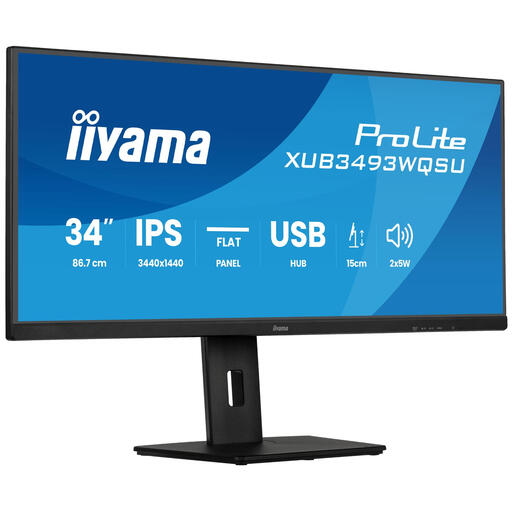
Why it stands out This 34-inch iiyama ultrawide monitor offers a vast amount of workspace with its UWQHD resolution (3440x1440). It's ideal for those who work with multiple windows simultaneously, such as programmers, data analysts, or video editors. The Picture-in-Picture (PiP) and Picture-by-Picture (PbP) functions allow you to display content from two different sources at the same time.
Key Features
Who is it for? This screen is an excellent choice for professionals and prosumers who want to boost their productivity and maintain a clean desk setup without a second monitor.
View the iiyama ProLite XUB3493WQSU
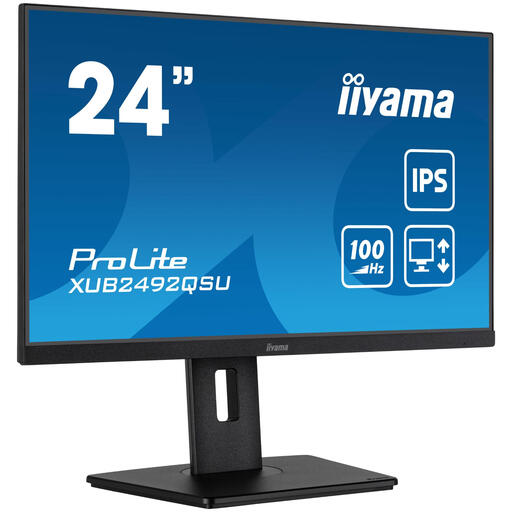
Why it stands out This model combines a compact 24-inch size with a sharp QHD resolution. This results in a high pixel density, ensuring razor-sharp text and detailed images. With a 100Hz refresh rate, the display is just that bit smoother than a standard 60Hz or 75Hz monitor, which is pleasant for general use and casual gaming.
Key Features
Who is it for? Ideal for remote workers, students, and all-round users looking for a sharp, ergonomic screen that doesn't take up too much space but is suitable for both productivity and entertainment.
View the iiyama ProLite XUB2492QSU-B1
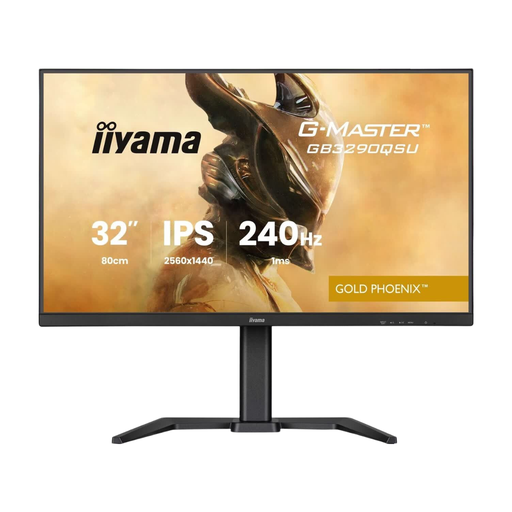
Why it stands out This iiyama gaming monitor from the G-Master series is built for speed. The combination of a 240Hz refresh rate, a fast 1ms (MPRT) response time, and a QHD resolution on a large 31.5-inch screen makes this a powerful monitor for competitive gamers. According to the manufacturer, FreeSync Premium ensures smooth gameplay without stuttering or tearing.
Key Features
Who is it for? This monitor is aimed at serious PC and console gamers who demand the highest performance and want to benefit from a high refresh rate and sharp resolution.
View the iiyama G-MASTER GB3290QSU-B1
The right monitor is a personal choice. Perhaps you're looking for a different size, a curved screen, or specific connections. If the models above don't quite meet your requirements, many more options are available.
Check out our full range of adjustable monitors for more choices that fit your workspace or gaming setup.
Discover more adjustable monitors
1. Is iiyama a good brand for monitors? Iiyama is known in the market as a brand that offers a wide range of monitors with a focus on an excellent price-to-performance ratio. They have models for a wide range of budgets and use cases, from basic office screens to advanced gaming monitors.
2. What is the difference between the iiyama ProLite and G-Master series? In general, the ProLite series is aimed at the business and professional market. These models emphasise ergonomics, colour accuracy, and reliability for daily use. The G-Master series is iiyama's gaming line, where the focus is on specifications like a high refresh rate, fast response times, and gaming-specific features such as FreeSync.
3. Do I need a QHD monitor? Whether you need a QHD monitor depends on your use case. For standard office work, Full HD may suffice. However, a QHD screen (2560x1440 pixels) provides noticeably sharper text and more detail in images and videos. It's a popular choice for creative work, gaming, and for anyone who simply appreciates a sharper, more comfortable viewing experience.
