
Vandaag of morgen in huis

Kwaliteit gegarandeerd

Welkomstaanbiedingen ontgrendelen: GRATIS bezorging | Tot 80% korting | Gratis 30 dagen JoyPlus-proefperiode
Download de app
Choosing a compact computer for home, study or the office might seem straightforward. However, small differences in the specifications can make a noticeable difference later on. A desktop PC with a fast SSD may start up quickly, but that won’t help much if there isn’t enough memory for the way you use it. A slim design can also save space, while the ports or included accessories might not suit your existing workspace.
The HP OmniDesk Slim S03-0006nd is designed for everyday computing, with an Intel Core i3 processor, 512GB SSD, 8GB DDR5 RAM, Windows 11 Home and Wi-Fi 6. Read on to find out what to check before buying and who this model could suit.
A label such as Intel Core i3 doesn’t tell you everything. Check the number of cores and threads, as well as the maximum clock speed. The HP OmniDesk Slim S03-0006nd uses the Intel 300 implementation, with 2 cores, 4 threads and a maximum turbo frequency of 3.9 GHz. This is suitable for browsing the internet, word processing, video calls, organising photos and streaming.
This configuration is less suited to demanding video editing, modern 3D games or complex technical software. The integrated Intel UHD Graphics 710 uses shared video memory and is not a dedicated graphics card.
A desktop PC with a 512GB SSD has room for documents, photos, apps and some larger files. An SSD also works differently from a traditional hard drive: it uses fast flash storage, with no moving disk parts. This model comes with a PCIe Gen4 NVMe M.2 SSD.
Think about how you use your storage, too. If you keep lots of videos, RAW photos or large game installations, you may fill the available space more quickly. So check your storage regularly in Windows 11 and use an external drive or cloud storage if needed.
A charger is no longer included as standard with this product. You’ll need to buy one separately. Before ordering, check which power accessory is suitable for this model and whether your existing cable will work. This helps make sure you can set up the desktop straight away.
This HP computer for home use has 8GB DDR5-4800 MT/s RAM, configured as 1 x 8GB. It’s suitable for everyday multitasking, such as using a browser, word processor, email and video calls.
If you often work with dozens of browser tabs open, use large spreadsheets or run demanding creative software, you may find 8GB limiting. The product specifications list two memory slots, but give the maximum internal memory capacity as 8GB. Check the latest upgrade information before counting on being able to add more memory.
The dimensions are approximately 30.35 × 30.35 × 10 cm and it weighs 3.8 kg. Its depth of just 10 cm makes this desktop particularly suitable for a narrow shelf, desk or workspace where a traditional PC tower would take up too much room.
Place the computer on a stable, flat surface and keep the ventilation openings clear. The system uses air cooling, so don’t put anything on top of the case and make sure there’s enough airflow around it.
For connecting peripherals, it has:
A desktop PC with Wi-Fi 6 can be handy if you don’t want to run a network cable to your desk. The actual speed also depends on your router, broadband plan, distance and any obstacles in your home. Gigabit Ethernet can be a practical choice for a permanent home-working setup.
The selection below matches the available products to different types of users. The desks and monitor stand are accessories for a complete computer setup; they don’t replace the desktop computer.
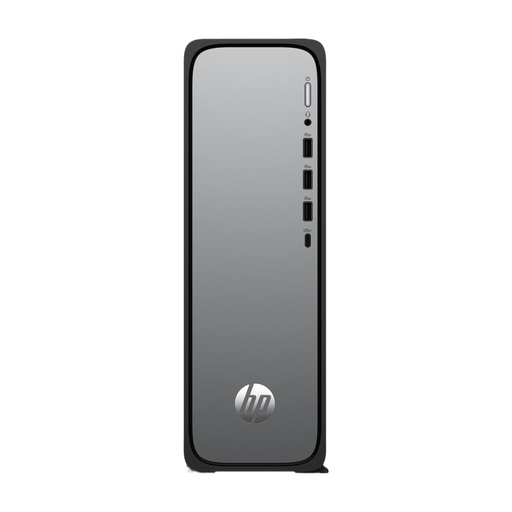
Why it suits this profile: This compact desktop PC combines Windows 11 Home, 512GB SSD storage and 8GB DDR5 RAM for browsing the internet, working with documents, viewing photos and streaming, without taking up space with a large PC case on your desk.
The product specifications clearly list the processor, storage, memory, ports and dimensions. Be sure to check the power accessory separately, as a charger isn’t included as standard.
10 cm-deep case, 512GB PCIe Gen4 NVMe SSD, Windows 11 Home and Wi-Fi 6.
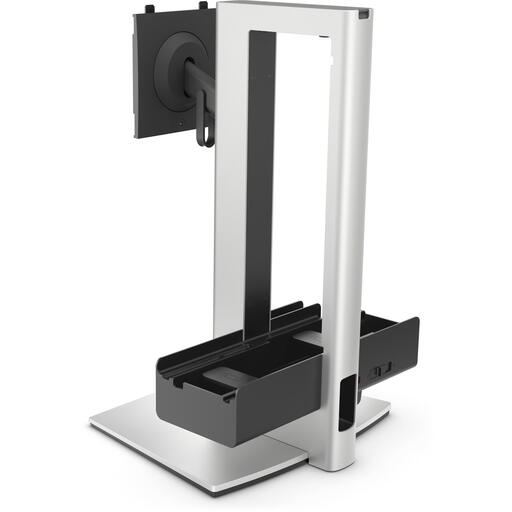
Why it suits this profile: For a tidy home-working setup alongside the HP desktop, this monitor stand offers adjustability and cable management.
The maximum load of 5.8 kg and VESA support are specified. Always check your monitor’s weight and VESA size.
Height adjustment up to 150 mm, tilt, swivel and cable management.

Why it suits this profile: This desk gives you extra space for a desktop, monitor and accessories. It’s particularly suitable if you’re setting up a dedicated space for studying, working or gaming.
According to the product information, the CPU stand is suitable for towers up to 47 cm tall. Check your PC’s dimensions and pay attention to the maximum load.
140 cm-wide desktop, adjustable CPU stand, monitor riser and two power sockets with two USB ports.
We’ve put together a complete, up-to-date list of products that meet these strict selection criteria and the applicable European safety regulations.
This configuration is suitable for standard home-working tasks, including using browsers, documents, email, online meetings and administrative software. The Intel Core i3, 8GB DDR5 RAM, SSD and Wi-Fi 6 are a good match for this kind of use. Check whether your work software has any specific system requirements.
Yes. The desktop has HDMI for a monitor and several USB ports for a keyboard, mouse, webcam or external storage. Check in advance which cables are included with your monitor and peripherals. A monitor, keyboard and mouse aren’t listed among the included items.
The computer runs on mains power. The exact cost depends on its power consumption, how many hours you use it and your energy tariff. Put Windows 11 into sleep mode when you won’t be using the PC for a while, and shut the system down completely when you don’t need it. Also remember that the charger mentioned in the product information must be bought separately.
