
Vandaag of morgen in huis

Kwaliteit gegarandeerd

Welkomstaanbiedingen ontgrendelen: GRATIS bezorging | Tot 80% korting | Gratis 30 dagen JoyPlus-proefperiode
Download de app
A new pair of headphones may seem like a quick purchase on paper. Yet many buyers are disappointed once they start using them for calls, travelling, gaming or working from home. For example, wireless headphones may have limited battery life, while a model with impressive sound claims may not connect properly to your phone or laptop.
So don’t focus only on the brand name or discount. Pay particular attention to the connection, wearing comfort, microphone and how features such as noise cancelling fit into your everyday use.
With noise-cancelling headphones, surrounding sounds are reduced electronically. The effect varies by model and type of sound. Low, constant noises from a train or aeroplane are generally easier to reduce than voices or sudden sounds.
So check whether the product uses active noise cancelling, passive sound isolation or both. Over-ear headphones with well-fitting ear cushions can block out some surrounding noise even without active technology.
A Bluetooth headset works without an audio cable, but requires a suitable Bluetooth connection and a charged battery. Check the Bluetooth version, stated playback time and whether you can also listen using a cable.
A battery life of, for example, 20, 42 or 55 hours is a product specification, but actual usage time may depend on volume, active features and the connection. According to the manufacturer’s or seller’s product information, conditions such as noise cancelling can affect playback time.
If you want to attend online meetings or make calls, look specifically at the microphone. Headphones with a microphone may have a built-in microphone, while a gaming headset often uses an adjustable boom microphone. The latter is usually positioned closer to your mouth, but makes the design less compact.
Also check whether the microphone can be muted, folded away or removed. This prevents you having to search awkwardly for the mute button during a meeting or gaming session.
Choosing the right connection can prevent a lot of frustration:
A wired headset does not need a battery, but the cable can get in the way. A wireless model gives you greater freedom of movement, but needs to be charged. For consoles, also check whether the model is compatible with your specific platform.
Over-ear headphones completely enclose your ears. This can be comfortable during longer listening sessions, but the design is often heavier than an on-ear model. The Dyson Zone OE, for example, is listed with a weight of 670 grams, while the Logitech H150 weighs 80 grams. That is a considerable difference during extended use.
Pay attention to:
Lightweight on-ear headphones may be suitable for the office and short conversations. For travelling, an over-ear model with active noise cancellation may make more sense, provided the weight and fit remain comfortable.
Frequency range, sensitivity and impedance are useful points of comparison, but they do not determine on their own how headphones sound. Driver tuning, fit and the source being used also play a part.
For headphones with a microphone, the stated microphone range is relevant to speech. For example, a Logitech H540 lists a microphone range of 100 Hz to 16 kHz. The Logitech G432 is described as having a 6mm flip-to-mute microphone. For gaming, platform support and software features are also important.
Use a safe volume and take regular breaks. Manufacturers warn that prolonged listening at high volume can cause hearing damage.
The selection below is based on verifiable features such as connection, battery life, weight, microphone and compatibility.
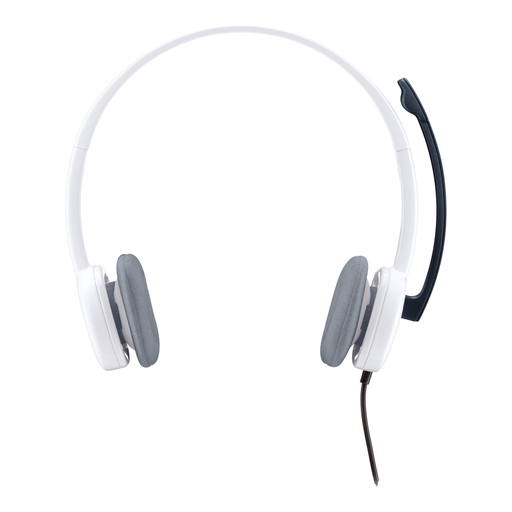
Why it suits this profile: This lightweight wired headset is designed for calls, music and multimedia. The 3,5mm connection works with many computers, smartphones and tablets.
You are not dependent on a battery or Bluetooth pairing. The adjustable microphone and in-line controls make calling easy.
80 grams, stereo audio, 180cm cable and a noise-cancelling microphone according to the product information.
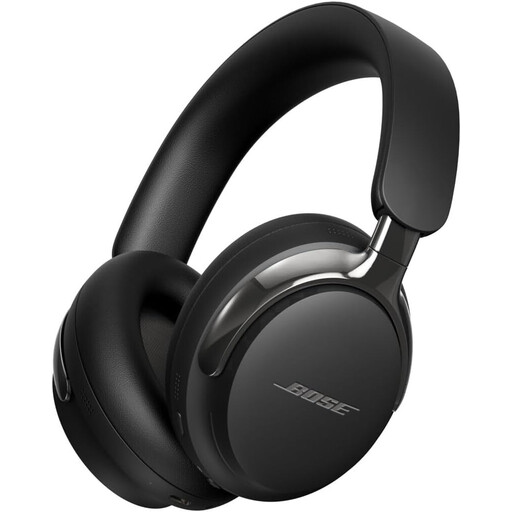
Why it suits this profile: This wireless over-ear model combines Bluetooth 5.4 with active noise cancelling and a detachable cable for flexible use at home, on the move and when travelling.
The detachable cable provides an alternative when Bluetooth is unavailable or the battery runs out. The level of noise reduction still depends on the surroundings and fit.
Bluetooth 5.4, active noise cancelling, 3,5mm and USB-C options according to the product specifications.
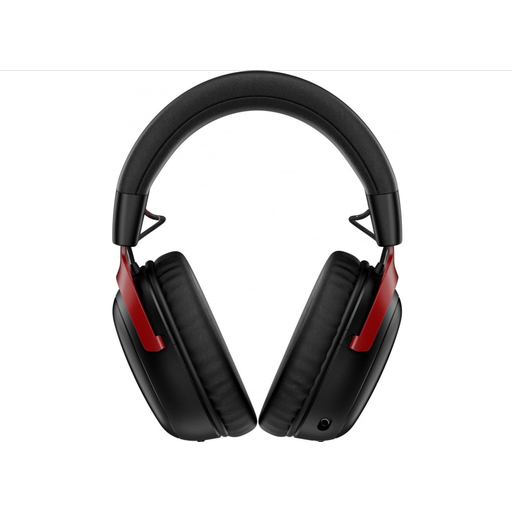
Why it suits this profile: This gaming headset supports 2.4GHz wireless use and Bluetooth. The detachable microphone and included USB dongles are practical for gamers with multiple devices.
You are not tied to a single connection type. The microphone can be removed, and the stated battery life varies by mode, so you can weigh this up in advance.
Bluetooth 5.3, 2.4GHz connectivity, USB-A and USB-C connections and stated playback time of up to 120 hours via 2.4GHz.
We have put together a complete, up-to-date list of products that fully meet these strict selection criteria and the applicable European safety regulations.
Not always. A USB headset only works when the laptop has a suitable USB port and supports USB audio. Also check whether the model uses USB-A or USB-C. A headset with a 3,5mm jack is often more flexible with older laptops, phones and consoles.
Their lifespan depends on the battery, charging habits, hinges, ear cushions and cables. A battery may provide less capacity over time. If you also want to listen without using the battery, it is therefore best to choose a model with a detachable cable. Keep the headphones dry and avoid extreme heat.
Not necessarily. Active noise cancelling and a closed-back over-ear design can be useful on train and aeroplane journeys, but comfort and fit are just as important. If you mainly make calls at home, a more affordable wired headset with a microphone may be perfectly adequate. Compare the features with how you actually use the headphones, rather than focusing solely on price or brand.
