
Vandaag of morgen in huis

Kwaliteit gegarandeerd

Welkomstaanbiedingen ontgrendelen: GRATIS bezorging | Tot 80% korting | Gratis 30 dagen JoyPlus-proefperiode
Download de app
Choosing a computer desk might seem straightforward, but marketing descriptions don't always tell the whole story. For example, a large desktop might leave little room for your legs or cables. A gaming desk with LED lighting might boast many features, while its stability and maximum load capacity are barely mentioned.
For those working from home, students, and gamers, these three pitfalls are particularly relevant:
The right choice, therefore, depends on your space, equipment and daily use. Below are the most important points to check.
First, measure the available space. Remember to account for skirting boards, doors, and the space behind the desk for cables. A desk for working from home or a study desk shouldn't just fit against the wall; it also needs to provide enough room to move around.
Pay attention to these dimensions:
A height-adjustable desk offers extra flexibility. The JOYFURNOS model in this selection has a 140 x 60 cm work surface and an adjustment range of 72 to 120 cm. According to the product description, the desk has a steel frame, a memory function, and a maximum static load of 70 kg. The height adjustment is electric, so don't place the desk right up against a wall, and keep liquids away from the electrical components.
A black desk made of particleboard and steel can be suitable for daily use, but material names alone don't tell the full story. Look at the combination of:
A desk with a CPU holder can save floor space, but check the dimensions of your computer case. On the SEVEN WARRIOR Straight gaming desk, the CPU stand is suitable for towers up to 47 cm, according to the product information. You should not exceed the specified load limit of the desk and the stand.
A desk isn't a sit-stand solution just because it's spacious. For an ergonomic workspace, your chair, screen height, keyboard and desk height must all be adjusted in harmony. A monitor stand can raise the screen, but always check its maximum load and compatibility.
Cables often only become a problem after assembly. Look out for:
On a desk with cable management, grommets are useful for monitor and power cables. The JOYFURNOS has two cable holes, a fabric organiser and a hook. The SEVEN WARRIOR model mentions two power sockets and two USB ports. These connections are practical, but electronic components must not come into contact with liquid. Unplug the desk from the mains before cleaning it.
A gaming desk with LED lighting often grabs the attention, but LED lighting is no substitute for a good cable management solution. The SEVEN WARRIOR desk is listed as having RGB lighting with app control, various colour modes and a memory function. According to the product description, a monitor stand, headphone holder and CPU stand are also built-in.

Why it's a good fit: This compact 80 x 50 cm black desk fits well in a bedroom, student room or small workspace. Its fixed height of approximately 75.5 cm is suitable for users who don't need electric adjustment.
The dimensions and maximum static load of 50 kg are clearly stated, so you can check beforehand whether your laptop, monitor and accessories will fit.
Compact size, adjustable feet and a reinforced frame, according to the product description.
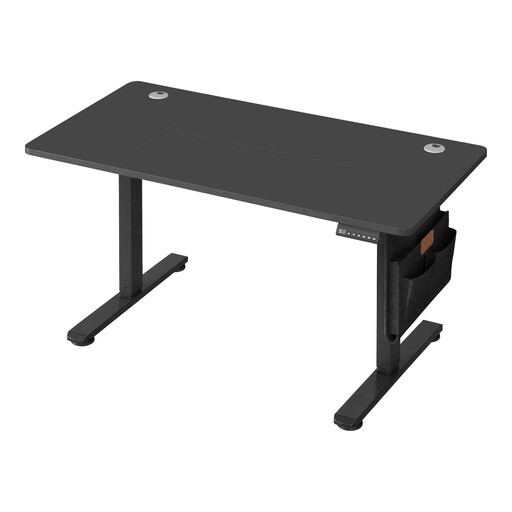
Why it's a good fit: The combination of a spacious work surface, memory function and electric adjustment range is perfect for home workers who want to change their posture regularly.
The specifications list the adjustment range of 72 to 120 cm, the 70 kg load capacity, and safety instructions for obstacle detection and overheating.
140 x 60 cm, USB-C port, two cable holes and a memory function.
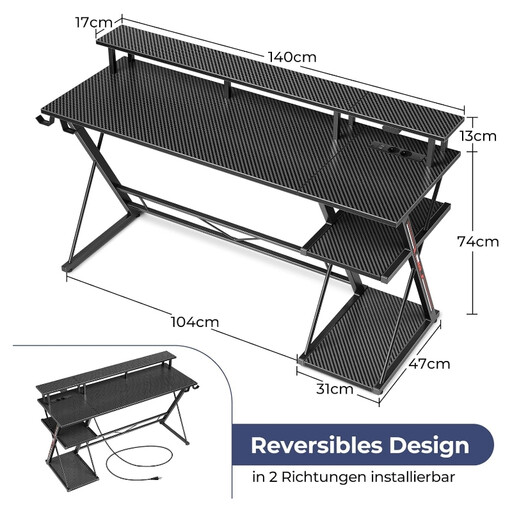
Why it's a good fit: This gaming desk is aimed at users with multiple devices and accessories. The integrated monitor stand, headphone holder and CPU holder keep frequently used items within easy reach.
The product information specifies which connections, holders and components are included. Before buying, be sure to check the maximum load capacity of the work surface and the CPU stand.
RGB LED lighting with app control, two power sockets, two USB ports and a CPU stand for towers up to 47 cm, according to the product description.
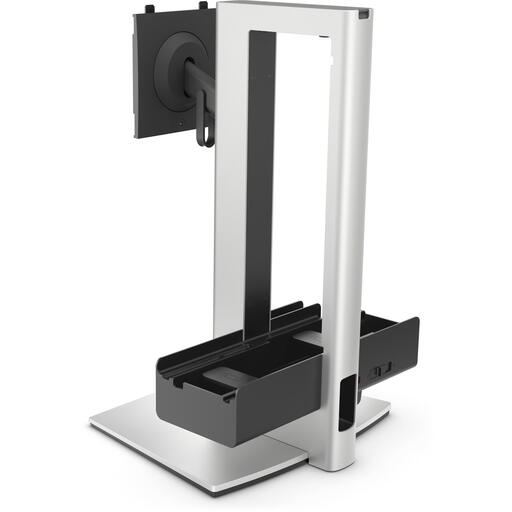
Why it's a good fit: This monitor stand is ideal if you already have a desk but need extra screen space and better cable organisation.
Compatibility with VESA 100 mm and the maximum weight of 5.8 kg are listed. Check these values against your own monitor.
Up to 150 mm height adjustment, tilt, swivel, cable management and support for a single screen up to 27 inches, according to the product specifications.
We have compiled a complete, up-to-date list of products that fully meet these strict selection criteria and comply with current European safety regulations.
For a laptop and a single screen, a compact computer desk may be sufficient. If you use a desktop PC, two monitors or study materials, you'll usually benefit more from a width of 120 to 140 cm. A gaming desk with a monitor stand can free up space on the work surface, but pay attention to the height of the stand and your viewing angle.
The GTPLAYER Gaming Desk, measuring 120 x 60 cm, has a carbon-fibre surface and a headphone hook, according to the product name. This is suitable for a simple gaming or work setup where you don't need electric adjustment. Check the product information for the GTPLAYER gaming desk to verify the current specifications and availability.
A fixed height of around 72 to 76 cm is standard, but whether this is comfortable depends on your chair and your height. Your forearms should be able to rest roughly horizontally, and your feet should be flat on the floor. With an adjustable desk, you can set the height more precisely.
The lifespan depends on the materials, load, assembly and maintenance. A metal frame and adjustable feet can contribute to stability, but you should never exceed the specified maximum load. Tighten all fixings carefully after assembly and avoid using harsh cleaning agents on particleboard or electronic components.
An electric desk uses power when being adjusted, but generally not continuously in the same way a computer does. The exact consumption depends on the motor and how often you use it. The JOYFURNOS model mentions a power-saving mode on its controls. Check the manual for precise operating details and safety instructions.
