
Vandaag of morgen in huis

Kwaliteit gegarandeerd

Welkomstaanbiedingen ontgrendelen: GRATIS bezorging | Tot 80% korting | Gratis 30 dagen JoyPlus-proefperiode
Download de app
A hot-swappable mechanical keyboard sounds like the perfect solution: the freedom to customize your typing experience without any soldering. But the market is flooded with models that overpromise and underdeliver. Before you invest, it's crucial to know what to look for. Many buyers fall into the same traps: overpaying for flashy lights or getting stuck with limited options.
This guide will help you see through the marketing jargon and understand the specs that truly matter. We'll cover the most common pitfalls and explain how to choose a keyboard that not only meets your needs today but also in the future.
The search for the perfect keyboard can be frustrating. Manufacturers often use confusing terminology. Pay close attention to these two common issues to avoid buyer's remorse.
To avoid the pitfalls above, you need to focus on a few technical details. These specifications determine the quality, feel, and longevity of your keyboard.
The core of a hot-swappable mechanical keyboard is its printed circuit board (PCB). This board contains the sockets where you click the switches into place. There are two standards:
A keyboard with 5-pin hot-swap sockets is the more flexible choice. It gives you access to the widest range of switches on the market, which is essential if you want to upgrade or experiment later on.
The way the internal plate (which holds the switches) is mounted inside the case has a huge impact on the typing feel and sound profile.
Combine this with the case material. An aluminum case feels heavy and premium, and it eliminates the hollow sound often found in plastic models.
Modern keyboards offer more than just typing. Think about how you'll use the keyboard.
Based on the criteria above, we have selected a few models that suit different user profiles.
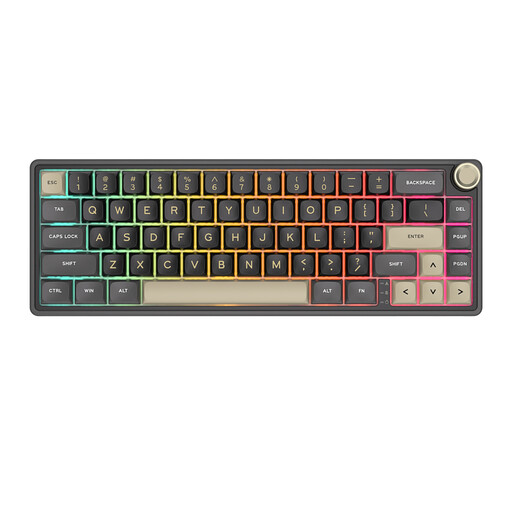
Why This Fits Their Persona: Offers premium features like a gasket mount and PBT keycaps in an affordable, compact package. Ideal for exploring the world of custom keyboards without a major investment.
Avoids the hollow plastic case pitfall by using a layered construction with sound-dampening material, which provides a surprisingly solid typing feel for its price point.
Compact 66-key layout with a convenient volume knob and programmable RGB lighting via QMK/VIA software.
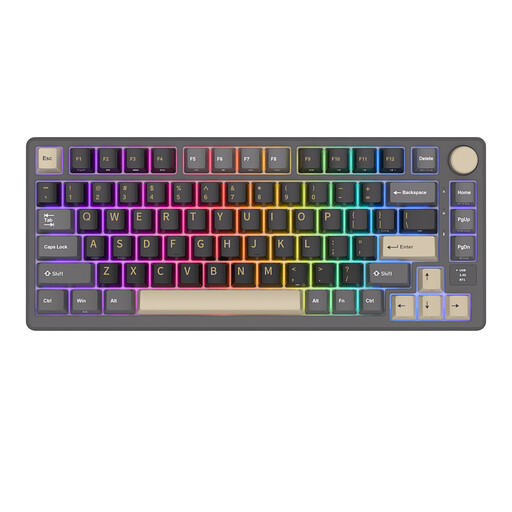
Why This Fits Their Persona: Perfect for those who want a single keyboard for both work and gaming. The 75% layout is compact but retains the function keys, and its tri-mode connectivity offers maximum flexibility.
Tackles the problem of poor wireless performance with stable 2.4G and Bluetooth options, plus a clear battery indicator on the OLED screen, so you're never caught without power.
Gasket mount for a comfortable typing experience and a handy OLED screen for status information and mode selection.
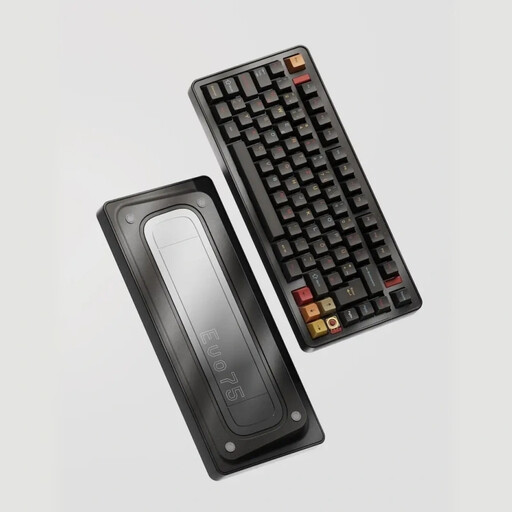
Why This Fits Their Persona: For the user who refuses to compromise. The full aluminum case, leaf spring mount, and VIA compatibility offer a build quality and customizability normally found only in the hobbyist scene.
This is the antithesis of a 'flashy but cheap' keyboard. The focus is on build quality and typing feel, with a heavy, solid aluminum construction that eliminates any trace of hollow sound.
Full aluminum case with an advanced leaf spring mount for a unique, soft typing feel and superior acoustics. Fully programmable with VIA.
We've curated a complete, up-to-date list of products that fully meet these strict selection criteria and comply with current regulations.
A 3-pin switch has two metal pins for the electrical contact and one large plastic post in the center. A 5-pin switch adds two small plastic pins for extra stability. A keyboard with 5-pin hot-swap sockets can use both switch types, whereas a 3-pin keyboard only supports 3-pin switches (unless you clip the extra plastic pins off a 5-pin switch). For maximum compatibility, 5-pin is the recommended choice.
Battery life varies greatly and depends on the capacity (measured in mAh), use of RGB lighting, and connection mode (2.4GHz is often more power-efficient than Bluetooth). With RGB lighting off, a keyboard with a large battery (e.g., 4000-8000 mAh) can last for weeks or even months. With the lighting at full brightness, this can drop to just a few days. Many models include a battery indicator to prevent surprises.
For many enthusiasts, yes. A gasket mount provides a softer and more consistent typing feel across the entire board because the plate holding the switches doesn't make direct contact with the hard case. This dampens vibrations and can make the sound more pleasant. Whether it's "better" is subjective, but it is widely considered a premium feature that significantly enhances typing comfort.
