
Vandaag of morgen in huis

Kwaliteit gegarandeerd

Welkomstaanbiedingen ontgrendelen: GRATIS bezorging | Tot 80% korting | Gratis 30 dagen JoyPlus-proefperiode
Download de app
A hot-swappable mechanical keyboard offers the freedom to completely customise your typing experience without a soldering iron. The promise is simple: pull out the old switches, click in new ones, and you have an entirely different keyboard. In practice, however, there are a few pitfalls that buyers easily fall into.
Before you invest in what will become a central part of your setup, it's crucial to know what to look for. We often see buyers disappointed by two specific issues:
This guide will help you avoid these common mistakes and choose the right specifications for your needs.
Marketing terms can be confusing. Instead, focus on these three concrete specifications to determine if a keyboard is worth its price.
This is the most critical specification for a custom mechanical keyboard.
A keyboard with 5-pin compatibility gives you access to virtually all switches on the market, which is essential for anyone who truly wants to experiment. A 3-pin model significantly limits your choices.
The way the internal components are mounted inside the case has a huge impact on the typing feel and sound.
The layout determines the physical size and number of keys.
Think carefully about which keys you truly need for your daily tasks. A smaller form factor provides more mouse space, which is an advantage for a gaming keyboard.
Here are a few models that suit specific needs, selected based on their specifications.
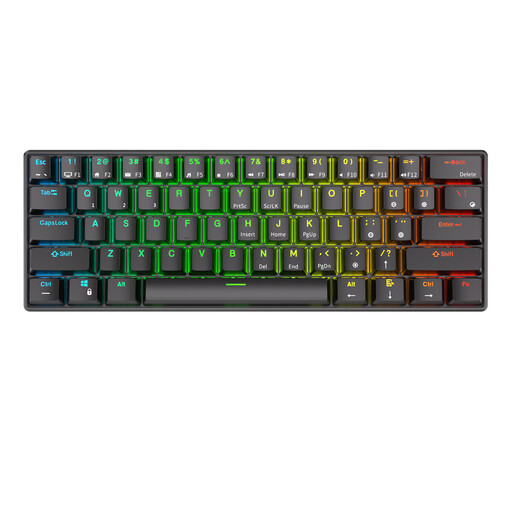
Why This Fits Their Persona: Perfect for those who want a clean desk and switch seamlessly between a laptop, tablet, and PC. The 60% layout is minimalist, and it's an accessible entry point into the world of hot-swap without a major investment.
This model provides a solid foundation for hot-swapping with support for common switches. It focuses on functional flexibility (tri-mode connectivity) rather than expensive materials that often disappoint in this price range.
The ability to connect to three devices (Bluetooth/2.4G/Wired) and its compact form factor make it a versatile workhorse for on-the-go or at-home use.
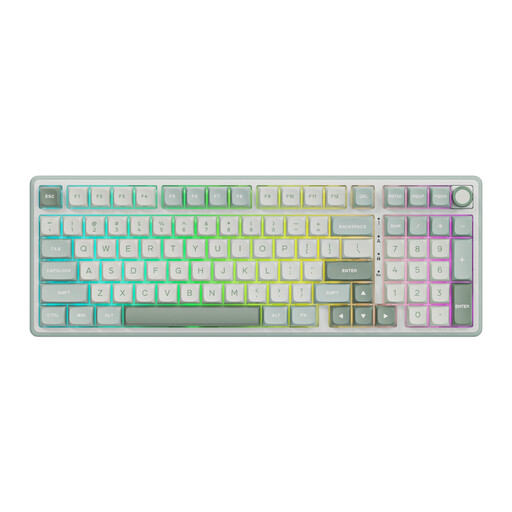
Why This Fits Their Persona: For programmers, content creators, and gamers who need a numeric keypad but still want a compact desk setup. The 98% layout is efficient, and the gasket mount ensures comfort during long work or gaming sessions.
This keyboard delivers a tangible upgrade with its gasket mount construction. This isn't just empty marketing jargon; it's a design choice that directly contributes to a more pleasant typing and sound experience, justifying its "premium" feel.
The combination of a near-full layout with a numpad, a keyboard with a volume knob, and the comfortable gasket mount makes this a highly functional and pleasant keyboard for daily intensive use.
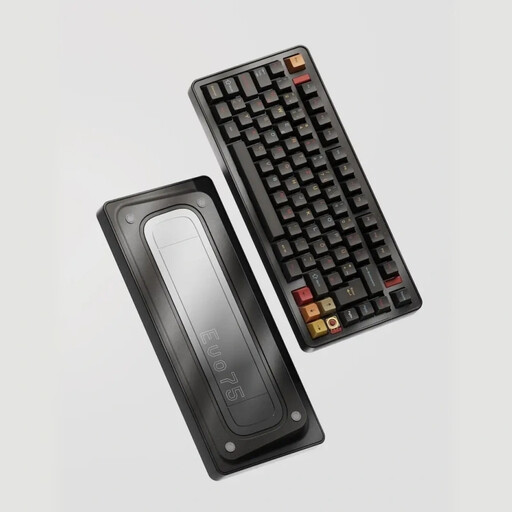
Why This Fits Their Persona: For the true enthusiast who wants the best in materials, construction, and customisability. This is a wireless mechanical keyboard that's built like a tank while offering a refined typing experience.
This aluminum keyboard bypasses the "hollow sound" trap by using an advanced Leaf Spring Mount (a variation of a gasket mount). This provides superior dampening and a flexible feel. The large 8000mAh battery addresses concerns about battery life with heavy RGB use.
The combination of a full metal construction, an advanced mounting style, and VIA compatibility makes this a true programmable keyboard for those seeking ultimate control and quality.
We have compiled a complete, up-to-date list of products that fully meet these strict selection criteria and EU regulations.
The difference lies in stability. 5-pin switches have two extra plastic legs that fit into the printed circuit board (PCB). This prevents the switch from wobbling, resulting in a more stable feel while typing. A keyboard that supports 5-pin switches is also compatible with 3-pin switches, but the reverse is not true without clipping the extra legs off the switch. For maximum flexibility, a 5-pin hot-swap PCB is the recommended choice.
Battery life depends heavily on two factors: its capacity (measured in mAh) and your use of the RGB keyboard lighting. With the backlighting off, a keyboard with a large battery (e.g., 4000mAh or more) can last for weeks or even months. With the RGB lighting at full brightness, that same battery can be depleted in just a few days. Pay close attention to the battery capacity if you plan to use the lighting frequently.
For those who type a lot or are looking for a specific sound and typing experience, a gasket mount keyboard is often worth the investment. The dampening gaskets provide a noticeably softer feel with each keystroke and a more pleasant, deeper sound. It reduces the harsh "bottom-out" and can mitigate fatigue during long sessions. If you are primarily looking for the functionality of a mechanical keyboard, a traditional tray mount is also an excellent starting point.
