
Vandaag of morgen in huis

Kwaliteit gegarandeerd

Welkomstaanbiedingen ontgrendelen: GRATIS bezorging | Tot 80% korting | Gratis 30 dagen JoyPlus-proefperiode
Download de app
A home-working desk needs to do more than look good in a product photo. It must fit the available space, remain stable while you type and provide enough room for a monitor, laptop and accessories. Students, gamers and people looking for a bedroom desk often have different requirements too.
The following pitfalls are common:
The right size depends on how you use the desk and the equipment you have. A compact desk measuring 80 x 50 cm is suitable for a laptop, books or one smaller screen. This size often fits in a bedroom, student room or corner of the living room.
If you work with two screens or need space for a keyboard, mouse and notebook, it is better to consider a 140 x 60 cm desk. The extra width provides more room, but also requires sufficient clearance for cables and chair movement.
When measuring, pay attention to:
A study desk often does not need a large desktop. For gaming or extended periods of work, width and depth are usually more important, particularly when using a monitor arm or multiple screens.
Do not focus solely on the appearance of the desktop. Check the material, frame and stated maximum load. A chipboard top with a steel frame can be a practical combination, provided the specifications are suitable for your equipment.
Pay particular attention to:
Always place a desk on a level, stable surface. Do not exceed the stated load capacity. This is important for its lifespan and to help prevent tipping or damage.
A height-adjustable desk allows you to alternate between sitting and standing. With an electric sit-stand desk, the height range, noise level stated in the product description and controls are all relevant considerations.
A desk with a memory function can be useful if several users want to save their preferred heights. A controller with a USB-C port may also be suitable for charging compatible devices. Always check the charging details and user instructions for the specific model, however; a USB-C connection does not automatically mean that every device will charge at the same speed.
Also check:
For the model described here, the stated height range is 72 to 120 cm. The product information also lists a locking function on the controller, two cable-management holes, a fabric organiser and a hook. If the desk is adjusted continuously for an extended period, the overheating protection may activate. Consult the manual for further information.
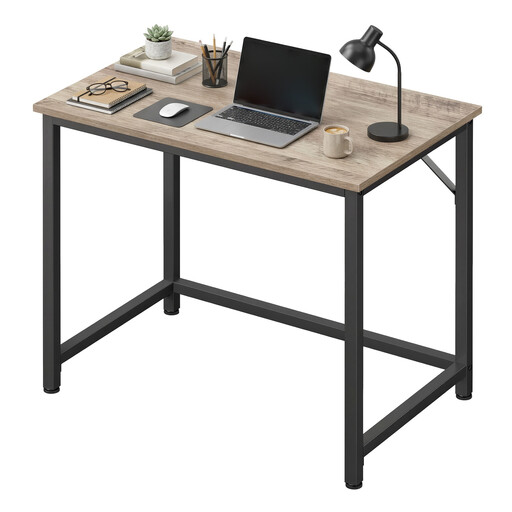
Why it suits this profile: Measuring 80 x 50 cm, this desk takes up very little space and is suitable for basic work, study or gaming with a laptop or compact screen.
The product information lists adjustable feet, a steel frame and a maximum static load of 50 kg. This means you can check the key stability specifications before buying.
80 x 50 x 75.5 cm; chipboard and steel; adjustable feet; assembly components and instructions included.

Why it suits this profile: This black desk has the same compact dimensions, but its colour complements a sleek home office, bedroom or darker gaming setup.
The stated 50 kg load capacity and adjustable-foot design allow you to assess stability rather than judging the desk on appearance alone.
Black finish; 80 x 50 cm desktop; steel frame; adjustable feet; stated weight of 8.5 kg.
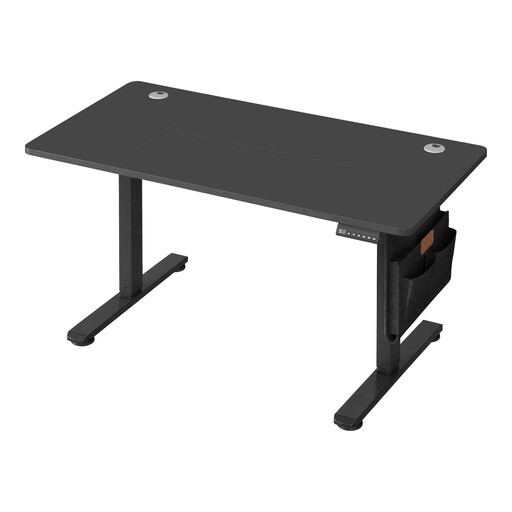
Why it suits this profile: Measuring 140 x 60 cm, this desk provides space for a more extensive home office, while the electric adjustment supports alternating between sitting and standing.
The model specifies a height range of 72–120 cm, a maximum static load of 70 kg and a controller with a memory function. Before positioning it, check the available movement space and cable length.
Electric height adjustment; memory function; USB-C port; two cable-management holes; organiser and hook; steel frame; adjustable feet.
We have put together a complete, up-to-date list of products that fully meet these strict selection criteria and the applicable European safety regulations.
Before assembly, read the parts list and check that all fixings are included. First assemble the desk loosely, tightening the connections fully only once the frame is correctly aligned. Then adjust the feet to suit the floor.
For an electric model:
A black desk can show dust more readily than a lighter greige finish. This is not a technical disadvantage, but it is worth bearing in mind when choosing a desk for a bedroom or open-plan living space.
For laptop work, 80 x 50 cm may be sufficient. For a monitor, keyboard and additional accessories, 140 x 60 cm provides more workspace. Always measure the room and allow for legroom and cables.
Power consumption depends on the motor, how often the desk is adjusted and its standby mode. According to the product description, a model with an energy-saving mode may limit consumption while inactive. For a precise estimate, check the technical specifications and consider how frequently you use the desk.
Its lifespan depends on assembly, load, moisture, cleaning and everyday use. Keep the desk within its stated load capacity, prevent contact with liquids and check the connections again after a while. This helps to limit unnecessary wear to the desktop and frame.
